AI Agents Dashboard: Tools, Metrics & Examples (2026)

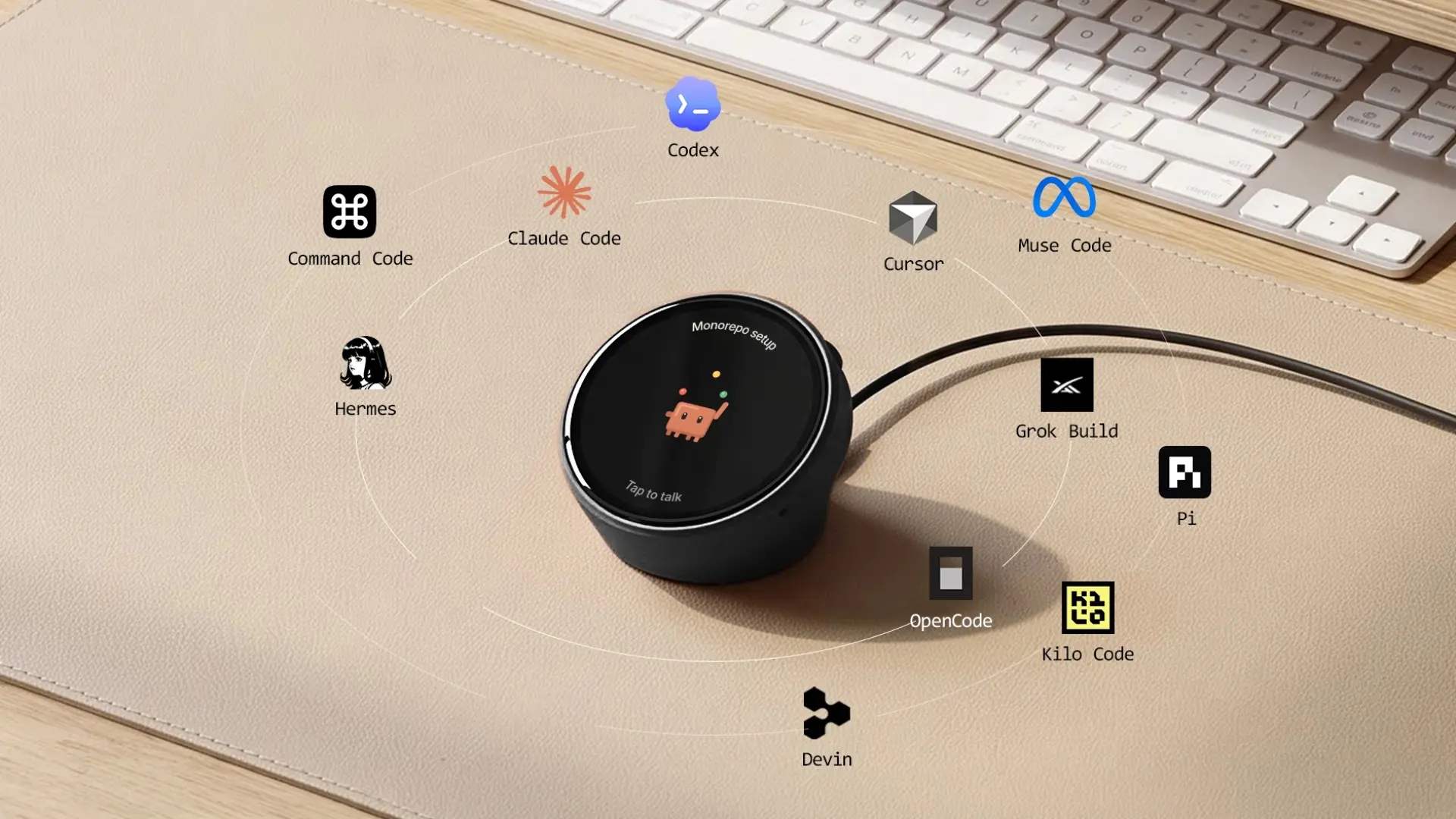
Autonomous Harness Pro shows supported coding agents on a 3.95-inch desk display; it cannot tell you whether a finished code change passed review. That gap captures the central choice in an AI agents dashboard: what status to show, what evidence to open, and who acts next.
Support leads need outcome and handoff reports, engineers need traces, and people running several coding agents need timely status. This guide shows what to measure, which tools fit each job, and how to test a dashboard on your own workflow.
What an AI agents dashboard includes
An AI agents dashboard brings agent status, execution records, or outcome measures into one interface. Its scope depends on the system collecting the data and the controls it exposes.
Three functions explain most AI agents dashboard designs:
- Analytics measures outcomes across conversations or tasks.
- Observability records the steps within a run. A trace is the ordered record of model requests and tool calls.
- Control lets operators assign work, review deliverables, and respond to requests for human input.
A product can cover several functions, but visibility alone does not mean control. A trace viewer may explain a failed request without letting you restart the task. A task board may show completed work without measuring whether the answer was correct.
A browser, an embedded panel, and a physical display are different presentation surfaces. Their value depends on the data the underlying system collects and the actions it permits.
AI agents dashboard tools compared
Choose a tool by the work it needs to show: agent status, run details, outcomes, or approval requests.
| Tool | Focus | Check first |
|---|---|---|
| Harness Pro | Desk status and input | App setup, voice privacy |
| Langfuse [1] | Traces and scores | Which events are sent |
| Opik [2] | Traces and evaluation | How runs get scores |
| Arize Phoenix [3] | Traces and evaluation | License terms |
| LangSmith [4] | Traces and monitoring | Supported integrations |
| Helicone [5] | Usage, cost and latency | Usage log setup |
| Zendesk [6] | Support outcomes | Plan and report access |
| Amazon Connect [7] | Contact-center performance | What success counts |
| AgentCenter [8] | Tasks and approvals | Status refresh timing |
Autonomous makes Harness Pro. Table details come from its product page and vendor documentation in References [1] to [8].
How real AI agent dashboards differ
Real AI agent dashboards organize information around the work being measured. Comparing a few documented examples makes the differences clearer than a feature checklist alone.
Zendesk connects activity to customer conversations
Zendesk’s analytics dashboards [6] include views for overall performance, contact reasons, knowledge sources, and conversation journeys. Users can filter reports by attributes such as agent, channel, language, and time period, then export supported report data.
Custom resolutions is a separate view with a specific eligibility limit: it is available to customers who deployed an AI agent on a messaging channel before September 8, 2025.
For a support team, conversation volume is only a starting point. The useful follow-up is whether customers reached an acceptable outcome and which topics still require additional support.
Amazon Connect separates execution from outcomes
Amazon Connect’s AI Agent Performance dashboard [7] reports invocation counts, invocation success, average latency, and conversation turns. It supports comparisons over time and drill-downs to individual agent versions.
The documentation also distinguishes goal success from technical invocation success. Its handoff rate covers contacts marked as needing additional support, which is broader than transfer to a human alone.
That distinction matters when a technically completed run still leaves a customer problem unresolved. Compare versions using both execution measures and outcomes, with the same filters and time window.
Langfuse exposes the steps inside a run
Langfuse traces [1] record model requests and related operations, including prompts, responses, token usage, timing, and tool or retrieval steps. Its dashboards can analyze cost, latency, volume, and quality scores.
This view is useful when a top-level result hides the cause of a problem. For example, a slow task may contain one expensive retrieval step or repeated calls to the same tool. The trace supplies the sequence to investigate; the operator still has to decide whether those steps were appropriate.
AgentCenter keeps task ownership and review visible
AgentCenter’s dashboard [8] shows OpenClaw agents, their task assignments, activity states, periodic heartbeat check-ins, and submitted deliverables. Operators can create tasks, review work, approve or reject deliverables, and message agents.
The timing of those interactions deserves attention. Its documentation says agents respond to chat on their next heartbeat. A displayed status or message thread therefore needs to be read with the reporting cadence in mind.
For this workflow, the important question is whether someone owns the task and whether a person needs to review the result.
The metrics an AI agent dashboard should track
An AI agent dashboard should measure reliability, speed, resource use, and achieved outcomes using definitions that remain consistent across reports. Start with the measures that change an operating decision.
| Metric | Example definition | What to decide |
|---|---|---|
| Invocation count | Recorded agent executions in a defined period | Whether workload or demand changed |
| Invocation success rate | Successful invocations divided by counted invocations | Whether execution is reliable |
| Task success rate | Evaluated tasks meeting acceptance criteria divided by evaluated tasks | Whether the work achieved its goal |
| Error rate | Failed executions divided by counted executions | Which failures need investigation |
| P95 latency | Duration at or below which 95 percent of measured runs fall | Whether slow runs need attention |
| Token usage | Recorded input and output tokens | Where resource use is increasing |
| Cost per successful task | Attributable cost divided by successful tasks | Whether useful outcomes justify spending |
| Human transfer rate | Eligible sessions transferred to a person divided by eligible sessions | Where human support is needed |
| Approval wait time | Elapsed time awaiting a human decision | Whether review is delaying progress |
These are example definitions, not a claim that every platform calculates each metric this way. Document the denominator, reporting period, exclusions, and treatment of retries. Some systems count model requests; others count agent invocations, sessions, or complete tasks. Those units should not be compared as if they were identical.
Execution success and task success answer different questions
Invocation success measures completion under the platform’s execution rules; task success measures whether the result met the task’s acceptance criteria. A coding agent such as Codex CLI can finish its tool calls and still produce a change that fails review.
Make acceptance criteria explicit before tracking the result. For a coding task, that might include the required behavior, relevant checks, and reviewer acceptance. For support, it might involve a defined resolution outcome. A model-generated quality score should be identified as an assessment, with its scoring method recorded.
Latency and cost need the right context
Latency percentiles describe different parts of the measured duration distribution, while cost per successful task connects spending to useful output. Record both the whole task and the individual operations when the integration permits it.
Also separate execution time from time waiting for human approval. If review takes most of the elapsed time, reducing model response latency will have little effect on the overall workflow. Label calculated cost as an estimate when it is based on token counts and rate assumptions rather than reconciled billing. When several Claude Code sessions run at once, track the cost of running Claude Code in parallel across the whole workflow.
How to design a dashboard around the next action
Put the task, its owner, the latest update, and the next decision where an operator can find them. The status alone is not enough: each state needs a path to evidence. This illustrative coding workflow shows what that means in practice.
| Displayed state | Evidence to open | Next action |
|---|---|---|
| Completed | Diff, checks, acceptance criteria | Review the result before marking the task accepted |
| Waiting for approval | Proposed action and assigned reviewer | Approve, reject, or request a change |
| No recent update | Last heartbeat and host connection | Check reporting before calling the agent stuck |
Use an overview to spot items needing attention, a task view to show ownership and requests, and a diagnostic view to inspect traces or errors. Carry the same task ID across these views. A last-updated timestamp helps readers tell an inactive agent from a broken reporting connection.
Dashboard templates still need a data source
An AI agent dashboard template supplies interface components or application code that you adapt to your workflow. Before choosing one, establish how it will receive events, store them, authenticate users, and enforce permissions.
A template can be useful for a custom layout or embedded panel. A ready-made platform may already supply parts of the collection and reporting system. Evaluate both against the same event requirements; a polished frontend cannot resolve missing or ambiguous status data.
Open source and self hosted dashboard options
Open-source and self-hosted dashboards give teams deployment choices, but licensing and operating responsibility need separate checks. A public GitHub repository alone does not tell you which features or uses its license permits.
- Langfuse: Its license [10] distinguishes an MIT-licensed core from enterprise directories with separate terms.
- Opik: Its documentation [2] provides open-source and self-hosting routes.
- Phoenix: Its repository [11] is source-available under Elastic License 2.0, with different terms from the other two.
For GitHub examples, AgentRails [12] focuses on n8n agent operations. Treat it as a repository to evaluate, rather than a production recommendation established by this guide. Its README includes API-key configuration using NEXT_PUBLIC_ names; Next.js documents that prefix for browser-exposed variables [13]. Review secret handling before using real credentials.
For any deployment you operate, budget for upgrades, backups, access controls, retention, and recovery. Decide which prompts and outputs you need to retain and who can inspect them. Self-hosting gives your team responsibility for those choices.
How to set up an AI agent monitoring dashboard
Setting up an AI agent monitoring dashboard starts with reliable events and clear questions, followed by a test that its reports match what actually happened. Use the following process before depending on its alerts.
Step 1: Identify the work and its owner
List the agents, runtimes, environments, and outputs you need to monitor. Give each task or run a stable identifier and record its owner. Decide whether the reporting unit is a request, an invocation, a conversation, or a complete task.
Step 2: Define states and acceptance criteria
Define what running, waiting, completed, failed, and disconnected mean in your workflow. Keep technical completion separate from accepted work. Where approval is required, record the requested action, the reviewer, and the time the request was created.
Step 3: Connect the necessary events
Choose integrations that capture the fields your decisions require. An observability tool may collect SDK traces, while a control center may receive task events or agent heartbeats. OpenTelemetry’s GenAI attribute conventions [9] provide a vocabulary for relevant telemetry; check which attributes your integration emits.
Step 4: Configure access and useful alerts
Set permissions around prompts, outputs, and tool data before sharing the dashboard. Keep an audit log of approvals and configuration changes. Alert on failures or pending approvals, and assign someone to respond.
Step 5: Validate normal and failure cases
Run a completed task, a controlled failure, an approval request, and an interrupted session. Compare the reported status and timing with source records. Check that retries remain associated with the correct task and that disconnected reporting does not appear as successful completion.

When a dedicated display helps
A dedicated display helps when coding-agent status needs to stay visible while you work in another window. Harness Pro puts that status on a 3.95-inch, 720 × 720 touch display beside the main screen.
- Connect: USB-C to a computer running the Harness app.
- See: supported agents across multiple machines and completion alerts.
- Act: swipe to switch agents; dictate a task by voice, then tap to send.
A completion alert is a cue to review, not proof the task passed. Use the app or terminal for context, and a diff and checks for acceptance. Harness Pro does not replace traces, evaluations, or task ownership. Its voice input uses cloud speech-to-text, so check your data-handling requirements. For a related setup, see the guide to running multiple Claude Code agents.
Harness Device is a separate round desk display. The Harness lineup lists it alongside Harness Pro and the app. Its short demo shows an agent overview and a completed-task summary, so readers can compare that interface with Harness Pro's square screen.
How to choose the right AI agents dashboard
Choose an AI agents dashboard by replaying one case that slows your team down, such as a failed run or a deliverable waiting for review.
- Evidence: Does it show the cause, owner, and next action?
- Data fit: Can your runtime send the needed events and carry task IDs across views?
- Operations: How quickly do states refresh, who can see sensitive records, and how long are they kept?
Compare candidates using the same reporting unit and time window. If your existing platform already answers the question, improve that view before adding another tool. Choose the display surface after the data passes the test.
Frequently asked questions
Do I need a separate screen to monitor AI agents?
You do not need a separate screen to monitor AI agents. A browser panel can show the underlying events. Harness Pro adds a desk display for supported coding agents when their status needs to remain visible beside other work. It does not replace traces, evaluation, or review.
What is an AI agents dashboard?
An AI agents dashboard is an interface for viewing agent activity, execution details, or outcomes so a person can decide what to do next. The exact data depends on the workflow. A support dashboard may focus on resolutions and handoffs, while an engineering dashboard may show traces, failures, cost, and approval requests.
What are the best AI agents dashboard tools?
The right tool depends on the decision you need to make. Langfuse, Opik, Phoenix, LangSmith, and Helicone support different observability needs. Zendesk and Amazon Connect report on their customer-service environments. AgentCenter supports task coordination, while Harness Pro puts supported coding-agent status on a desk display. Test each option with your own workflow.
Are there open-source AI agent dashboards on GitHub?
GitHub hosts open-source AI agent dashboards, including Langfuse’s MIT-licensed core and Opik. Phoenix’s public repository is source-available under Elastic License 2.0, with different terms. Read each project’s license and deployment requirements. A public repository such as AgentRails is an example to evaluate, not proof that its security or operations suit production.
What metrics should an AI agent performance dashboard track?
Start with invocation count, execution success, task success, error rate, latency, token usage, and cost per successful task. Add human transfer or approval wait time when the workflow needs them. Define the reporting unit, denominator, time window, retries, and exclusions before comparing results across agents or platforms.
Can an AI agent dashboard manage multiple agents?
Some dashboards can coordinate multiple agents, but others only report what happened. A control center may assign tasks, display owners, surface approval requests, and review deliverables. A trace viewer may cover many agents without controlling them. Check which runtimes can report to the tool and how often statuses update.
How do I create an AI agent dashboard?
Define the tasks, owners, states, and acceptance criteria first. Then connect the events needed for those decisions, build an overview and a task-level view, set permissions, and test completed, failed, waiting, and disconnected cases. A template can speed up the interface, but it cannot replace reliable event collection.
What is the difference between an AI agent dashboard and an analytics dashboard?
An analytics dashboard mainly aggregates performance over time, such as volume, success rate, latency, and cost. An AI agent dashboard may also show live task status, execution traces, approval requests, or controls. Products can combine these functions. Choose based on the action an operator must take, not the label on the product page.
Conclusion
Choose an AI agents dashboard by the question it must answer and the action someone will take from that answer. Outcome analytics, execution traces, and task controls solve different parts of the problem. Define the events and metrics first, test them against real runs, then choose the interface that makes the result useful. For supported coding agents, a dedicated surface such as Harness Pro can keep status within sight while detailed review remains in software.
References
- Langfuse observability documentation
- Opik documentation
- Arize Phoenix tracing documentation
- LangSmith observability documentation
- Helicone documentation
- Zendesk AI agent analytics dashboards
- Amazon Connect AI Agent Performance dashboard
- AgentCenter dashboard documentation
- OpenTelemetry GenAI attributes
- Langfuse license
- Phoenix license
- AgentRails repository
- Next.js environment variable guidance