How to Use the Stable Diffusion AI Image Generator for Free
You can use Stable Diffusion for free in two ways: on a website that runs the model for you, or by downloading Stability AI's open weights and running them on your own graphics card. Online is quicker to start. Running it locally removes per-image limits but needs a GPU with about 10 GB of VRAM for the newer models.
One thing worth knowing before you click the top search result: most sites selling themselves as a Stable Diffusion AI image generator are third-party wrappers, not Stability AI. This guide covers what Stable Diffusion is, how it works, which model to pick, where to use it free, how to run it locally, and what the license says about commercial use and ownership.
What Is the Stable Diffusion AI Image Generator?
Stable Diffusion is a family of open-weight text-to-image models, first released in August 2022 by researchers from CompVis and Runway with compute support from Stability AI. It is not one website or app. Anyone can download the model files and run them, which is why so many generators, apps, and plugins are built on it.
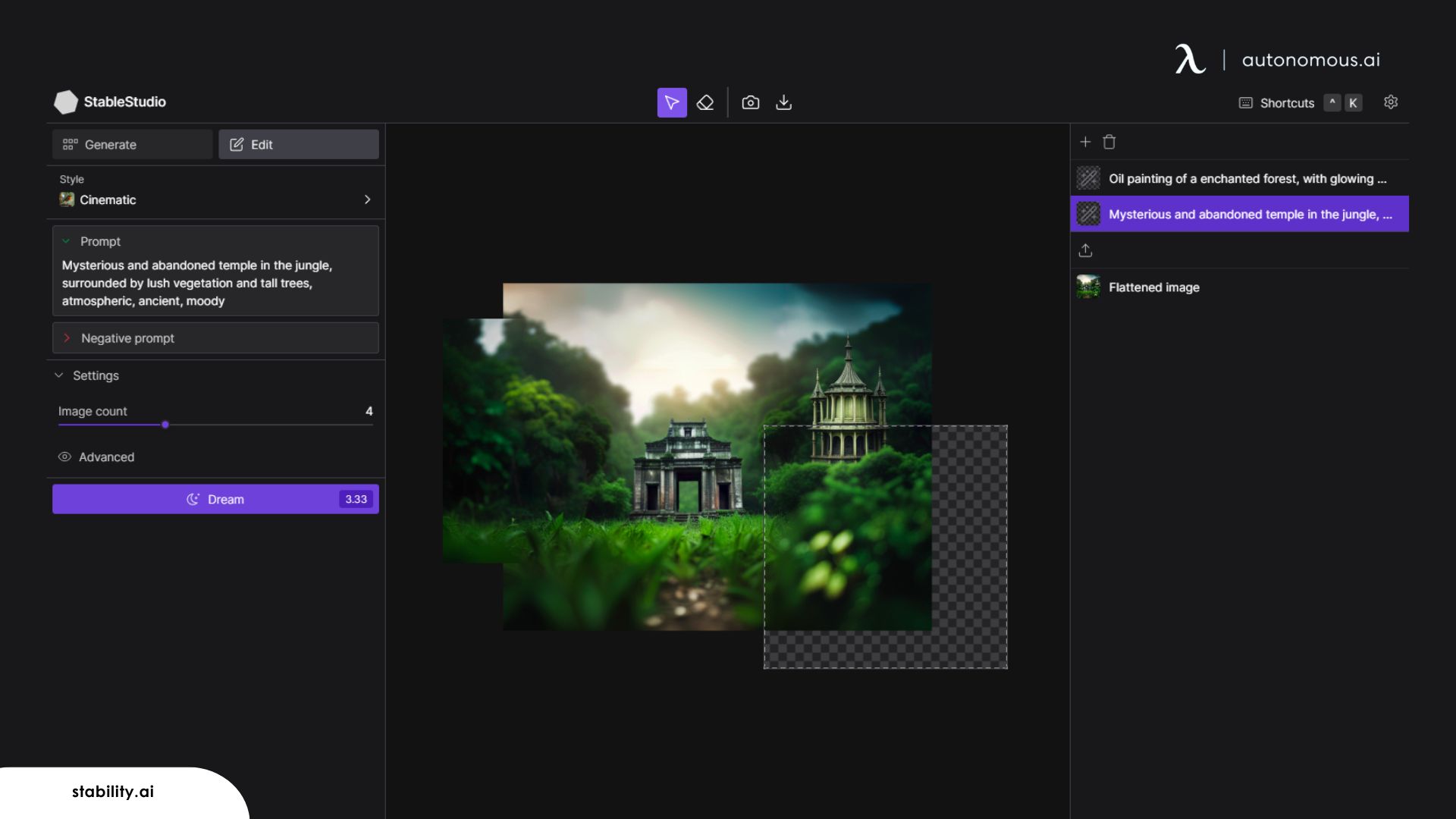
You type a text prompt and it returns an image. It can also start from an existing picture, known as image-to-image, to restyle a photo, extend a canvas, or fill in a masked area. Those editing modes are what make it popular for design work, not just one-off art.
How Does Stable Diffusion Work?
Stable Diffusion works by starting from random noise and removing it step by step until an image that matches your prompt is left. It does this in a compressed "latent" space rather than on full-size pixels, which is why it runs on a home GPU instead of a data center. That design is called latent diffusion.
A text encoder turns your prompt into numbers the model can follow. At each step, the denoising network predicts what noise to remove, steered by those numbers. When the steps finish, a decoder called a VAE turns the compressed result back into a normal image.
The denoising network changed over time. Versions 1.5, 2.x, and SDXL use a U-Net. Stable Diffusion 3 and 3.5 switched to a transformer design (MMDiT) that lets text and image information pass both ways, which mainly improves prompt following and text inside images.
Stable Diffusion Models Compared: 1.5, SDXL, and 3.5
The Stable Diffusion model you pick decides image quality, speed, and the hardware you need. Older models are lighter; newer ones follow prompts better but need more memory.
| Model | Released | Size | Architecture | License |
|---|---|---|---|---|
| Stable Diffusion 1.5 | October 2022 | About 1B parameters | U-Net latent diffusion | CreativeML OpenRAIL-M |
| Stable Diffusion XL 1.0 | July 2023 | 3.5B parameters | Larger U-Net, two text encoders | See the model card |
| Stable Diffusion 3.5 Medium | October 2024 | 2.5B parameters | MMDiT-X transformer | Stability AI Community License |
| Stable Diffusion 3.5 Large | October 2024 | 8.1B parameters | MMDiT transformer | Stability AI Community License |
| Stable Diffusion 3.5 Large Turbo | October 2024 | Distilled from Large | Generates in 4 steps | Stability AI Community License |
For most people, SD 3.5 Medium is the starting point on a single consumer GPU. Stable Diffusion 1.5 and SDXL still matter because many community fine-tunes and add-ons were built for them, and they run on smaller cards.
How to Use the Stable Diffusion AI Image Generator Free Online
The fastest way to try Stable Diffusion is in a browser, but check who runs the site and which model it uses. These are the three routes people usually find:
- Stability AI's own options: its Stable Assistant web app, its API, and cloud partners such as Replicate. These are the official way to use Stability's hosted models; check current plans, since Stability AI does not list a free tier on its image models page.
- Hugging Face: the official model files live on Stability AI's Hugging Face page, behind a short license agreement, and some community demo Spaces run the models in the browser.
- Third-party "Stable Diffusion online" sites: these run a Stable Diffusion model for you, often with daily caps, sign-up walls, or upsells. The top-ranking one names Black Technology LTD as its operator and says it runs SDXL, with no stated link to Stability AI.
Whichever you pick, the prompt matters more than the site. The same habits from our tips on using AI tools to generate images apply here: name the subject first, then style, lighting, and framing.
How to Run Stable Diffusion Locally for Unlimited Images
Running Stable Diffusion on your own computer means no credits, no queue, and no per-image limit; the only cap is your hardware. The setup takes four steps: confirm your GPU has enough VRAM, install a free front end, accept the license on Hugging Face and download the weights, then load the model and prompt.
How much VRAM Stable Diffusion needs
Stability AI says SD 3.5 Medium needs 9.9 GB of VRAM, not counting the text encoders, and recommends 10 GB or more in general. Optimized builds of the original model run in as little as 2.4 GB, and SD 3.5 Large can be squeezed onto smaller cards with 4-bit quantization at some cost in quality and speed. A card with 12 GB or more leaves room for the text encoders on top of the model.
Autonomous Computer 2 for teams that outgrow one GPU
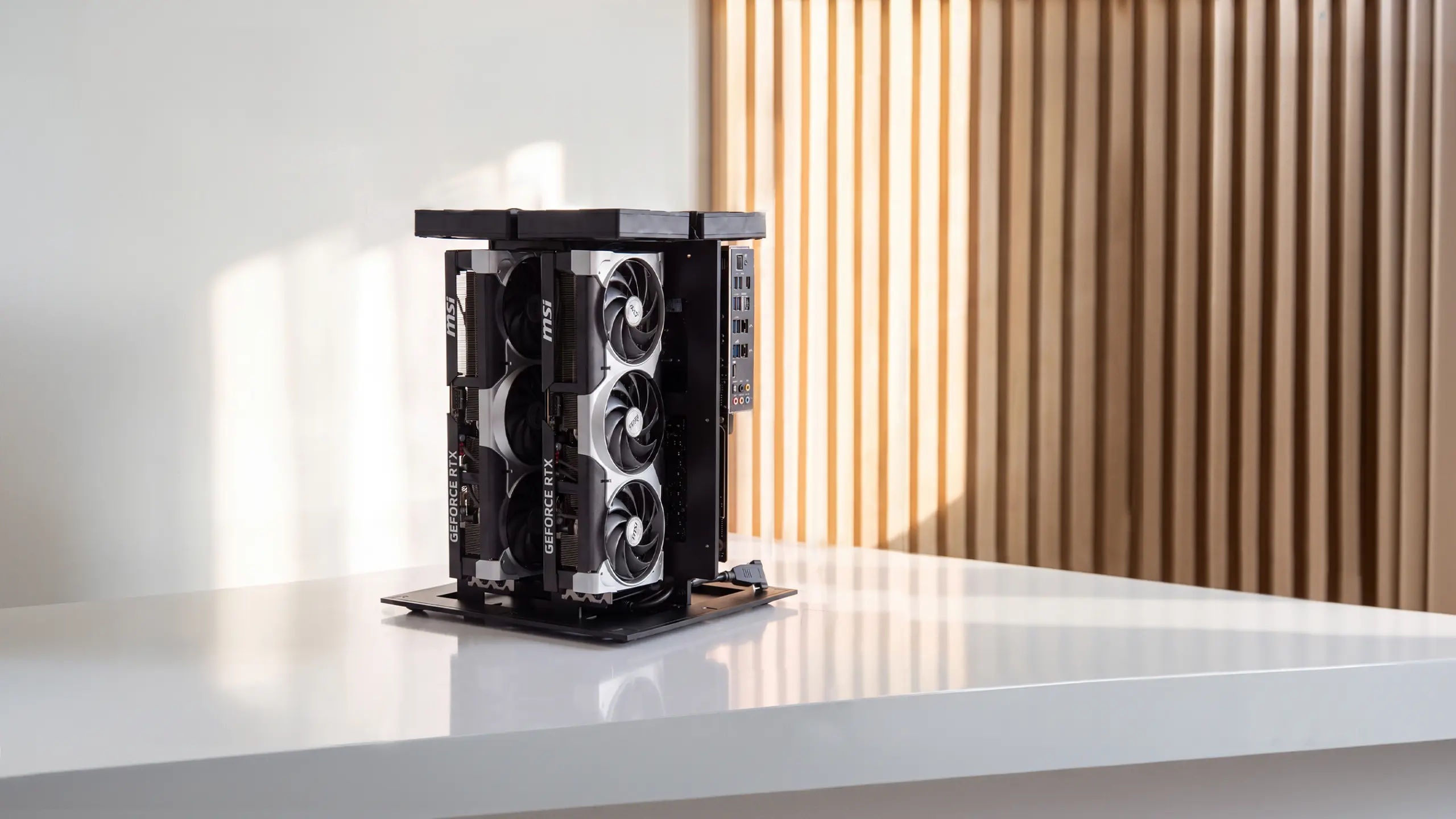
One person making images does not need a workstation. A studio or team that wants to generate at volume, fine-tune on its own work, and run language models on the same box is a different case. Autonomous Computer 2 is a 2-GPU machine with 64 GB of total VRAM on two RTX 5090 cards, or 192 GB on two RTX PRO 6000 Blackwell cards, shipped with Ubuntu, CUDA, and PyTorch installed.
For scale, that 64 GB is more than six times what SD 3.5 Medium needs. The image models Autonomous lists as running on it are Qwen Image, Qwen Image Editing, and FLUX.2-dev, alongside open language models. It has a 3-year warranty, and the CAD files, parts list, and BIOS settings are published on GitHub.
Free Stable Diffusion apps and front ends
You do not need to write code to run Stable Diffusion locally. These free tools load the model and give you a prompt box:
- ComfyUI: a node-based interface that Stability AI recommends for running SD 3.5 locally. It has a learning curve but supports SD 3.5 as well as older models.
- AUTOMATIC1111 Stable Diffusion Web UI: the long-running browser interface with a large extension library, widely used with SD 1.5 and SDXL.
- Draw Things or DiffusionBee: simpler desktop apps listed on the SD 3.5 model card, useful on a Mac.
Is Stable Diffusion Free and Legal to Use?
Yes, Stable Diffusion is free and legal to use, within its license. Versions 1.x and 2.x ship under the CreativeML OpenRAIL-M license. The 3.5 models use the Stability AI Community License, which is free for research, personal use, and commercial use by people or companies with less than $1 million in annual revenue. Above that, Stability AI requires an Enterprise License.
Stability AI says you own the images you generate, as long as you follow the law and its Acceptable Use Policy. Owning an image is not the same as copyright, though. The US Copyright Office concluded in January 2025 that prompts alone do not make an image copyrightable; protection depends on human creative choices, such as arranging or editing the output.
Running the model locally removes usage caps, not rules. The license terms and Acceptable Use Policy still apply on your own hardware, and so does the law on what you create and share.
What People Make With Stable Diffusion
Stable Diffusion is used most for early-stage visuals that would otherwise wait on a designer. Common uses include:
- Marketing creative: ad concepts, social graphics, and campaign mood boards, often refined by a designer afterward.
- Thumbnails and blog headers: quick, on-topic images in a consistent style.
- Concept art and product mockups: early looks at characters, scenes, packaging, or a product in a room, using image-to-image to keep the layout.
- Logo and brand exploration: rough directions to react to before final vector work, the same way people use AI tools for logo design.
For anything you plan to sell or trademark, keep a human edit step in the workflow, both for quality and for the copyright reasons above.
FAQs
Is Stable Diffusion free?
Yes. The model weights are free to download, and the 3.5 models are free for personal use and for businesses under $1 million in annual revenue under the Stability AI Community License. Running it locally costs nothing beyond your hardware and electricity, while hosted websites and APIs may charge or cap free use.
Can I use Stable Diffusion online without installing anything?
Yes. Stability AI offers its Stable Assistant web app and API, and many third-party websites run Stable Diffusion models in the browser. Most third-party sites are not run by Stability AI, so check which model they use, how many free images you get per day, and what their terms say before uploading anything.
Which AI can generate images for free with no limits?
Stable Diffusion running on your own computer is the closest thing to unlimited free image generation, because there are no credits or daily caps once the model is installed. Online free generators almost always limit images per day. Local use still has to follow the model license and its acceptable use policy.
How much VRAM do I need for Stable Diffusion?
Plan on about 10 GB of VRAM for current Stable Diffusion models. Stability AI lists 9.9 GB for SD 3.5 Medium, not counting text encoders, and recommends 10 GB or more. Older models can run on much less with optimized builds, and 4-bit quantization helps larger models fit on smaller cards.
Is Stable Diffusion legal to use for commercial work?
Yes, within the license. SD 1.x and 2.x use the CreativeML OpenRAIL-M license, and SD 3.5 uses the Stability AI Community License, which allows commercial use for individuals and organizations under $1 million in annual revenue. Larger organizations need a Stability AI Enterprise License for commercial use of the 3.5 models.
Who owns images made with Stable Diffusion?
Stability AI says users own the images they generate, provided they follow the law and its Acceptable Use Policy. Copyright is a separate question: the US Copyright Office says prompts alone do not create a copyrightable work, but human choices like arranging, combining, or editing the output can be protected.
What is the difference between Stable Diffusion 1.5, SDXL, and 3.5?
Stable Diffusion 1.5 is the lightest and oldest, with a huge base of community add-ons. SDXL is larger and produces sharper, more detailed images. Stable Diffusion 3.5 replaces the U-Net with a transformer design, which improves prompt following and text in images, and comes in Medium, Large, and Large Turbo versions.
Is Stable Diffusion the best AI image generator?
Stable Diffusion is the best choice when you want control: open weights, local use, fine-tuning, and no per-image fees. Hosted closed generators are often easier to start with, since there is nothing to install or configure. If you want an image in seconds, use a hosted tool; if you want to own the workflow, use Stable Diffusion.
Conclusion
The Stable Diffusion AI image generator is free to try online and free to run locally, and the right choice depends on how much control you want. Use a browser tool to test prompts, move to a local install with about 10 GB of VRAM when you want unlimited images, and read the license before using results commercially. For more options beyond image generation, our list of the best AI tools covers the wider field.
References
- Introducing Stable Diffusion 3.5, Stability AI
- Stability AI License, Stability AI
- Stability AI Image Models, Stability AI
- stabilityai/stable-diffusion-3.5-large model card, Hugging Face
- Rombach R, et al. High-Resolution Image Synthesis with Latent Diffusion Models, arXiv, 2021
- Esser P, et al. Scaling Rectified Flow Transformers for High-Resolution Image Synthesis, arXiv, 2024
- Stable Diffusion, Wikipedia
- Copyright Office Releases Part 2 of Artificial Intelligence Report, US Copyright Office
- Copyright and Artificial Intelligence, Part 2: Copyrightability, US Copyright Office