


5 Best Office Chairs With Adjustable Lumbar Support

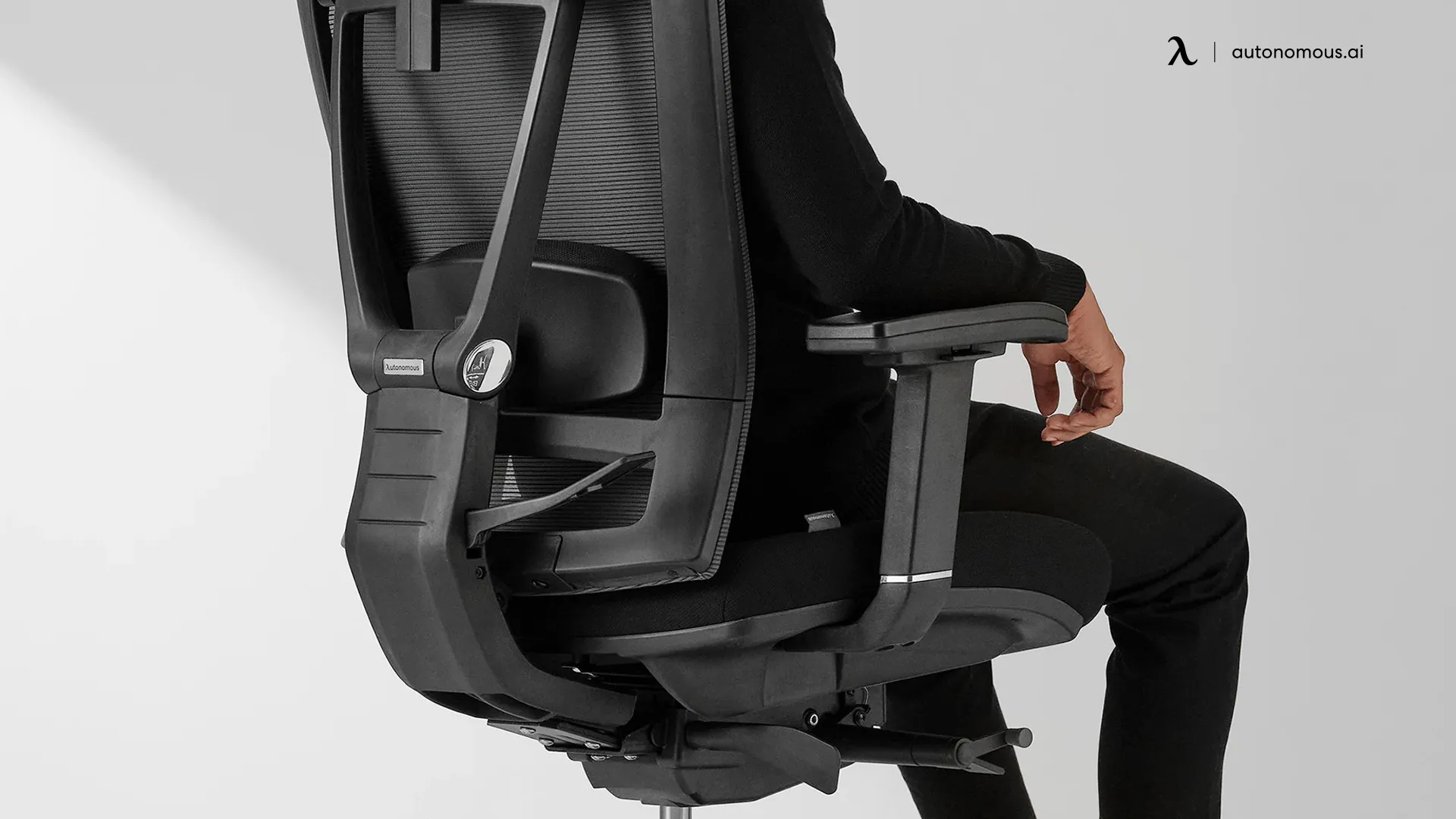
Adjustable lumbar support means the part of a chair that meets your lower back can be moved - in height, depth, or pressure - to match your specific spine, rather than sitting in one fixed position molded for an average body. That distinction matters more than it sounds. A lot of chairs marketed as "ergonomic" use a lumbar-shaped backrest that never moves at all; it just happens to be curved. This guide only includes office chairs with adjustable lumbar support in the strict sense - a mechanism you can actually reposition - and explains how each one works before comparing them.
Comparison
Chair | Lumbar Mechanism | Adjustment Range | Weight Capacity | Warranty | Price |
Autonomous ErgoChair Pro | Sliding cushion + tension lock | Height slide, on/off tension | 300 lbs | Lifetime | $499 |
Autonomous ErgoChair Mesh | Sliding cushion + dual-hinge tension crank | Height slide, fine tension control | 300 lbs | Lifetime | $499 |
HBADA E3 Ultra | 3-zone dynamic wrap-around | 8-way adjustable, motion-tracking | 330 lbs | 5-year | $809 |
FlexiSpot C7 Morpher | AirLumbar™ inflatable + height slide | Inflate/deflate, backrest height adjustment | 380 lbs | 10-year | $799 |
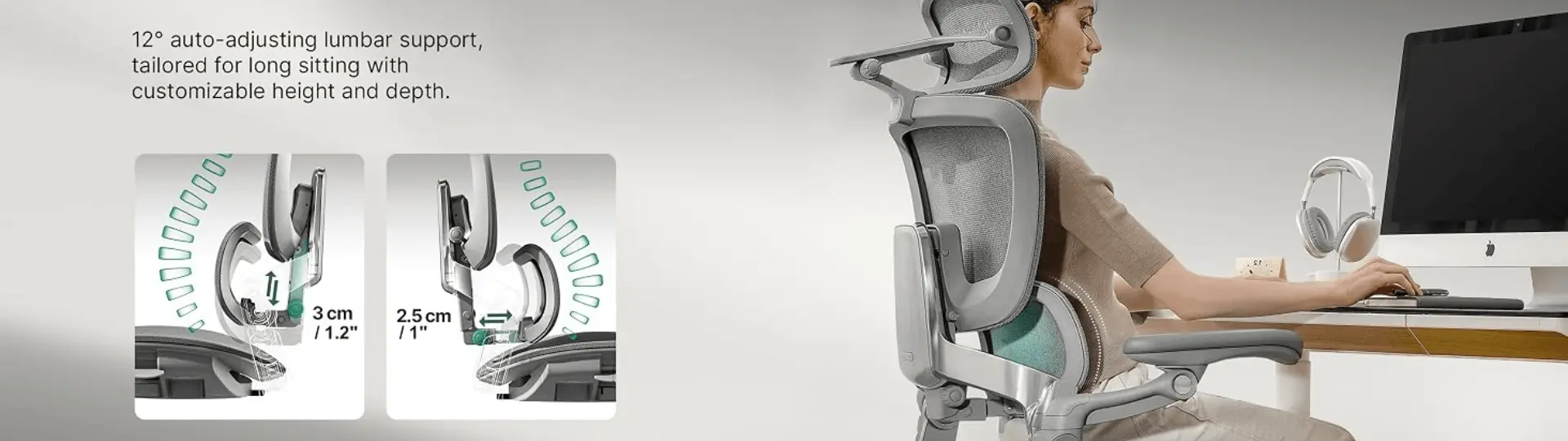
Hinomi H2 Pro | Dual lumbar, height + depth + tilt | 1.18" height, 0.98" depth, 19 total points | 330 lbs | 10-year | $759 |
What "Adjustable" Actually Means in a Lumbar System
A genuinely adjustable lumbar system falls into one of three categories: sliding mechanical support, where a cushion or pad moves up and down a track to sit at the exact curve of your lower back; pneumatic or inflatable support, where you add or release air pressure to change how firm the support feels without moving its position; and dynamic or motorized support, where sensors or a flexible structure shift the support automatically as you move.
This matters because a fixed lumbar bump - however well-shaped - supports one spine curve, at one height, for one sitting position. If that curve doesn't match yours, or if you shift between upright typing and reclined thinking throughout the day, a fixed system loses contact. An adjustable system is built to be reset for your body, and in the better designs, to follow you as you move.
.webp)
The 5 Best Office Chairs With Adjustable Lumbar Support
1. Autonomous ErgoChair Pro - Best for Precise Height Adjustment
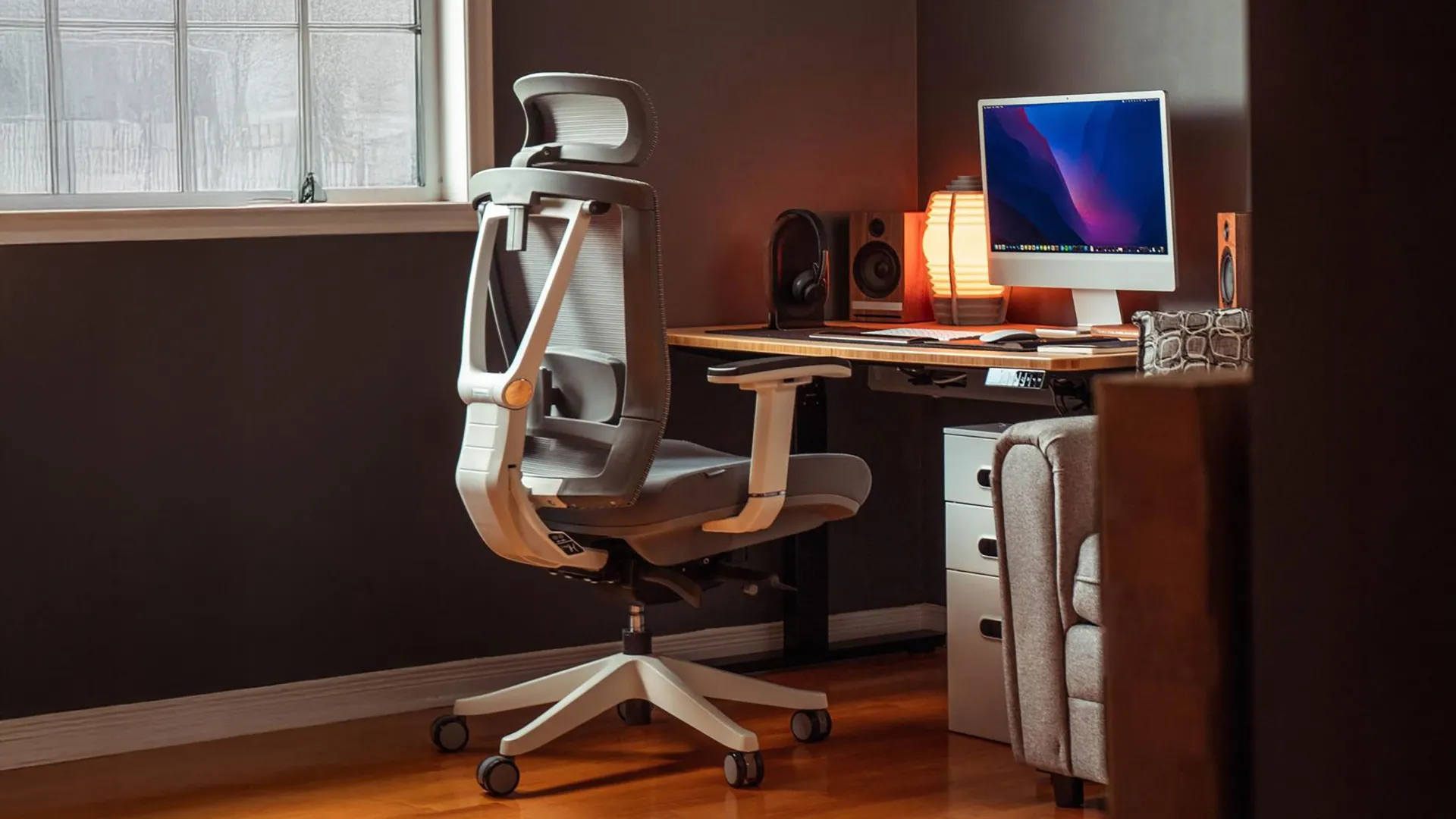
The ErgoChair Pro is the most straightforward entry point on this list of ergonomic office chairs with lumbar support for anyone who wants a genuinely adjustable lumbar system without paying premium-tier prices - it sits well below the three competitors here while still backing the mechanism with a lifetime warranty, which none of them match. The lumbar cushion slides vertically along the backrest, letting you position it at the exact height of your lower spine rather than wherever a fixed pad happens to sit.
Reviewers consistently single out the lumbar system as the chair's strongest feature. GameRant described it as making "a noticeable difference with my lower back feeling more conformed to the shape of the chair," and noted it "can be raised or lowered to suit a user's height." Tom's Guide's review called the overall lumbar support "great" and praised how easily you can unlock it for a more reclined position, adding that the mesh and lumbar combination is "very comfortable when reclined."
The one adjustment worth knowing about before buying: Tom's Hardware's review found the tension lever functions closer to an on/off switch than a fine dial, which matters most for taller users who want more granular pressure control.
What adjusts: Height (sliding cushion), tension (locked/unlocked).
What doesn't: Fine-grained pressure - it's closer to binary than a dial.
2. Autonomous ErgoChair Mesh - Best for Fine-Tuned Tension Control
.jpg)
The ErgoChair Mesh is the answer for anyone who read the Pro's entry above and wanted the same lifetime-warrantied lumbar system with finer control - it takes the sliding cushion design and adds a second hinge point roughly halfway up the chair's spine, turning the Pro's binary tension lock into a genuine dial. It still lands in the middle of this list on price, well under the three non-Autonomous chairs.
TechRadar's review called this out directly: "the backrest can actually hinge at two separate points," with the second adjustment controlling "how far back the backrest sits when you don't have any load on it" - solving the "ejector seat" feeling some reclining chairs produce when the tension is unlocked. The same reviewer praised the precision: instead of a binary tight-or-loose setting, "I can rotate a little wheel, much like the crank of an old car window... to fine-tune just how I want my backrest to be." Tom's Guide's review confirmed the chair's "recline angle and resistance is adjustable at multiple points," calling it a genuine upgrade over the Pro's simpler lever.
The one tradeoff: that added mechanism comes in a heavier chair, which Tom's Guide noted made assembly more effortful than lighter Autonomous office chair models.
What adjusts: Height (sliding cushion), tension (fine dial, not binary), secondary recline-return hinge.
What doesn't: The lumbar position itself still requires manual height sliding, not automatic tracking.
3. HBADA E3 Ultra - Best for Multi-Zone Coverage
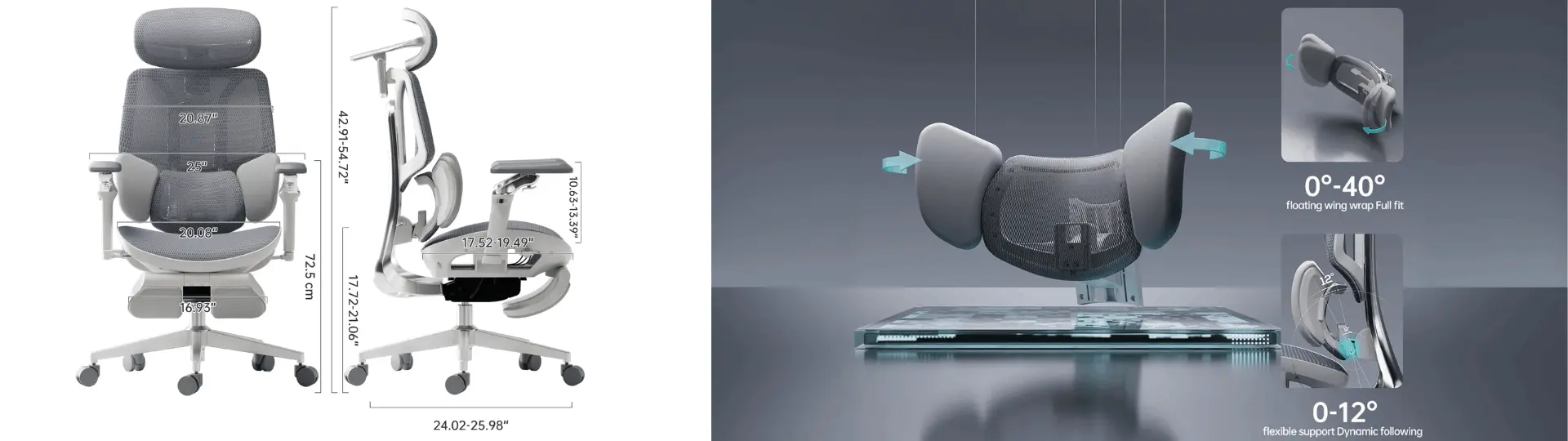
The HBADA E3 Ultra is the most ambitious lumbar system on this list on paper: a 3-zone wrap-around matrix with floating wings and 8-way adjustment, built to track three separate points of the lower back instead of supporting it as one flat zone. The idea is that leaning, twisting, or shifting weight to one side still keeps contact across the relevant zone instead of losing support entirely - a segmented approach rather than a single sliding pad. It's backed by a 5-year hassle-free warranty and sits at the top of this list of lumbar support office chairs on price.
As one of the newer lumbar support chairs in this category, real-world comfort over long, multi-week sessions is still being established outside of manufacturer testing. The mechanism itself - three independently tracked zones rather than one - is a meaningfully different engineering approach than the single-point sliding systems most competitors use, and worth watching as more sitting hours accumulate on it.
What adjusts: All three zones independently, per manufacturer spec.
Worth tracking: long-term comfort data as more owners log hours on it.
4. FlexiSpot C7 Morpher - Best for On-the-Fly Pressure Control
The C7 Morpher's AirLumbar™ system is a genuinely different adjustment type from the other office chairs with adjustable lumbar support: instead of moving a cushion's position, you inflate or deflate the lumbar zone directly, changing how firm the support feels without getting up. It's paired with a backrest height adjustment, so you still set vertical position separately from pressure.
PC Gamer's review called it "one of the most adjustable chairs available," highlighting the 360-degree swivel arms as a standout alongside the lumbar system, though the same review was blunt about price: "the enormous, too-close-to-$1000 price tag" was the main hesitation despite genuinely rating the ergonomics highly. TechRadar's review offered a more measured take, noting the design "blends into every other" chair rather than standing out, and flagged that the "armrest ratcheting mechanisms are loud and move easily" - a build quality note worth knowing if quiet adjustment matters to you.
The inflatable design is a real tradeoff to understand before buying: it gives you pressure control no sliding cushion offers, but it also means more day-to-day fiddling if you're the type who likes to set a chair once and leave it.
What adjusts: Pressure (inflate/deflate), backrest height, independent of each other.
What's a tradeoff: More hands-on maintenance than a set-once sliding system.
5. Hinomi H2 Pro - Best for Maximum Adjustment Range
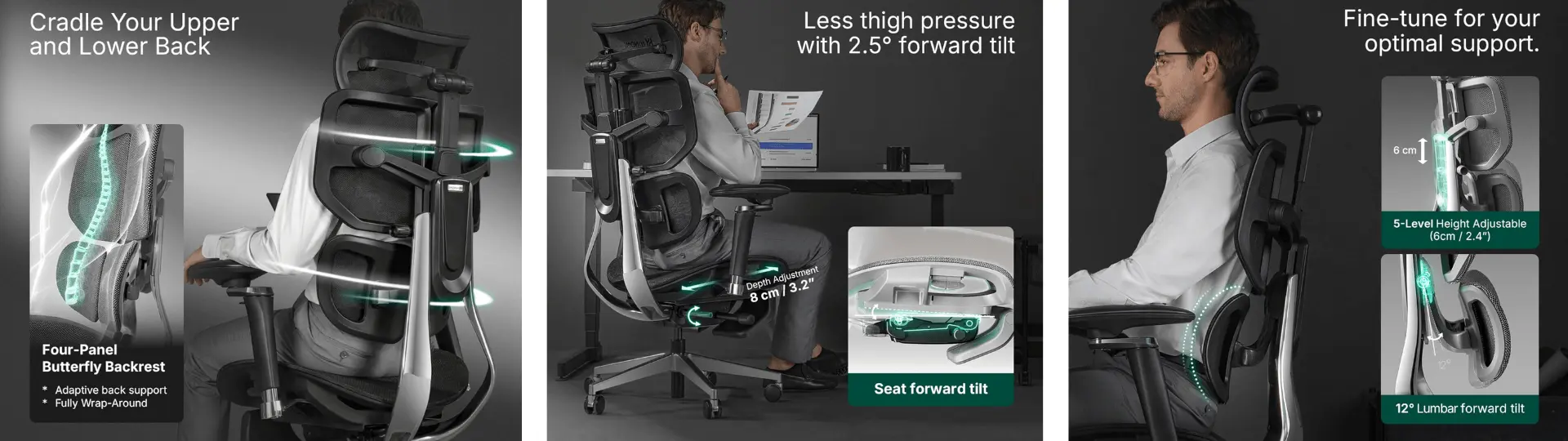
The Hinomi H2 Pro's lumbar system adjusts in height (1.18 inches) and depth (0.98 inches) as part of a chair offering 19 total adjustment points, more than any other adjustable lumbar support chair on this list. TechRadar's review called it "a substantial and adjustable lumbar support system," and described testing it across a full day: "By hour eight, I was noticing that my head and neck still felt supportive and I hadn't noticed any squeaking nor looseness in the chair."
Creative Bloq's review - written by a 6'4" reviewer who says he typically struggles to find chairs that fit - reported being able to "dial in the Hinomi H2 Pro to be just right, with an upright, supported, feet-and-forearms flat position." Both reviews agree the lumbar presence is pronounced rather than subtle; TechRadar noted directly that if you "want a more subtle or adjustable lumbar," this chair's prominent support "may not be the right fit for you."
What adjusts: Height, depth, and tilt of the lumbar zone, plus armrests, seat depth, headrest, and backrest height - 19 points total.
What's a tradeoff: The lumbar support is noticeably firm and present, which some reviewers flagged as too much for users who prefer minimal lower-back contact.
How to Test Lumbar Adjustability Before You Buy
Three checks separate an ergonomic chair with genuinely adjustable lumbar support from one that only markets itself that way.
- First, confirm the lumbar zone moves independently of the recline mechanism - if leaning back is the only way the support position changes, it isn't adjustable, it's just shaped.
- Second, check whether the adjustment holds under your actual body weight once set, since some mechanical sliders (as reviewers noted above) can loosen or shift during normal use.
- Third, if buying online, look for a manufacturer spec sheet that states a measurable adjustment range - inches of height travel, degrees of tilt - rather than marketing language like "ergonomic support" with no numbers attached.
According to the National Institute of Neurological Disorders and Stroke, maintaining the natural inward curve of the lower spine while seated is one of the most consistently recommended strategies for reducing lower back strain during long periods of sitting - which is the specific function an adjustable lumbar system is designed to support.
.webp)
Frequently Asked Questions
What does adjustable lumbar support mean on an office chair?
Adjustable lumbar support means the part of the chair that contacts your lower back can be repositioned - typically in height, depth, or firmness - rather than staying in one fixed shape. This lets the support match your specific spine curve instead of an average body's curve, which is the main difference between genuinely adjustable systems and chairs that are simply lumbar-shaped.
Is adjustable lumbar support worth it for back pain?
Adjustable lumbar support is generally worth it for back pain because it lets you maintain the spine's natural inward curve while seated, which health organizations including the National Institute of Neurological Disorders and Stroke identify as a key factor in reducing lower back strain. That said, adjustable support addresses posture-related discomfort - it isn't a substitute for medical treatment if you have a diagnosed spinal condition.
How much do office chairs with adjustable lumbar support cost?
Office chairs with genuinely adjustable lumbar support typically start around $300 for chairs with basic height-adjustable systems and range up to $800 or more for chairs with multi-zone or inflatable lumbar mechanisms. Price generally tracks with how many independent dimensions the lumbar system adjusts across, not just whether it adjusts at all.
What's the difference between sliding, inflatable, and dynamic lumbar support?
Sliding lumbar support uses a cushion that moves up and down a track to match your spine's height, inflatable support changes firmness through air pressure without moving position, and dynamic support uses sensors or a flexible structure to shift automatically as you move. Each solves a different problem - sliding systems are simplest to set once, inflatable systems let you adjust pressure without standing up, and dynamic systems aim to stay engaged through posture changes without any manual input.
How do I adjust the lumbar support on my office chair correctly?
Sit upright with your hips fully back in the seat, then adjust the lumbar height so it sits at the inward curve just above your beltline, not against your mid or upper back. If your chair has a separate tension or pressure adjustment, set that after positioning the height, since firmness preference is a separate variable from placement.
Can I add adjustable lumbar support to a chair that doesn't have it?
Aftermarket lumbar cushions and pillows can approximate some of the benefit, letting you strap on adjustable positioning to a chair with fixed or no lumbar support. However, these add-ons don't integrate with the chair's recline mechanism the way built-in systems do, so support tends to shift or slip more than an engineered-in adjustable system.
Do gaming chairs have adjustable lumbar support?
Some gaming chairs include adjustable lumbar support, but many rely on a separate strapped-on pillow rather than an integrated sliding or inflatable mechanism, which can shift out of position during use. If lumbar adjustability specifically matters to you, check whether the support is built into the backrest structure or sold as a detachable add-on before buying.
Conclusion
Not every chair marketed as "ergonomic" has lumbar support that actually adjusts - a lumbar-shaped backrest and an adjustable lumbar system solve different problems, and the difference only shows up once you're a few hours into a workday. Among the lumbar support chairs here, the ErgoChair Pro offers straightforward height adjustment at a mid-range price, the ErgoChair Mesh adds finer tension control for anyone who wants more than an on/off lock, the FlexiSpot C7 Morpher trades sliding position for on-demand pressure control, and the Hinomi H2 Pro offers the deepest adjustment range of the group for anyone who wants to fine-tune every dimension.
Whichever you choose, test the adjustment through your actual sitting positions - upright, reclined, and leaning forward - rather than judging it in the showroom stance alone. A system that feels supportive when you first sit down needs to hold that support through the postures you'll actually use during a real workday.
Sources
- National Institute of Neurological Disorders and Stroke - Back Pain
- Tom's Hardware - ErgoChair Pro Review
- Tom's Guide - ErgoChair Pro Review
- GameRant - ErgoChair Pro Review
- TechRadar - ErgoChair Mesh Review
- Tom's Guide - ErgoChair Mesh Review
- PC Gamer - FlexiSpot C7 Morpher Review
- TechRadar - FlexiSpot C7 Morpher Review
- TechRadar - Hinomi H2 Pro Review
- Creative Bloq - Hinomi H2 Pro Review