Windsurf Review 2026: The AI Code Editor Now Devin Desktop

(1).webp)
Windsurf is now Devin Desktop, and our Windsurf review verdict is that it is worth paying for if you want local and cloud agents in one editor, but not if you need a monthly bill you can predict. Cognition, the company behind the Devin coding agent, renamed Windsurf on June 2, 2026. The editor, extensions and settings carried over, and windsurf.com now redirects to devin.ai/desktop.
The catch is billing. Since March 2026, paid plans run on a daily and weekly usage quota instead of monthly credits, and long agent sessions on frontier models use it up fast. Existing users protested the switch loudly on Reddit, and the Free plan cannot buy extra usage once its quota runs out.
Below: what changed with the rename, the features that matter now, pricing and quotas, security settings, and how it compares to Cursor and Claude Code at about $20 a month.
Windsurf review at a glance
Windsurf (Devin Desktop) suits developers who want local and cloud agents in one editor, and it is a weaker fit for JetBrains users and anyone who needs a fixed monthly cost.
| Question | Short answer |
|---|---|
| Current name | Devin Desktop (since June 2, 2026) |
| Maker | Cognition, maker of Devin |
| What it is | AI code editor + agent command center |
| Platforms | Mac, Windows, Linux |
| Price | Free tier; Pro $20/mo; Max $200/mo |
| Billing model | Daily and weekly quota |
| Old Windsurf plans | Pro $15 and Teams $30/seat kept |
| Best for | Running several agents in one place |
| Main drawback | Quota limits on heavy days |
Prices are Cognition's monthly list prices for one person and change often.
Is Windsurf now Devin Desktop?
Yes. Windsurf became Devin Desktop on June 2, 2026, through a regular over-the-air update, and Cognition's Devin Desktop FAQ says only the name and branding changed. Cognition, the AI company behind Devin, agreed to buy Windsurf in July 2025, after OpenAI's $3 billion offer for the company expired and Google hired its CEO in a separate $2.4 billion deal.
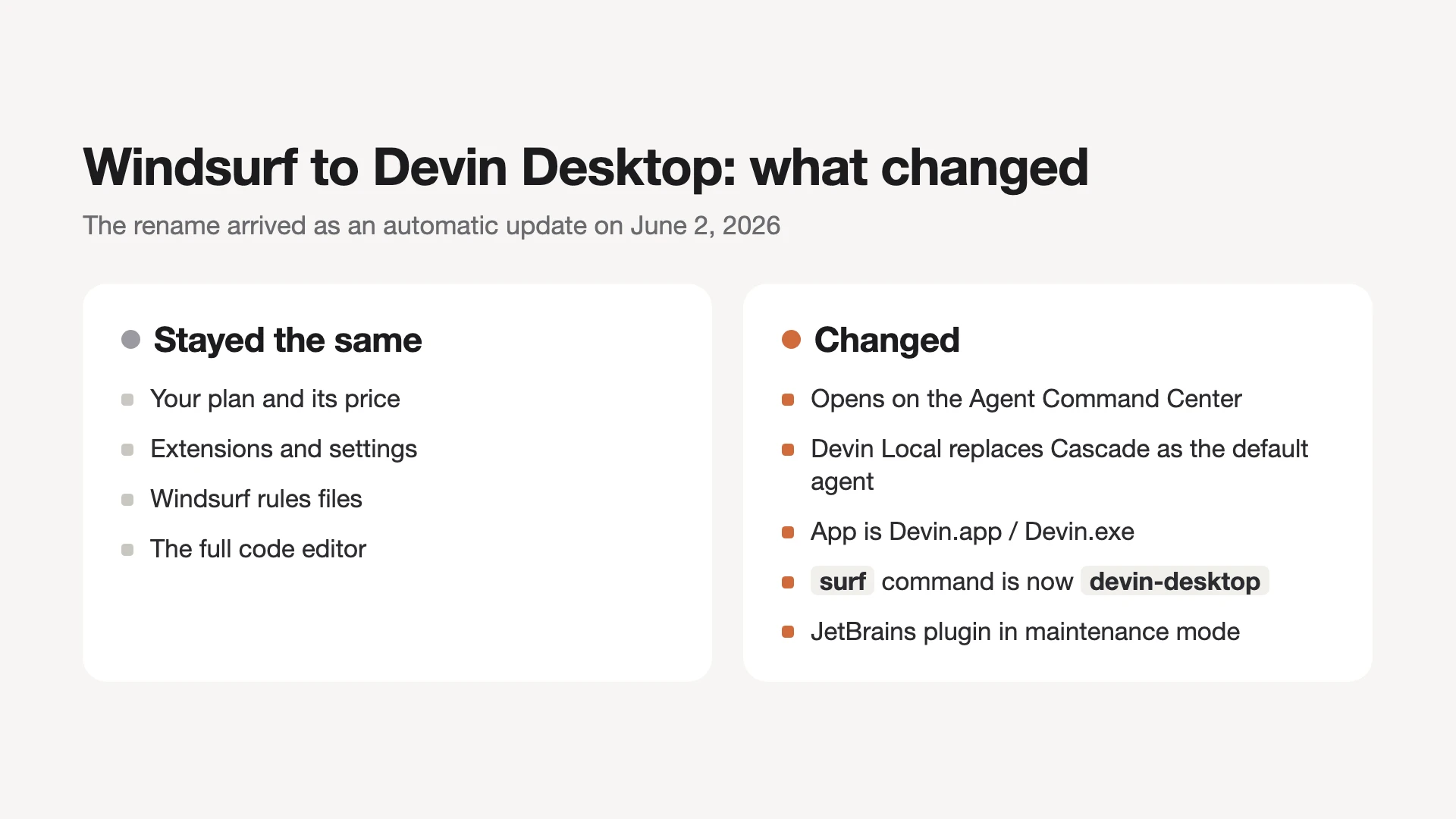
What stayed the same:
- Your plan and price: unchanged, including legacy Windsurf Enterprise plans.
- Editor and settings: extensions, keybindings, workflows and settings migrate on the first launch.
- Rules: .windsurfrules and .windsurf/rules files are still read. New rules go in .devin/rules, which takes precedence.
What changed:
- The first screen: the Agent Command Center now opens first, with the classic editor one switch away.
- The default agent: new conversations start with Devin Local instead of Cascade.
- The app name: it installs as Devin.app on macOS and Devin.exe on Windows, and the old surf command is now devin-desktop.
- JetBrains: the Windsurf plugin is in maintenance mode, and Cognition recommends running Devin in JetBrains over ACP instead.
One check for company machines: device management policies that only allow an app called "Windsurf" may block the renamed app, so IT needs to add "Devin" to the allowlist.
What is Windsurf (Devin Desktop) now?
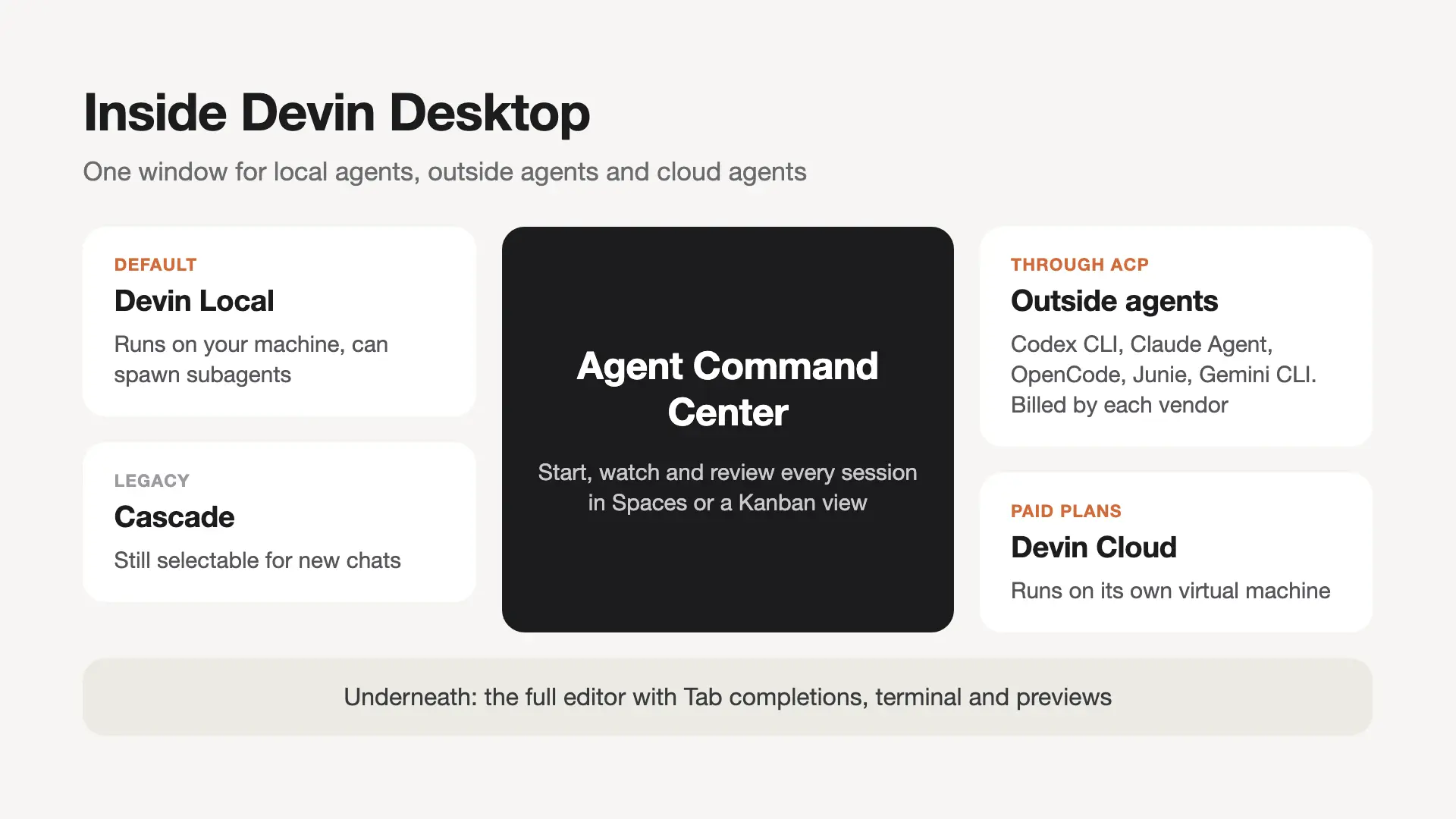
Devin Desktop is an AI code editor that opens on an Agent Command Center, a view for starting, watching and reviewing several coding agents, with the full Windsurf IDE still available underneath. Local agents run in your editor, and cloud agents run on their own virtual machines in Cognition's cloud. Both show up in the same session list, which you can sort into Spaces or a Kanban view.
The editor itself is built on a VS Code base. Cognition's docs describe its settings folder as "VS Code-derived", extensions come from the Open VSX registry, and onboarding imports your VS Code or Cursor settings. It installs on Mac, on Windows 10 or later, and on Linux through a tarball or apt and yum package repositories. The devin.ai/desktop page only shows a Mac download button, but the install docs list all three.
In practice, the question to ask is whether you want to manage agents or write code with help. Devin Desktop leans toward the first. If you mostly want inline suggestions while you type, the Agent Command Center is extra screen you will rarely use.
Windsurf features that matter in 2026
The features that set Devin Desktop apart are the agent controls: Devin Local with subagents, ACP for outside agents, cloud handoff and Fusion. Tab completions and linter fixes are still there for the typing side.
Devin Local replaced Cascade as the default agent
Devin Local is now the main local agent in Devin Desktop, and Cascade, the agent the old Windsurf was known for, is labeled legacy. Your old Cascade conversations stay in the history, and you can still pick Cascade for a new one.
Devin Local shares its harness with the Devin CLI. It can spawn subagents for subtasks, run in an optional OS-level sandbox, plan before it edits, and work in a separate git worktree. One gotcha: Cascade workflows do not run in Devin Local. Cognition provides a migration wizard that turns them into skills.
Tab and Supercomplete for inline edits
Tab is Devin Desktop's autocomplete, and it suggests edits before and after your cursor, not only the next line. Supercomplete, the recommended mode, shows small diff windows with additions and deletions. Tab to Jump moves you to the next likely edit, and Tab to Import adds the import line.
Tab reads your code, terminal, agent chat and recent edits. Clipboard context is off until you opt in. Tab is unlimited on every plan, including Free.
Fast Context for searching large codebases
Fast Context is a search subagent that finds the relevant files and lines for the main agent in Devin Desktop. Cognition says it runs on its own SWE-grep models and retrieves code up to 20 times faster than traditional agentic search, using up to 8 parallel tool calls per turn. The point is a cleaner context window: the main model spends its context on the task instead of on reading unrelated files.
Running Codex, Claude Agent and other agents through ACP
Devin Desktop can run outside coding agents through the Agent Client Protocol (ACP), an open protocol that works for agents roughly the way LSP works for language servers. Cognition lists Codex CLI, Claude Agent, OpenCode, Junie and Gemini CLI as examples, and you can add a custom agent too.
You turn ACP agents on in the Agents tab of Devin settings, then restart. ACP agents bill through their own vendor, not your Devin quota, and Cognition's privacy policy and terms do not cover them. They work on Free, Pro, Max and Teams; on Enterprise they are off by default, and admins ask their Cognition account team to enable them. Running agents from several vendors together is its own topic, covered in our piece on AI agent orchestration.
Devin Cloud, handoff and subagents
Devin Cloud runs the Devin agent on its own virtual machine, so a session keeps going after you close your laptop. Pro, Max and Teams include it, and it draws from the same quota as the editor. You can plan with a local agent and send the plan to Devin Cloud in one click, keeping the same context.
On long tasks, Devin can coordinate subagents that each open their own pull request. Cognition adds up to $50 in extra usage credits when you first connect GitHub, with the amount depending on how established your GitHub account is.
Fusion for cheaper long tasks
Fusion pairs a frontier lead model, which plans and reviews, with a cheaper sidekick model that writes the code and runs the tests. Each model bills at its own rate, so a session costs less than running the frontier model for every step. Fusion is on paid plans only, and not on legacy credit-based plans.
Code review, linter fixes and previews
Devin Desktop reviews diffs inside the editor with Devin Review, and Devin Local adds a Quick Review subagent for fast feedback on local changes. Cascade, the legacy agent, fixes lint errors in the code it writes. This is on by default, and Cognition's docs say these lint-fix edits are not charged.
Previews open your web app inside the editor or browser, and you can select an element or a console error and send it to the agent as context.
Integrations and language servers
Devin Desktop connects to Slack, Microsoft Teams, Linear, Notion, Jira and Confluence, Datadog, Sentry, Figma, Vercel and Stripe. Its listed language servers are rust-analyzer, clangd, Windsurf Pyright and gopls, with Prettier for format on save. By default, Devin Local asks before calling any MCP tool.
Windsurf pricing in 2026: is Windsurf free?
Yes, Windsurf has a free plan: Devin Desktop Free costs $0 and includes a light agent quota, limited models, and unlimited Tab completions and inline edits. Paid plans add bigger quotas, frontier models and Devin Cloud.
| Plan | Price | What you get |
|---|---|---|
| Free | $0 | Light quota, limited models, unlimited Tab |
| Pro | $20/mo | Bigger quota, frontier models, Devin Cloud |
| Max | $200/mo | Much higher quota |
| Teams | $80/mo + $40 per seat | Up to 200 users, admin dashboard |
| Enterprise | Custom | SSO, VPC deployment |
Prices come from Devin's pricing page and change often. Pro lists frontier models from OpenAI, Claude, Gemini and SpaceXAI, plus open models and free use of Cognition's SWE-2. There are no free trials of paid plans, but Cognition offers a refund if you change your mind before using the subscription.
How the Windsurf quota works
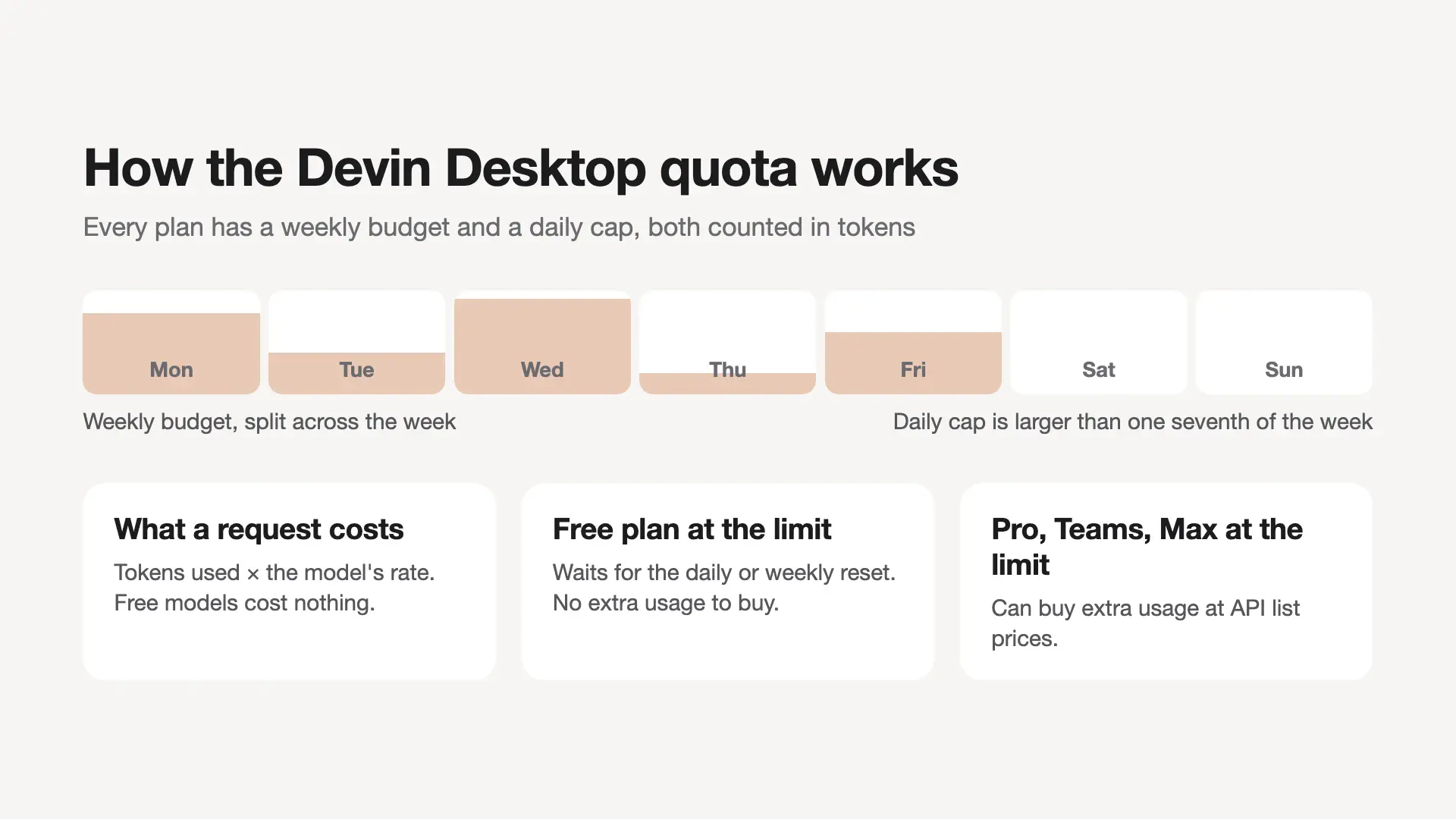
Each plan includes a daily and a weekly usage budget, measured in the tokens each request uses, and both reset on the calendar date. The quota docs add details most reviews skip:
- The daily cap is more than one seventh of the weekly cap, so weekend coders can still use the full week.
- Free models do not count against your quota at all.
- Free users wait for the next reset when they hit the limit. Pro, Teams and Max users can buy extra usage at API list prices.
- Context adds up fast. Cognition's own example, a two-prompt refactor with a Claude Opus model, totals about 200,000 tokens because each step re-reads the shared context.
To make the quota last, Cognition suggests tighter prompts, smaller SWE models for routine work, shorter sessions and sticking to one frontier model so caching kicks in. You can check what is left in the usage meter inside Devin Desktop.
What happened to old Windsurf plans and credits
Existing subscribers kept their old prices when the quota system arrived. Pro stays at $15 a month and Teams at $30 per developer seat, indefinitely, on the new quota rules. Unused add-on credits turned into extra-usage balance at $0.04 per credit, and Cognition will refund that balance on request. One loss: new Teams plans no longer include SSO, which moved to Enterprise.
Windsurf downsides: the quota backlash and other limits
The biggest complaint about Windsurf in 2026 is the March switch from credits to quotas, which many paying users saw as a price increase in disguise. Threads on the r/windsurf subreddit called it a "rugpull", because a daily cap replaced the monthly credit pool that heavy users used to stretch.
Ratings reflect it. Trustpilot's page for windsurf.com shows 1.4 out of 5 from 58 reviews, with complaints about sudden price increases, slow responses and no human support for billing. A June 2026 video review also reported random edits and slowdowns in long sessions. Treat these as user reports, not measured results.
The documented numbers explain why. Each request costs tokens times the model's rate, Cognition's own two-prompt refactor example with a Claude Opus model uses about 200,000 tokens, and extra usage bills at API list prices. Cognition does not publish how large each plan's daily or weekly quota is, so you cannot convert Pro into a number of tasks in advance.
Other limits worth knowing before you pay:
- JetBrains users get the old plugin. It is in maintenance mode, and newer JetBrains releases can break it.
- Free has a hard stop. You cannot buy extra usage on Free, so a busy day ends at the cap.
- Cascade habits need migrating. Workflows only run in the legacy Cascade agent, not in Devin Local.
- Agents still make mistakes. Cognition itself warns that Devin can introduce bugs or suggest insecure code.
A practical check: before you renew, open the usage meter after a normal work week. If you hit the daily cap more than once or twice, price in extra usage or compare Max against your API spend.
Is Windsurf secure? What happens to your code
Windsurf is reasonably secure for most teams, but Cognition may train on your data by default, and only paid plans can turn that off. That is the main thing to check before you open a private repo in it.
According to Cognition's security page, which windsurf.com/security now redirects to:
- Training: allowed by default. Paid users can opt out in Data Controls, which also turns on zero data retention with Cognition's model providers. On Teams, only an admin can opt out.
- Enterprise: Cognition will not train on your data without your written consent.
- Audits: Cognition has been SOC 2 Type II certified since September 2024, and data is encrypted in transit and at rest.
- Output: code produced by Devin is the customer's intellectual property, except that it cannot be used to train a competing model.
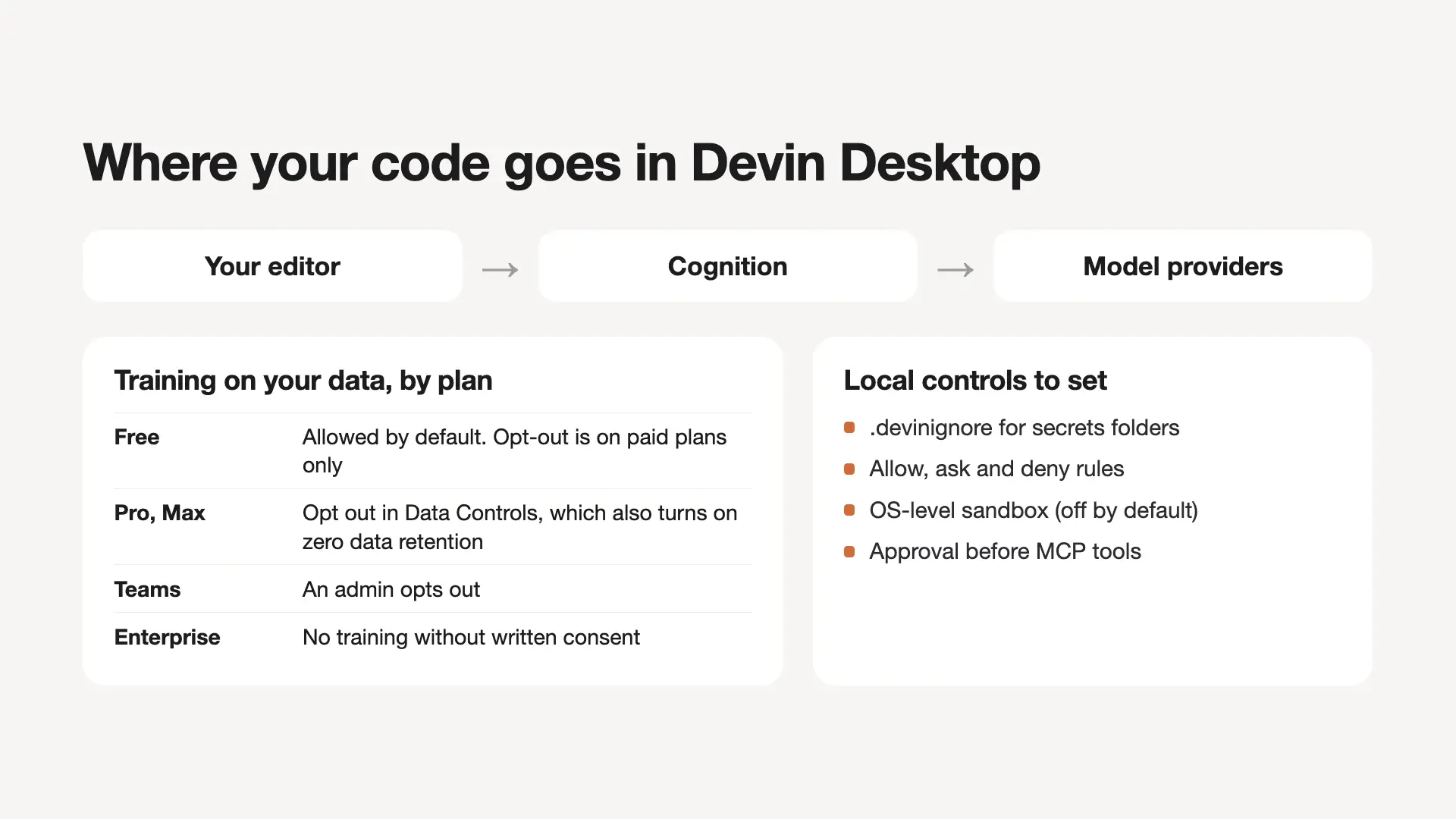
The real security risks are about what the agent can touch. Devin Local uses allow, ask and deny rules for file reads, writes, commands, web fetches and MCP tools, and its OS-level sandbox can limit writable paths and network access, but you have to turn it on. A .devinignore file keeps folders out of indexing and agent access, and opening a workspace in Restricted Mode disables every agent.
A quick safety setup: opt out of training, add secrets folders to .devinignore, set deny rules for .env and key files, enable the sandbox, and keep branch protection on so no agent merges without review.
Devin Desktop sends prompts and code context to Cognition and its model providers. Outside agents you run through ACP, such as Codex or Claude Agent, send your code to their own vendor under that vendor's terms, not Cognition's. If code must never leave your hardware, local models on an AI PC are the alternative, the edge AI route covered in our edge AI applications guide.
Windsurf vs Cursor and Claude Code
Pick Devin Desktop if you want frontier models from several labs included in a $20 plan and want to run outside agents through ACP; pick Cursor if Cursor and Grok models are enough and you prefer weekly usage resets. Both are AI-first editors with a free tier, and both offer cloud agents and a no-training setting on paid plans. Claude Code is the third common choice: a coding agent included in Anthropic's Claude Pro plan.
| Feature | Devin Desktop (Windsurf) | Cursor | Claude Code |
|---|---|---|---|
| Maker | Cognition | Anysphere | Anthropic |
| Free plan | Yes, light quota | Yes, limited | No (Claude Free excludes it) |
| Entry paid plan | Pro $20/mo | Plus $8/mo, Grok models only | Claude Pro $20/mo ($17 yearly) |
| Claude, GPT, Gemini | In the Pro quota | At API list price, billed separately | Claude models in your plan |
| Usage resets | Daily and weekly | Weekly | Five-hour window and weekly |
| Where it runs | Its own editor + Devin Cloud | Its own editor; cloud agents from Premium ($30/mo) | Terminal, IDE extensions, desktop app, web |
| Outside agents | Codex, Claude Agent and more via ACP, billed by each vendor | Not listed on pricing page | Not applicable |
| No-training setting | Opt-out on paid plans | Privacy Mode | Trains only if the setting is on |
| Team plan | $80/mo + $40 per seat | $30+ per user | $25 per seat monthly |
The pricing difference matters most. Cursor's pricing gives Plus access to Grok models only, and from Premium up, Claude and GPT models are billed separately at API list price. Devin Pro counts those frontier models against the included quota. Cursor's Privacy Mode promises that neither Cursor nor its model providers train on your code.
If you have about $20 a month
At $20 a month, the choice is Devin Desktop Pro or Claude Pro, because Cursor has no $20 plan: Plus costs $8 for Grok models only, and Premium costs $30.
- Devin Desktop Pro ($20): for several agents in one editor, with Claude, GPT and Gemini models in one quota and Devin Cloud for tasks that run while you are away.
- Claude Pro ($20, or $17 a month billed yearly): for working with Claude models in the terminal or your current IDE. According to Anthropic's pricing, Claude Code shares one usage pool with Claude chat, limits reset on a rolling five-hour window plus a weekly limit, and paid plans can keep going at standard API rates.
- Cursor Plus ($8) or Premium ($30): Plus if Grok models are enough; Premium if you want Cursor's cloud agents and accept paying API list price for Claude or GPT.
Devin Desktop can also host Claude Agent and Codex through ACP, billed by those vendors. Our Codex vs Claude Code comparison covers the two terminal agents.
For a wider list, compare Windsurf with other AI tools for coding.
Who should use Windsurf, and who should skip it
Windsurf fits developers who already run more than one coding agent and want them in one window; it is a poor fit for JetBrains-first teams and for anyone on a strict budget with heavy daily use.
Use it if:
- You juggle agents: you want Devin Local, Codex or Claude Agent and cloud sessions side by side, with a notification when each finishes once notifications are on. Outside agents bill separately through their own vendor.
- You want frontier models without API bills: Pro includes them in its quota, up to the daily cap.
- You come from VS Code or Cursor: settings import on the first launch.
Skip it if:
- You live in JetBrains: the plugin is in maintenance mode.
- You need a fixed monthly cost: extra usage bills at API rates once the quota runs out.
- Your code cannot leave your machine: an AI PC assistant running local models is the safer route.
- You only want autocomplete: the free Tab tier covers that, so there is little reason to pay.
For a small business, Teams works out to $80 a month plus $40 per developer seat, so five developers cost $280 a month, with an admin dashboard and centralized billing. If you need SSO, that is now an Enterprise feature, so ask for a quote before you commit.
Watching agents across several machines
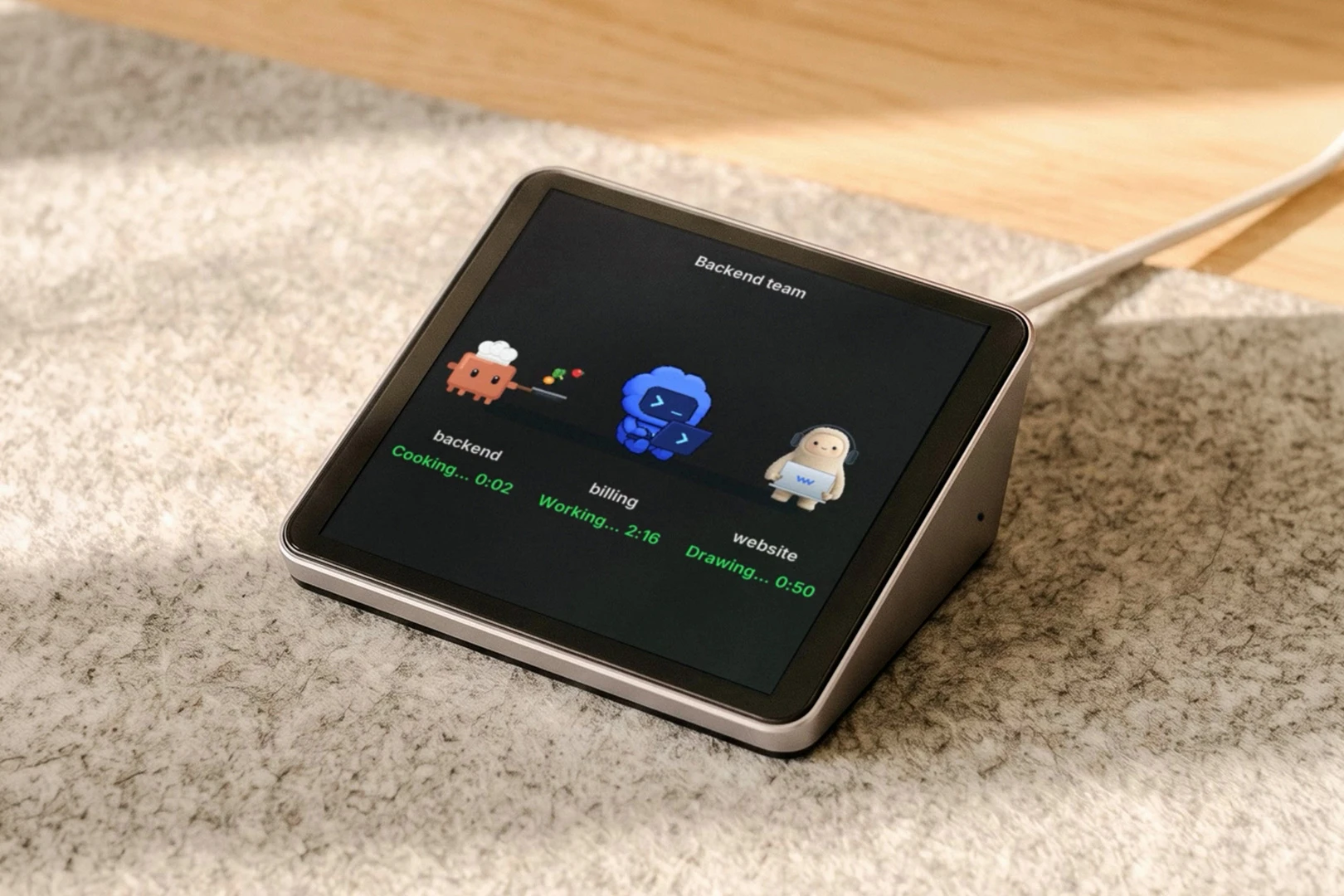
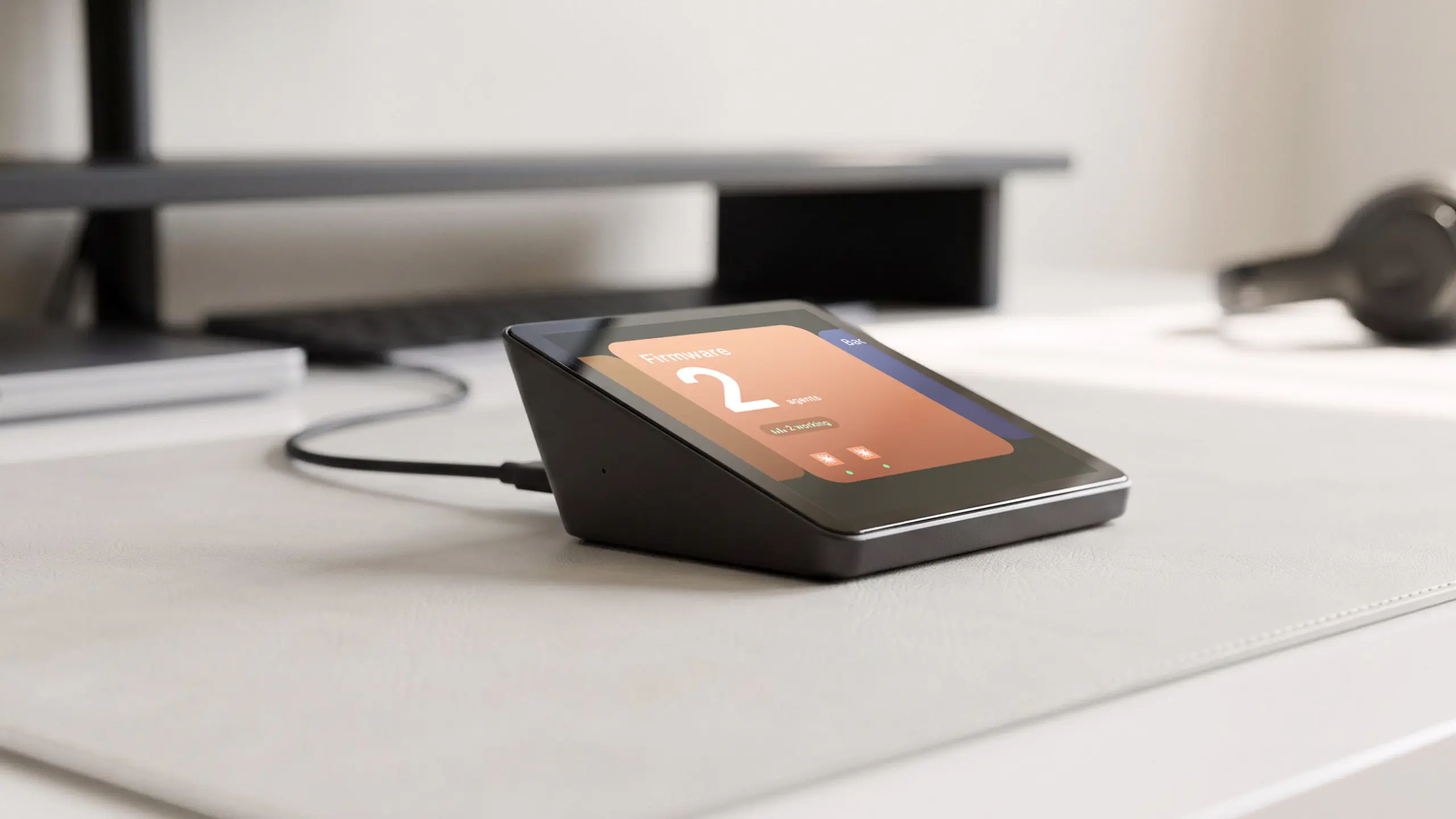
Agents that run on more than one computer usually mean a multi-agent dashboard or a lot of window switching. Harness Pro, our own product, is a 3.95-inch touch screen that plugs into a Mac by USB-C and shows agents from every computer you use, such as Claude Code, Codex and Cursor, side by side, and pings you when one is done. Its product page does not list Devin Desktop, and it ships December 15.
Agents that run for hours also mean more reading than typing. A second screen helps, and our guide to the best monitor for coding covers size and resolution. Our coding room setup and peripherals for computer programmers guides cover the rest of the room. For long sessions, look at which desk setup is best for a developer, a standing desk for developers and the best chairs for programmers.
FAQs
Is Windsurf still available?
Yes, Windsurf is still available under its new name, Devin Desktop. Cognition renamed it on June 2, 2026, through an over-the-air update, and windsurf.com now redirects to devin.ai/desktop. Plans, prices, extensions and settings carried over, and the Windsurf plugin for JetBrains can still be downloaded.
Is Windsurf free?
Yes, Windsurf (Devin Desktop) has a free plan with a light agent quota, limited models, and unlimited Tab completions and inline edits. When the free quota runs out, you wait for the daily or weekly reset, because only paid plans can buy extra usage. Pro costs $20 a month.
Does Windsurf have a free trial of Pro?
No, Cognition does not currently offer free trials of paid Devin Desktop plans, and support cannot add one to your account. You can subscribe and request a refund before you use the subscription if you change your mind. The Free plan is the way to try the editor first.
What is Windsurf Cascade?
Cascade is the AI agent that made Windsurf known, and in Devin Desktop it is now labeled the legacy agent. It edits across files, runs terminal commands, follows rules and workflows, and fixes its own lint errors. New conversations start with Devin Local, but old Cascade chats stay in your history.
Is Windsurf safe to use with private code?
On a paid plan with training turned off, Windsurf keeps your code out of model training and turns on zero data retention with its model providers; on Free, Cognition may train on it. Enterprise data is never trained on without written consent. Outside ACP agents follow their own vendor's terms.
Is Windsurf based on VS Code?
Yes, Windsurf (Devin Desktop) is built on a VS Code base. Cognition's docs call its settings folder VS Code-derived, it installs extensions from the Open VSX registry, and onboarding imports your VS Code or Cursor settings and keybindings. If you come from VS Code, most of your setup and shortcuts carry over on day one.
Does Windsurf work in JetBrains IDEs?
Partly. The Windsurf plugin for IntelliJ IDEA, PyCharm, WebStorm and other JetBrains IDEs is still available, but Cognition has put it in maintenance mode, and newer JetBrains releases can break it. Cognition recommends running Devin inside JetBrains AI Chat through the Agent Client Protocol instead.
Is Windsurf better than Cursor?
Windsurf is the better pick if you want Claude, GPT and Gemini included in a $20 plan and want to run outside agents through ACP. Cursor suits you if Cursor and Grok models are enough or you prefer weekly usage resets. Neither is better for everyone, so try both free tiers on one real task.
Is Windsurf good for small businesses?
Windsurf works for small businesses that want shared billing and an admin dashboard: Teams costs $80 a month plus $40 per full developer seat, for up to 200 users. New Teams plans no longer include SSO, so a company that requires single sign-on needs the Enterprise plan.
Does Windsurf work with GitHub?
Yes, Devin Desktop connects to GitHub, GitLab and Bitbucket, and Devin Cloud opens pull requests on your repos. When you install the GitHub integration, you choose which repositories Devin can reach. Cognition adds up to $50 in extra usage credits the first time you connect GitHub.
Who owns Windsurf now?
Cognition, the company behind the Devin coding agent, owns Windsurf. It agreed to buy Windsurf in July 2025, after OpenAI's $3 billion offer for the startup expired and Google hired Windsurf's CEO and co-founder in a separate $2.4 billion deal. Cognition renamed the editor Devin Desktop in June 2026.
Final Windsurf review verdict: is it worth it?
Yes, Windsurf is worth it for developers who run several coding agents and stay under the daily cap, and that is where this Windsurf review lands. This review is built from Cognition's docs and pricing, other vendors' sites and public user reports, not from a paid test of our own.
- Pay for Pro if you want local agents, Devin Cloud and Claude, GPT and Gemini models in one editor for $20 a month.
- Keep a legacy $15 Pro or $30 Teams plan if you have one. Cognition grandfathers those prices indefinitely for existing subscribers, while new Pro plans list at $20, so test the quota before you cancel.
- Switch if you live in JetBrains, need a fixed bill, or mostly use Claude models in the terminal, where Claude Pro covers Claude Code at the same $20.
- Stay on Free if you only want Tab completions and inline edits, which are unlimited there.