Best AI Tools for Coding in 2026 and Autonomous AI Coders

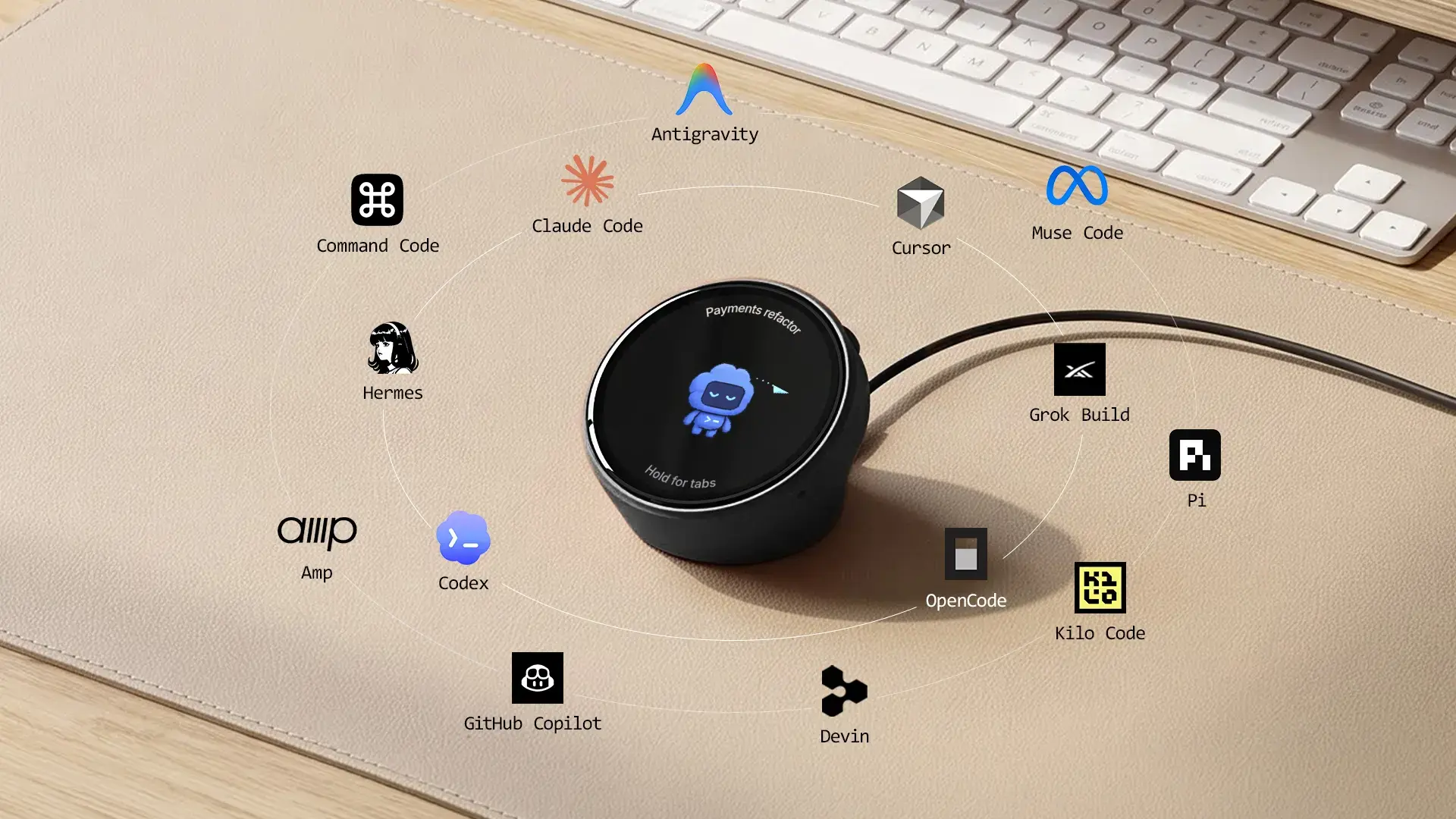
The best AI tools for coding in 2026 are Claude Code and OpenAI Codex if you want an autonomous AI coder, Cursor if you want an AI-first editor, and GitHub Copilot if you want low-cost help inside the editor you already use. An autonomous coder is an agent you hand a whole task: it plans the change, edits files across the repo, runs your tests and asks before risky steps.
Below, 11 tools are sorted by how much they do on their own, with each vendor's current price, its training setting and one real limit.
Best AI tools for coding at a glance
Pick Claude Code or Codex to hand off whole tasks, Cursor or Devin Desktop for an agent inside an editor, GitHub Copilot for cheap help in almost any editor, and OpenCode, Cline or Aider to bring your own model.
| Tool | Type | Price | Best for |
|---|---|---|---|
| Claude Code | Terminal agent | From $20/mo | Long multi-file tasks |
| OpenAI Codex | Terminal + cloud agent | Free tier; $20/mo | ChatGPT subscribers |
| OpenCode | Open-source agent | Free + your model | Any model, no new plan |
| Cline | Open-source agent | Free + your model | Approving each step |
| Aider | Open-source terminal agent | Free + your model | Git-tracked edits |
| Cursor | Agentic IDE | Free; $8 Grok-only; $30/mo | One editor for everything |
| Devin Desktop | Agentic IDE + cloud agents | Free tier; $20/mo | Managing many agents |
| Google Antigravity | Agentic IDE + CLI | Free tier | Gemini users |
| Kiro | Spec-driven IDE + CLI | Free tier; $20/mo | Planning before code |
| GitHub Copilot | Editor assistant + cloud agent | Free tier; $10/mo | Teams on GitHub |
| Zed | Editor that hosts agents | Free; $10/mo | A fast editor for agents |
Prices are each vendor's monthly list price for one person and change often. "Your model" means the tool is free and you pay the model provider, or run a local model.
What is an autonomous AI coder?
An autonomous AI coder is a coding agent that takes a task, plans it, edits several files, runs commands and tests, and keeps going until the job is done or it needs your approval. Autocomplete is the opposite end: it suggests the next lines while you type, and you apply every change.
Most tools now sit in one of five groups, sorted here from least to most hands-off:
- Editor assistants: inline suggestions and chat inside your editor. GitHub Copilot's completions and Zed's edit predictions work this way.
- Agentic IDEs (AI agent editors): an editor built around an agent that edits across files and shows you diffs. Cursor, Devin Desktop, Google Antigravity and Kiro.
- Terminal agents: run in your shell with access to the repo, run tests and fix what fails. Claude Code, the Codex CLI, OpenCode, Cline's CLI and Aider.
- Cloud (background) agents: run on the vendor's servers from an issue or a prompt and hand back changes to review, often as a pull request. Copilot, Codex, Cursor, Devin and Claude Code all offer one.
- Browser app builders: Replit and v0 build a whole app from a prompt, mostly for people who do not code. Those belong with app-building software rather than this list.
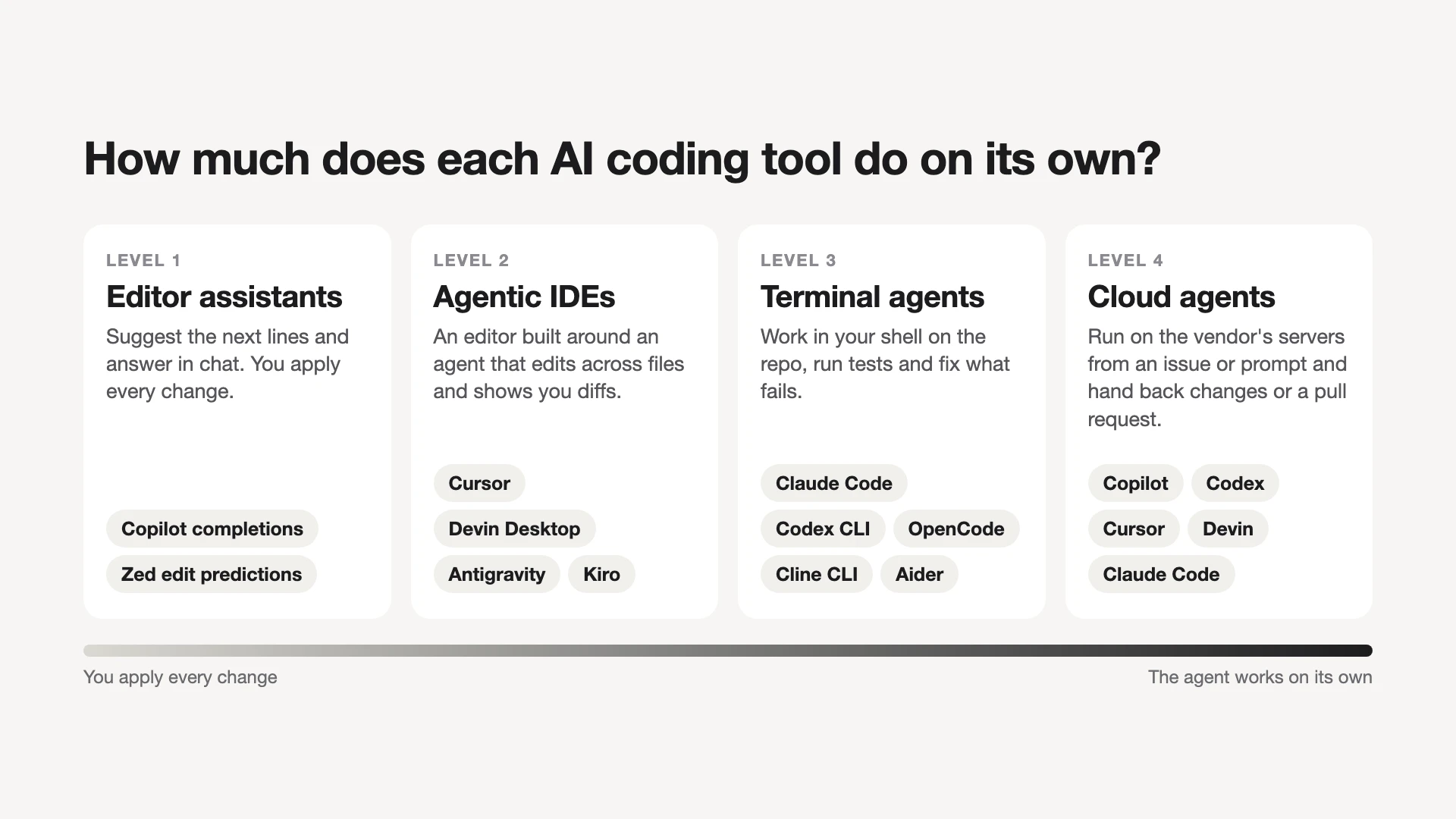
The lines blur, because most vendors now ship several surfaces. Claude Code, for example, runs in the terminal, in VS Code and JetBrains, in a desktop app and on the web. Pick by the surface you will use most.
A quick check of how autonomous a tool really is: give it one failing test. An autonomous coder runs the suite, reads the failure and fixes it without you pasting the output back.
The 11 best AI tools for coding, by how much they do on their own
The list runs from the most hands-off agents to editors where you stay at the keyboard; within each group, tools from model vendors come before open-source ones. Prices and settings come from each vendor's own pricing page or docs, not from our own benchmark tests.
1. Claude Code: for long multi-file tasks
Claude Code is Anthropic's coding agent: it reads your codebase, edits files, runs commands and works with your git and dev tools. It comes with every paid Claude plan. Pro costs $20 a month ($17 a month billed yearly), Max starts at $100, and you can also pay per use through the API. The Free plan does not include it.
It suits someone who wants to hand over a refactor or a test suite and check back later. Plan mode lets it read and propose before it touches anything.
One limit: heavy daily use pushes you from Pro toward Max. On Free, Pro and Max accounts, Anthropic trains on your sessions when the model-improvement setting is on.
2. OpenAI Codex: for ChatGPT subscribers
OpenAI Codex is OpenAI's coding agent, included in ChatGPT plans. It runs in a CLI, an IDE extension, the ChatGPT desktop app, on the web and on iOS, and cloud tasks can review pull requests or take requests from Slack. According to OpenAI's Codex pricing, Free and Go ($8) cover light tasks in the desktop app as access rolls out. Plus at $20 a month adds the web, CLI and IDE extension, and Pro comes at $100, $200 or $500.
Its sandbox is the main difference. Local commands, including git and test runners, run inside an OS-level boundary, so the agent can edit and test in your workspace but must ask before going further.
One limit: Plus usage is metered in five-hour windows, and OpenAI notes that similar-looking tasks can use very different amounts of it. Our Codex vs Claude Code comparison covers the choice between these first two.
3. OpenCode: for an open-source agent with any model
OpenCode is an MIT-licensed, open-source coding agent with a terminal interface, a desktop app and an IDE extension. It is free, ships with a few free models, and connects to more than 75 model providers, including local models. You can also sign in with a ChatGPT Plus or Pro account or a GitHub Copilot account, and run several agents in parallel on one project.
This suits someone who already pays for a model and wants an open-source alternative to Claude Code without another subscription.
One limit: OpenCode says it does not store your code, except when you use its free models. Switch to your own provider for private work, and expect quality to follow the model you connect.
4. Cline: for approving each step
Cline is an Apache-2.0, open-source agent that runs as an extension in VS Code, JetBrains, Cursor and Windsurf, as a CLI, and as a desktop app. Plan mode agrees on an approach first, Act mode carries it out, and you approve each step or turn on auto-approve. It works with Claude, GPT, Gemini, local models through Ollama or LM Studio, or any OpenAI-compatible endpoint.
The tool is free. You pay your model provider, use Cline's pay-as-you-go credits, or take ClinePass at $9.99 a month for higher limits on open coding models. Cline's free models are rotating, limited-time promotions.
One limit: with your own API key, cost follows how much the agent reads and writes. Set a spending cap at the provider before a long task.
5. Aider: for git-tracked edits in the terminal
Aider is an Apache-2.0, open-source pair programmer that runs in your terminal and commits each change to git with a message, so you can diff or undo it with normal git tools. It builds a map of your codebase, can lint and test after each edit, and connects to almost any model, including local ones.
It suits a developer who wants every AI change as a reviewable commit, at no tool cost.
One limit: development has slowed. The Aider repo shows its last tagged release in August 2025, and its homepage still recommends older models. Check recent commits before you build a workflow on it.
6. Cursor: for one editor with agents built in
Cursor is an AI-first code editor with an agent, Tab completion, cloud agents and AI code review (Bugbot). Its plans are now sold through X Subscription Corp and bundle Grok and X features. The Cursor pricing page lists Free (limited agent and chat requests), Plus at $8 (Grok models only), Premium at $30, Super at $100 and Ultra at $200, with Teams from $30 per user.
The catch for most developers: plan usage covers Grok models, while Claude, GPT and other third-party models are billed separately at API list price. If you mainly want Claude in an editor, compare that cost with Claude Code's own editor extensions.
It suits someone who wants autocomplete, a local agent and cloud agents in one window. Privacy Mode, covered below, keeps code out of training.
7. Devin Desktop (formerly Windsurf): for managing many agents
Windsurf is now Devin Desktop from Cognition, and windsurf.com redirects to it. It works as a command center: you run agents locally or in the cloud, review their pull requests, and plug in other agents through the Agent Client Protocol (ACP).
Devin's pricing starts with Free (a light agent quota, unlimited Tab completions and inline edits). Pro costs $20 a month and adds frontier models from OpenAI, Anthropic, Google and xAI plus Devin Cloud agents, while Max costs $200. Teams pay $80 a month plus $40 per developer seat.
One limit: quotas refresh daily and weekly, and extra usage is billed at API pricing. Our Windsurf review describes the editor under its old name.
8. Google Antigravity: for a free start with Gemini
Google Antigravity is Google's agent-first coding platform, with a desktop app, an IDE, a CLI, editor extensions and an SDK. The free individual plan includes several agent models, unlimited Tab completions and command requests, with basic weekly rate limits. Google AI Pro and Ultra subscriptions raise those limits.
On June 18, 2026, Antigravity CLI replaced Gemini CLI for unpaid and Google One users, so older advice about Gemini CLI's free allowance no longer applies to them.
One limit: the Antigravity pricing page does not put numbers on the weekly limits, so you find the ceiling by reaching it.
9. Kiro: for writing a spec before code
Kiro is an agentic coding tool from AWS with an IDE, a CLI, a web interface and a mobile app. It turns prompts into executable specs before it writes code, and it can run parallel agents. You do not need an AWS account to use it.
Kiro's pricing runs on credits: Free gives 50, Pro is $20 a month for 1,000, and Pro+, Pro Max and Power cost $40, $100 and $200. Extra credits cost $0.04 each.
One limit: content from the Free tier, and from paid users who sign in with a social login or AWS Builder ID, may be used for service improvement unless you opt out.
10. GitHub Copilot: for low-cost help in any editor
GitHub Copilot works in more editors than any other tool here: VS Code, Visual Studio, JetBrains IDEs, Xcode, Vim, Neovim, Zed and Eclipse. Free gives 2,000 inline suggestions a month plus limited chat and agent mode on entry-level models. Copilot's plans then run $10 a month for Pro, $39 for Pro+ and $100 for Max.
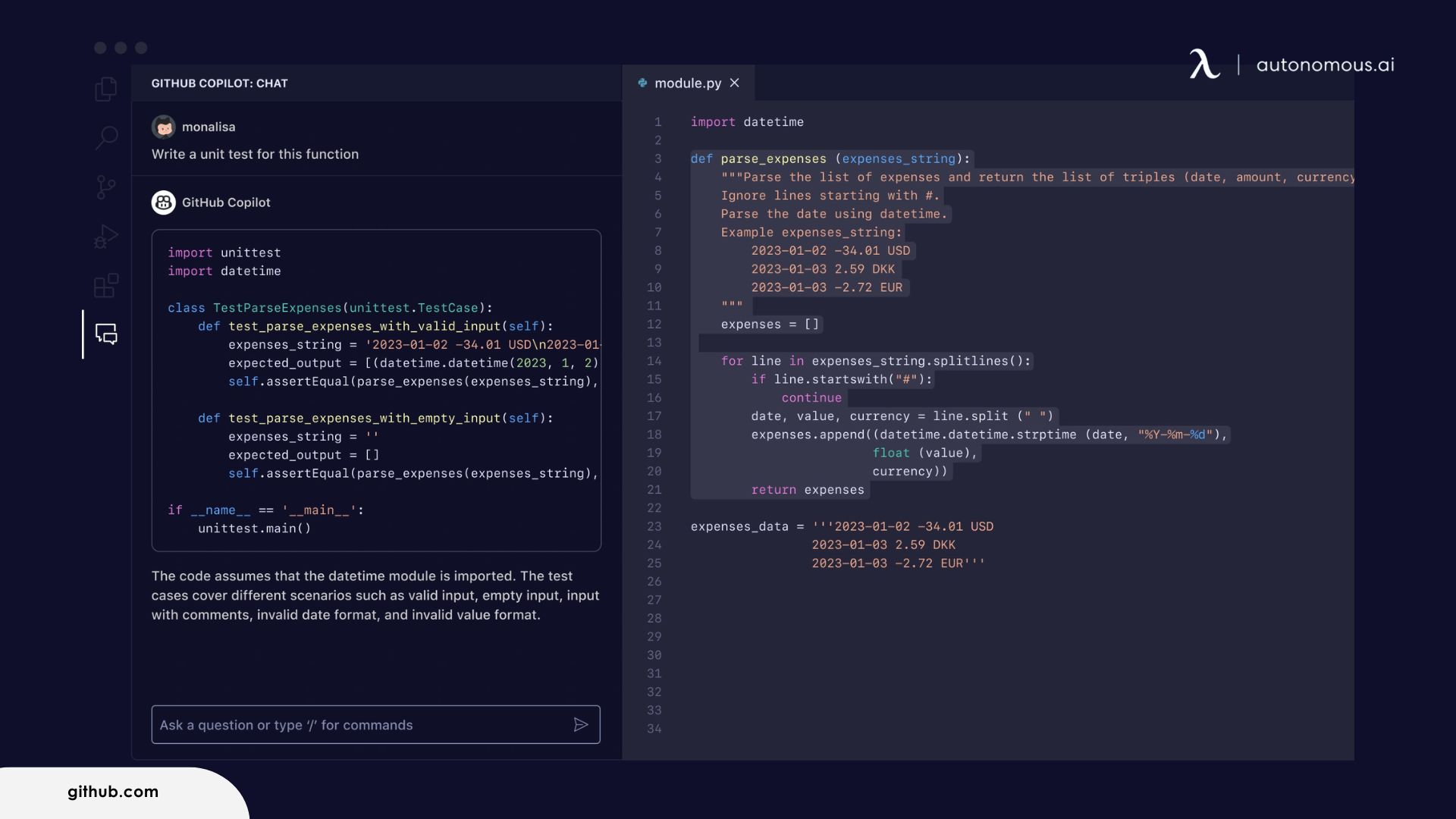
Paid plans add the cloud agent: assign Copilot an issue and it comes back with a pull request. It suits a team already on GitHub, or anyone who wants a capable editor assistant for $10.
One limit: since April 24, 2026, GitHub may use your interactions on Free, Pro, Pro+ and Max to train models unless you switch that setting off. Business and Enterprise data is not used.
11. Zed: for a fast editor that hosts Claude Code and Codex
Zed is an open-source code editor from the creators of Atom and Tree-sitter. Zed says it is written from scratch in Rust to use multiple CPU cores and your GPU, which is where its speed comes from. On Zed's pricing page, Personal is free with your own API keys or external agents. Pro is $10 a month with unlimited edit predictions and $5 of hosted model tokens, and Business is $30 per seat.
Through ACP, Zed hosts Claude, Codex, OpenCode, Copilot and Cursor agents in its agent panel, so you can work with Claude or Codex agents in a lighter editor than VS Code.
One limit: Business has no SSO, SAML or SCIM yet; Zed lists them as planned.
Also worth knowing: JetBrains Junie is an agent with a CLI, a free Junie Lite model and bring-your-own-key pricing at provider rates. Augment Code, which older lists include for large codebases, now sells Cosmos, a team platform at a flat $20 or $100 a month for up to 50 seats.
Best free AI coding tools and agents
You can code with AI for free in two ways: an open-source agent such as OpenCode, Cline or Aider, where the tool costs nothing and you pay only for the model, or the free tier of a paid tool.
- GitHub Copilot Free: 2,000 inline suggestions a month, limited chat and agent mode, entry-level models.
- Google Antigravity: a free individual plan with basic weekly limits.
- Cursor and Devin Desktop: free tiers with limited agent use and Tab completions.
- Kiro Free: 50 credits.
- Codex on ChatGPT Free: light tasks in the desktop app, as access rolls out.
- Zed Personal: a free editor that runs external agents or your own keys.
Claude Code has no free plan. For a setup that is free and keeps code on your machine, pair Cline, Aider, OpenCode or Zed with a local model. The hardware side is covered in our guide to running AI locally.
Before you rely on a free tier, run one real task on it. A quota that runs out halfway through a refactor costs more time than a $10 plan.
Which AI coding tools don't train on your code?
Copilot Business and Enterprise, Claude Code under Team, Enterprise or API terms, Cursor with Privacy Mode on, and Augment's plans all state that your code is not used for training. Individual Copilot, Claude and Kiro plans can be, unless you change a setting.
- GitHub Copilot: on Free, Pro, Pro+ and Max, open Copilot settings and set "Allow GitHub to use my data for AI model training" to Disabled. Business and Enterprise accounts do not see the setting because their data is excluded.
- Claude Code: on Free, Pro and Max, training follows your model-improvement setting. Team, Enterprise and API use are not trained on unless an admin joins Anthropic's Development Partner Program.
- Cursor: Privacy Mode, turned on in settings or by a team admin, guarantees code is not used for training by Cursor or its model providers.
- OpenAI Codex: the pricing page promises no training by default on Business. On personal ChatGPT plans, check ChatGPT's data controls.
- Kiro: Free and social or Builder ID sign-ins may be used for service improvement, with an opt-out; paid users through IAM Identity Center are excluded.
- Open-source agents: with a local model, code never leaves your machine. With a hosted model, the provider's terms apply.
Check the setting again after any plan change. GitHub's April change shows a default can flip while your plan stays the same.
How to control what an AI coding agent is allowed to do
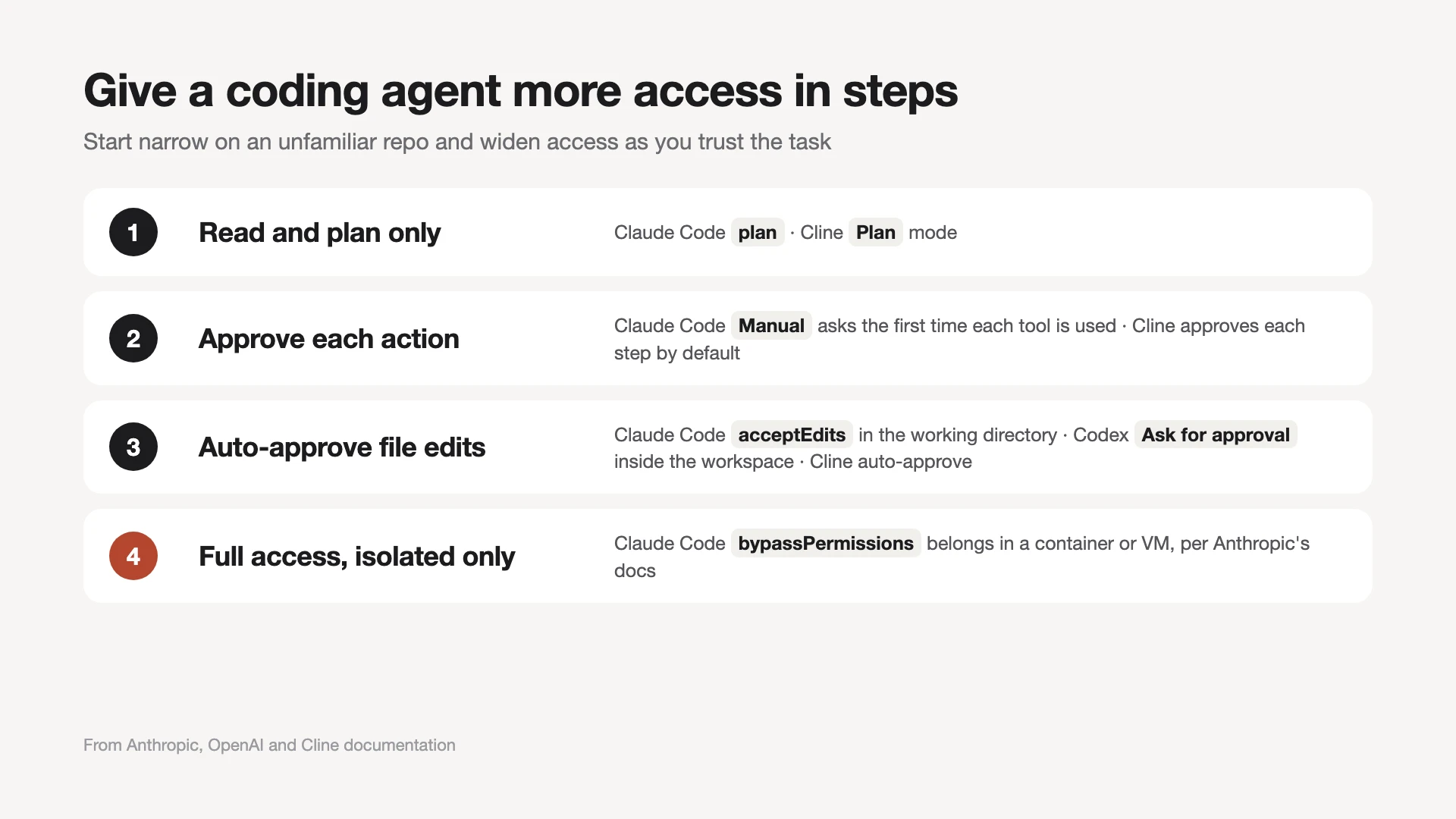
Every major agent has built-in limits at no extra cost. Start in a read-only or plan mode on an unfamiliar repo, allow file edits once you trust the task, and keep full access for a container or VM.
- Claude Code: Manual asks the first time each tool is used; acceptEdits approves file edits in the working directory; plan reads and proposes only; auto lets a classifier review actions. Anthropic's permissions docs say bypassPermissions belongs only in isolated environments.
- OpenAI Codex: a sandbox sets which files and network the agent can reach, and approvals set when it stops. "Ask for approval" works inside the workspace and pauses before going beyond it.
- Cline: Plan mode first, then Act, with each step approved unless you turn on auto-approve.
- JetBrains Junie: human-in-the-loop review with a dynamic allowlist of actions.
- Cloud agents: Copilot's cloud agent hands its work back as a pull request, so nothing merges without your review.
Before an unattended run, write down what the agent may touch: one repo, no production credentials, and network access only if the task needs it.
How to choose AI tools for coding (and why most developers use two)
Match the tool to the size of the task: an editor assistant for small edits, a terminal or cloud agent for the jobs that would take you an afternoon.
- About $20 a month: Claude Pro (Claude Code) or ChatGPT Plus (Codex) gets you an autonomous agent. Adding Copilot Pro for editor help makes $30.
- Claude models in an editor: use Claude Code's VS Code or JetBrains extension, or Zed with the Claude agent. In Cursor, Claude is billed at API rates on top of the plan.
- Code that must stay private: an open-source agent with a local model, or a business plan that excludes training.
- A team on GitHub: Copilot Business keeps data out of training and fits existing pull request reviews.
- You want a plan before code: Kiro's specs, or plan mode in Claude Code and Cline.
Most setups pair one editor tool with one agent: Copilot or Zed for typing, Claude Code or Codex for the big jobs. The skills carry over, because the agents share one loop: read, edit, run, check.
Treat agent output as a draft. Read the diff, run the tests yourself and keep each agent on its own branch.
Running several coding agents at once
Running two or more agents in parallel works when each one has its own task and its own copy of the code, usually a git worktree.
Running multiple Claude Code agents takes worktrees, clear task names and a merge order. Workspace apps give each agent its own panel, and our list of Conductor alternatives compares them. Mixing vendors, such as Claude Code writing and Codex reviewing, is a question of AI agent orchestration.
Where Autonomous Harness fits
Harness is our own product, and it is not a coding tool: it does not write code and is not ranked above. It is a command center for the agents on this list when they run on more than one machine.
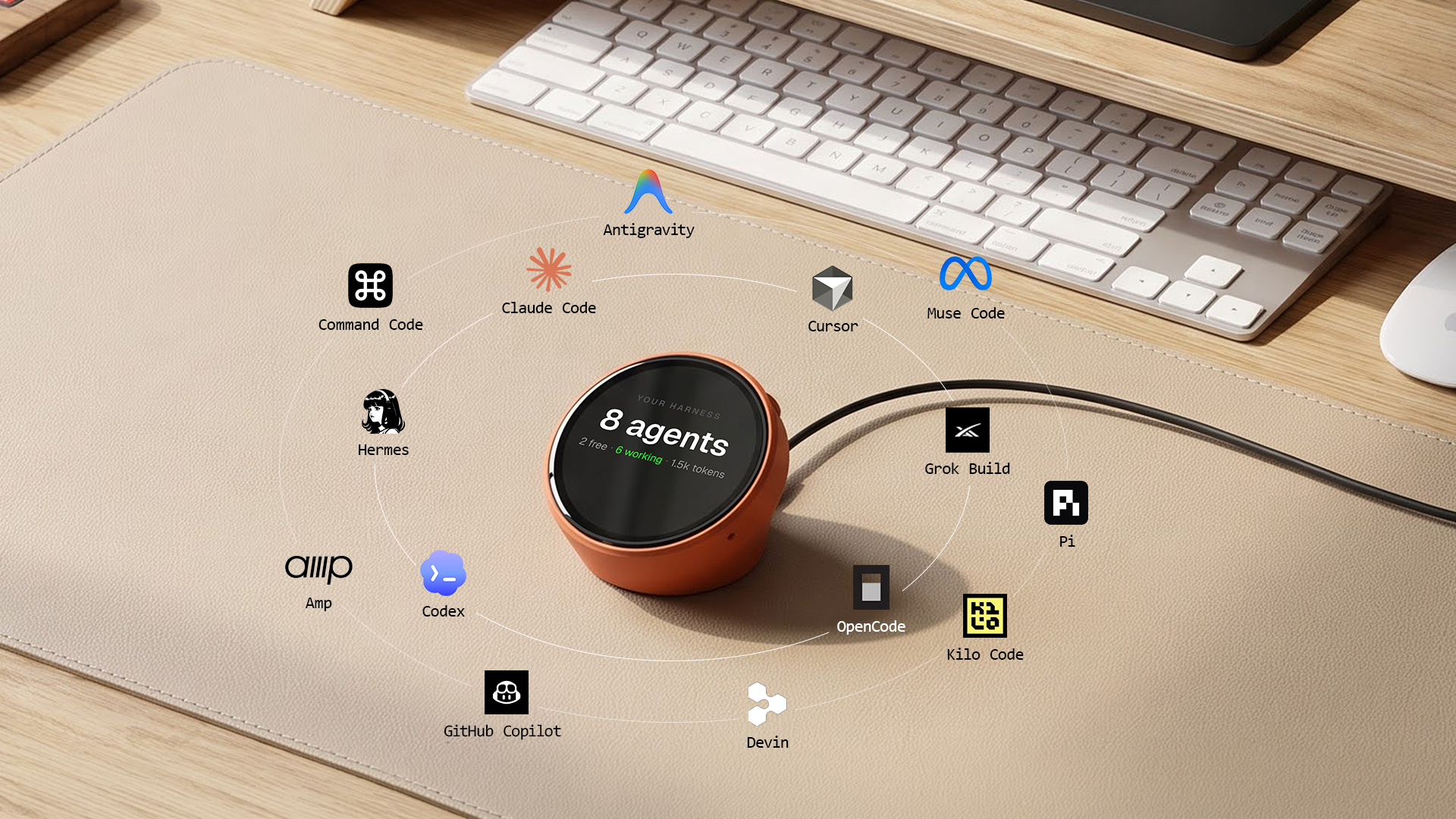
The free Harness App shows every agent on every machine in one place. Harness Pro is a 3.95-inch, 720 x 720 touch screen that plugs into a Mac by USB-C. It shows Claude Code, Codex, Cursor and more side by side, and pings you when an agent is done. It works with Harness for Mac and Linux and ships December 15.
Harness Device is the voice input: you say the next task out loud and it goes to your agents.
This suits someone with agents at work, at home or on a server who is tired of checking terminals. It only makes sense once you run more than one agent; with one agent in one terminal, the terminal is enough. Voice input uses cloud speech-to-text, so spoken tasks leave your machine.
Where to run coding agents unattended
Agentic tools such as Claude Code and OpenClaw can run on a separate, always-on machine. That keeps them working while your laptop is closed and keeps an agent's shell access off your main computer.
The Autonomous Intern 2 is our own plug-and-play agent server for that job. Its Developer edition has an open shell, so you can install packages, swap the agent framework and run system commands. Claude Code is ready out of the box, and Codex or OpenCode is one install away. It runs scheduled tasks around the clock, and you chat with it through Telegram, Slack or Discord.
Two honest limits. It is an 8-core board with 6 GB of RAM, built to run an agent that calls a cloud model, not to serve large local models. And it does not replace an editor tool: Copilot or Cursor still writes code where you type.

FAQs
What is the best AI for coding?
Claude Code and OpenAI Codex are the best AI for coding if you want an agent to do whole tasks. Cursor is the pick for an AI-first editor, and GitHub Copilot for low-cost help in the editor you already use. Many developers pair one agent with one editor tool.
What is the best autonomous coding tool?
Claude Code and OpenAI Codex are the most common choices for autonomous coding, because both plan, edit across files, run tests and work under clear permission limits. OpenCode and Cline are the open-source options. For tasks you want to leave entirely, use a cloud agent that returns a pull request.
Is Claude Code better than Cursor?
Claude Code is better for long, hands-off tasks, and Cursor is better if you want one editor with autocomplete and agents together. Cost differs too: Claude Code comes with Claude Pro, while Cursor bills Claude models at API list price on top of its plan.
How do Codex, Claude Code and OpenCode differ?
Codex runs on ChatGPT plans and OpenAI models with a strict sandbox. Claude Code runs on Claude plans with several permission modes. OpenCode is free and open source, works with 75+ model providers, and can even sign in with your ChatGPT or Copilot account. All three run in the terminal.
Are there free AI coding agents?
Yes. OpenCode, Cline and Aider are free, open-source agents where you pay only for the model, or nothing with a local model. GitHub Copilot, Cursor, Devin Desktop, Google Antigravity and Kiro have free tiers with limits. Claude Code has no free plan.
What is the best AI coding assistant for VS Code?
GitHub Copilot is the simplest AI coding assistant to add to VS Code: it has a free tier, and agent mode is built in. Claude Code, Codex and Cline also ship VS Code extensions, so you can keep VS Code and add an autonomous agent next to Copilot.
Which AI coding assistants don't train on your code?
Copilot Business and Enterprise, Claude Code under Team, Enterprise or API terms, Cursor with Privacy Mode, and Augment's plans say they do not train on your code. Individual Copilot plans can be trained on since April 24, 2026, unless you switch the setting off.
Can I run AI coding tools locally?
Yes. Cline, Aider, OpenCode and Zed all connect to local models, for example through Ollama or LM Studio, so your code stays on your machine. Local models need real hardware, so many setups still send the hardest reasoning to a cloud model.
What is the best code editor for Claude Code?
VS Code and JetBrains IDEs have official Claude Code extensions, so they are the simplest choice. Zed hosts Claude as an external agent through the Agent Client Protocol if you want a different editor. Cursor can run Claude models, but bills them at API rates on top of its plan.
Which AI models are best for coding?
The models behind most coding agents come from Anthropic (Claude), OpenAI (GPT), Google (Gemini) and xAI (Grok), plus open-weight models such as Qwen and DeepSeek. Rankings change every few months, so pick a tool that lets you switch models rather than one locked to a single vendor.
Should I trust AI-generated code?
Treat AI-generated code as a fast first draft, not a finished answer. Read the diff, run the tests yourself and keep agent work on a separate branch. Permission modes and sandboxes limit what an agent can break, but they do not check whether the code is correct.
Bottom line
The best AI tools for coding come down to how much you want to hand off. Use Claude Code or Codex as your autonomous coder, Copilot, Cursor or Zed where you type, and an open-source agent when cost or privacy matters. Whichever you pick, check its training setting before you connect a private repo.
References
- Anthropic, Claude Code documentation (data usage)
- OpenAI, Codex documentation (sandbox)
- Cursor, Pricing
- GitHub Docs, Managing Copilot policies as an individual subscriber
- Cognition, Devin plans and pricing
- Google, Antigravity pricing
- Google, Gemini CLI
- Kiro, FAQ
- Cline, Overview
- Zed, External agents
- Augment Code, Pricing