11 Conductor Alternatives Compared by Platform and Price

The main Conductor (conductor.build) alternatives are Pane, Emdash, Orca, Paseo and T3 Code for Windows and Linux, Superset (now Paradev) for a terminal-first Mac app, and Claude Code's own worktrees and agent view if you only run Claude. The catch: every workspace tool here can put each task in its own Git worktree, and none of them stops two branches from conflicting at merge. Each fact below comes from the maker's own site, docs or repository.
Why people look for a Conductor alternative
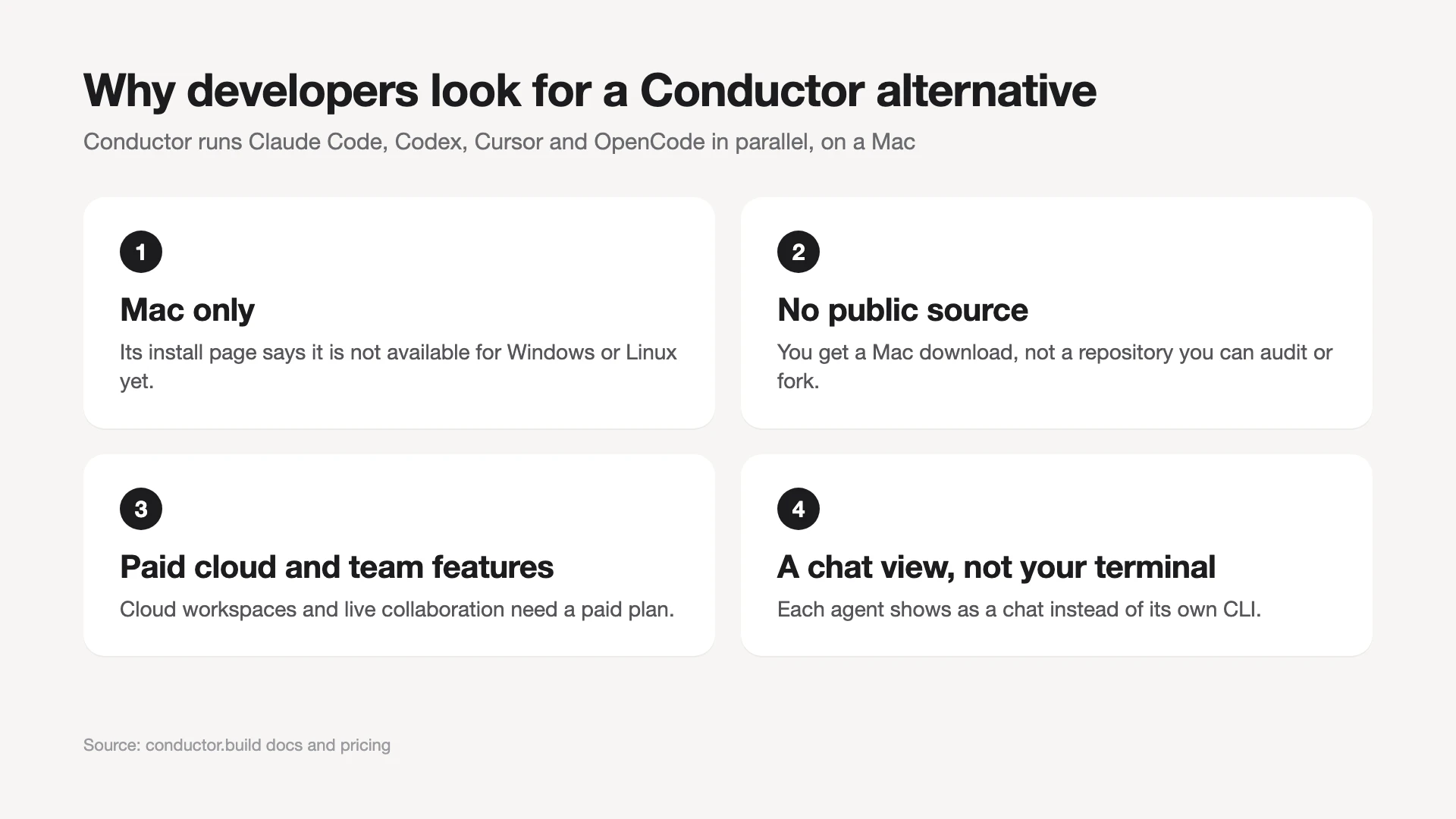
The first reason to look for a Conductor alternative is that Conductor runs only on macOS, and "Is Conductor only for Mac?" is the top People Also Ask question. The other common reasons are that its code is not public, its cloud and team features cost money, and it shows each agent as a chat rather than the agent's own terminal.
Conductor is a Mac app from Melty Labs that runs Claude Code, Codex, Cursor and OpenCode in parallel. Each task gets its own workspace: a Git worktree with its own branch, files, terminal, diff and review path. Claude Code, Codex and OpenCode come bundled with the app, and Cursor runs through the Cursor API with your key.
Conductor's pricing page lists a Free plan at $0 for local workspaces on your Mac. Pro costs $50 a month and adds Conductor Cloud, live collaboration with up to five Pro users, the Conductor API and the mobile app. Teams costs $60 per user per month and adds an admin portal and central billing. Model usage is billed by your Claude, OpenAI or Cursor account, not by Conductor.
The reasons people give for switching map to specific facts in Conductor's docs:
- Mac only. The install page says Conductor is not available for Windows or Linux yet and offers a waitlist.
- No public source. The site offers a Mac download, not a repository you can audit or fork.
- Paid cloud. Cloud workspaces need Pro, Teams or Enterprise. Conductor stores chat messages from cloud workspaces on its servers, while local sessions send messages straight to your model provider.
- Chat view. Each agent session is a chat tab, and Conductor injects its own system prompts that tell the agent it runs inside Conductor. Some developers want the agent's own CLI in a plain terminal instead.
- GitHub setup. Conductor checks for GitHub authentication in your terminal, and its docs say you need GitHub plus at least one agent provider to use it.
Which Conductor alternative fits your reason?
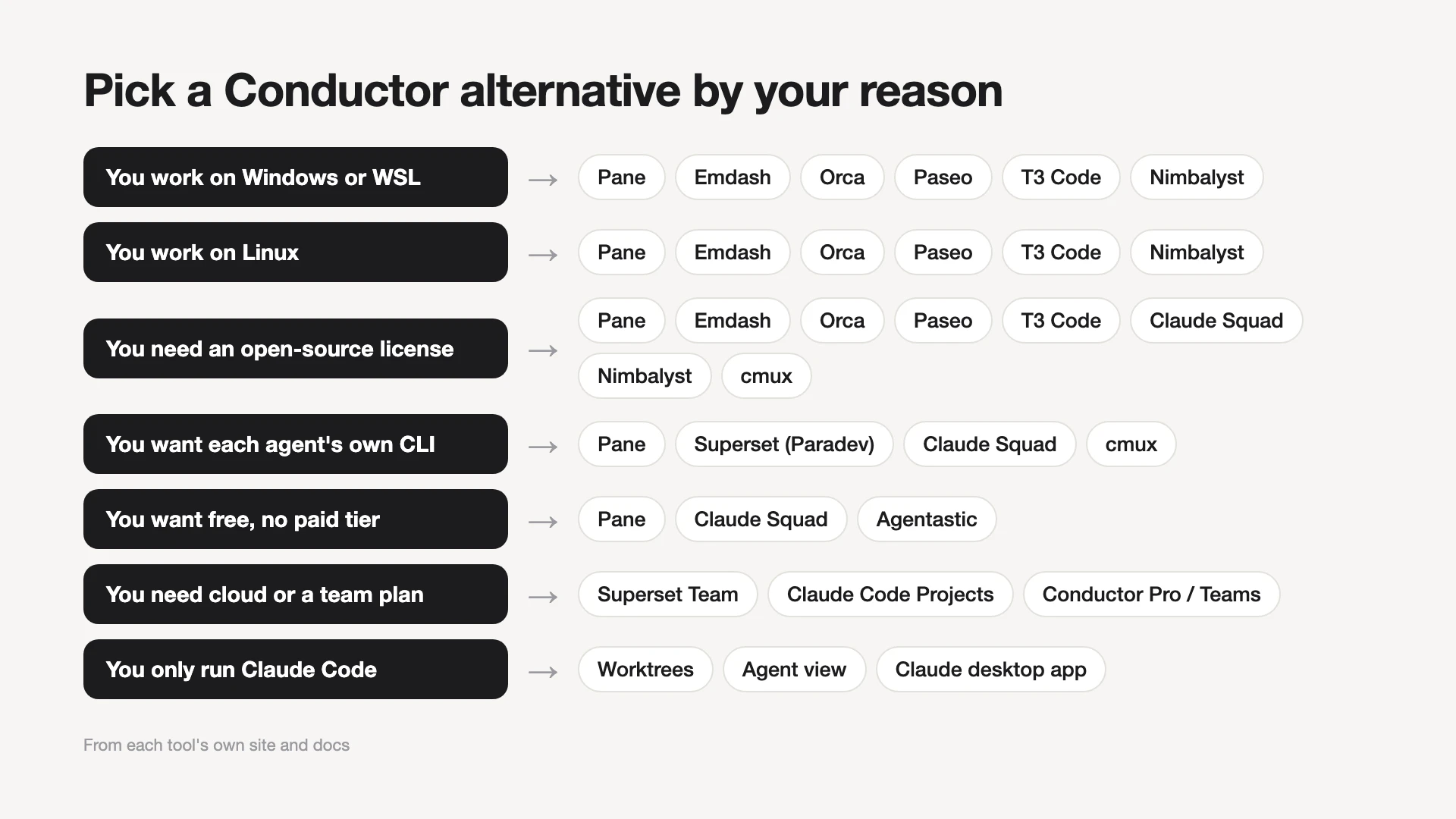
Pick the alternative by the problem you have with Conductor, not by a ranking. Each reason below lists the tools whose own sites confirm they solve it.
- You work on Windows or WSL: Pane, Emdash, Orca, Paseo, T3 Code or Nimbalyst. Pane also documents running agents inside a WSL distro.
- You work on Linux: the same six. Superset (Paradev) has only an experimental Linux AppImage.
- You want an open-source license: Pane, Emdash, Orca, Paseo, T3 Code, Claude Squad, Nimbalyst or cmux. Superset's ELv2 license is source-available, not OSI open source.
- You want each agent's own CLI in a terminal: Pane, Superset, Claude Squad or cmux. cmux is a terminal only and does not manage worktrees.
- You want free with no paid tier: Pane, Claude Squad or Agentastic. Agentastic is not open source, and the free Paseo app has an optional paid Hub.
- You need cloud workspaces or a team plan: Superset's Team plan, Claude Code Projects, or Conductor Pro or Teams. Projects is a public beta on Claude Pro and Max.
- You only run Claude Code: Claude Code's worktrees, agent view and desktop app. No extra app, but Claude only.
11 Conductor alternatives and who each one suits
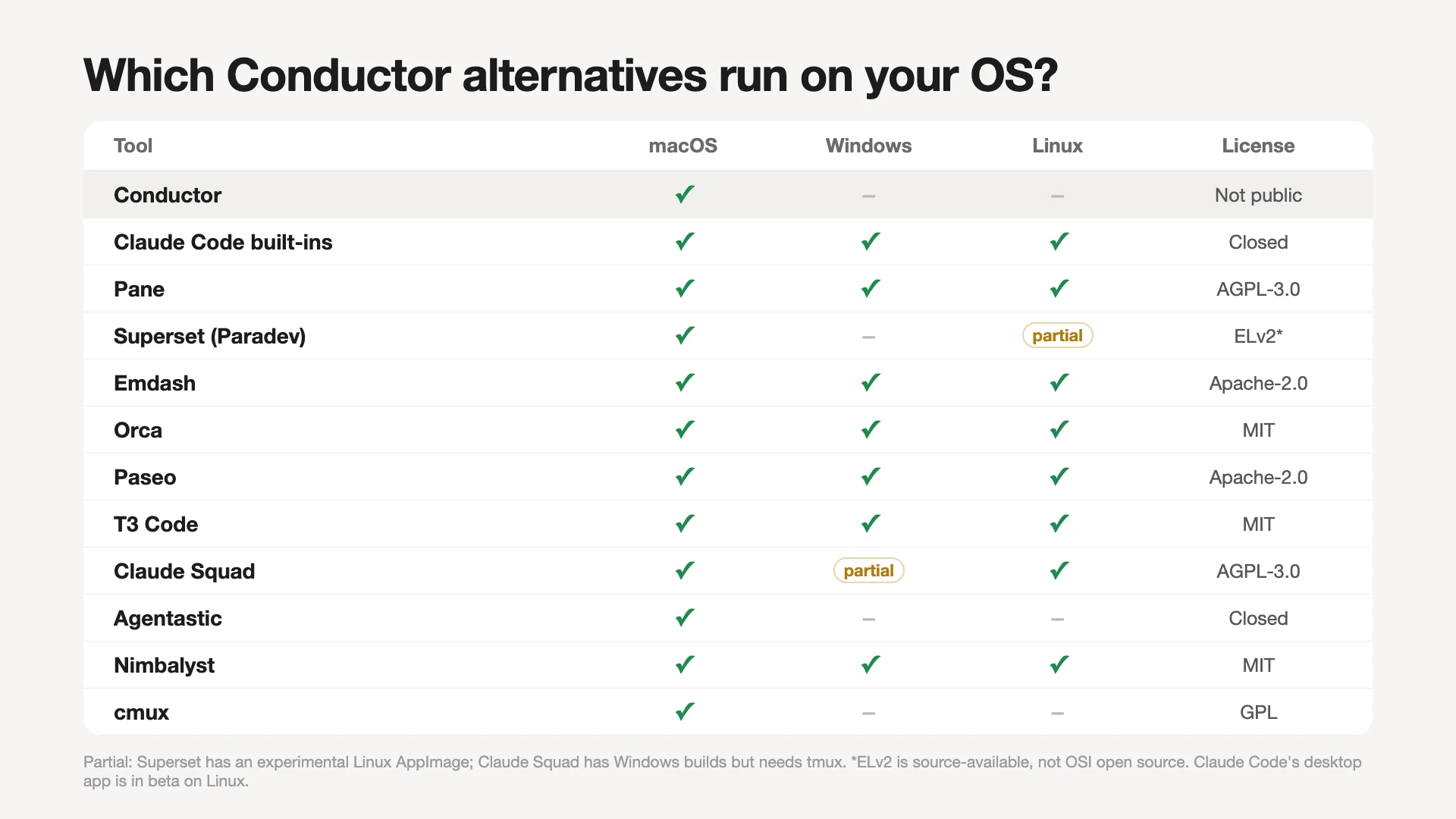
The tools below are ordered by the reason people leave Conductor: staying inside Claude Code first, then cross-platform and open-source apps, then terminal tools and Mac-only apps. Each entry covers platforms, worktree handling, review and one limit. The table below compares where each tool runs, its license and its price.
| Tool | Runs on | License | Price |
|---|---|---|---|
| Conductor (reference) | Mac | Not public | Free; Pro $50/mo |
| Claude Code built-ins | Mac, Win, Linux (desktop app beta) | Closed | Your Claude plan |
| Pane | Win, Mac, Linux, WSL | AGPL-3.0 | Free |
| Superset (Paradev) | Mac; Linux experimental | ELv2 | Free; Pro $20/user/mo |
| Emdash | Mac, Win, Linux | Apache-2.0 | Free |
| Orca | Mac, Win, Linux | MIT | No price listed |
| Paseo | Mac, Win, Linux, mobile, web | Apache-2.0 | Free; Hub Pro $15/seat/mo |
| T3 Code | Mac, Win, Linux, mobile, web | MIT | Free |
| Claude Squad | Mac, Linux; Win needs tmux | AGPL-3.0 | Free |
| Agentastic | Mac (macOS 14+) | Closed | Free |
| Nimbalyst | Mac, Win, Linux | MIT | Free for individuals |
| cmux | Mac | GPL | Free |
Claude Code's built-in tools: if you only run Claude
Claude Code can run parallel agents without a separate app. Running claude --worktree auth-fix creates a worktree under .claude/worktrees/auth-fix with a new branch named worktree-auth-fix, so each terminal gets its own checkout. Agent view, opened with claude agents, lists background sessions grouped by state, such as Needs input and Ready for review.
The Claude desktop app adds parallel sessions with Git isolation, visual diff review and PR monitoring on macOS, Windows and Linux (beta). Its Worktree toggle is off by default, so turn it on per session or set it as the default for a saved environment. The steps to run multiple Claude Code agents with worktrees, including the merge order, apply to every tool on this list.
For the cloud reason, Anthropic has Projects, a public beta on Pro and Max. From one conversation at claude.ai/code or in the desktop app, Claude starts parallel threads in the cloud, or on your computer when you ask, and shows which ones need you.
There is no separate app to buy: these features come with Claude Code under your Claude plan. Claude Code is not open source; its license file reads "All rights reserved."
Limit: Claude only, and agent view is a research preview whose sessions run on your machine and stop if it shuts down.
Pane: for Windows, WSL and an open-source license
Pane is a free desktop app under AGPL-3.0 that runs Claude Code, Codex, Cursor or any other CLI agent in its own terminal. Each agent works in a worktree that Pane creates and cleans up for you. It runs on Windows x64 and ARM64, macOS on Apple Silicon and Intel, and Linux x64 and ARM64, and it can run agents inside a WSL distro.
Each pane gets its own block of 10 ports, so parallel dev servers do not collide, and .env files copy into every new worktree. Built-in Git covers diff, commit, push, pull, rebase, squash and merge from the keyboard. Remote Pane keeps the window on your machine while agents run on a VM or another computer.
One migration detail matters: Pane runs setup scripts from pane.json or conductor.json. Conductor's own docs now call conductor.json a legacy file and keep current settings in .conductor/settings.toml, so check which file your repository has before you expect Pane to pick it up.
Limit: no team features today; the maker says paid team and cloud services are planned. The Windows build is unsigned, so SmartScreen shows a warning on install.
Superset (now Paradev): for a terminal-first Mac app with team plans
Superset now goes by Paradev: superset.sh redirects to paradev.com, and the CLI is still called superset. It starts any CLI coding agent in its own Git worktree and terminal. Review happens in a diff viewer and a pull request pane that can squash, merge or rebase, and automations run agents on a schedule or on events.
Paradev's pricing page lists Free for one user with local workspaces and Pro at $20 per user per month ($16 billed yearly), which adds remote access, automations and the mobile app. Team costs $60 ($54 yearly) and adds cloud workspaces in beta; Ultra costs $200. The code is public under the Elastic License 2.0, which Paradev itself says is not OSI-approved open source.
Limit: the desktop app is macOS-only plus an experimental Linux AppImage, and Windows is not available yet.
Emdash: for one open-source app on Mac, Windows and Linux
Emdash is a free, open-source app (Apache-2.0) from a YC W26 company that runs 25+ coding agents in parallel on macOS, Windows and Linux. Each task gets its own Git worktree, with its branch, terminal, conversation and review state kept together.
You can pull issues from Linear, Jira, GitHub, Notion or Asana straight into a task, review diffs, commit, push, open pull requests and watch CI in the app. Over SSH, agents run on a dev server or cloud VM with the same worktree isolation, and scheduled runs cover chores like weekly bug sweeps.
Limit: Emdash 2.0 is on an early-access waitlist, so expect the current app to change.
Orca: for inline diff comments on any desktop OS
Orca is an MIT-licensed agent workspace for macOS, Windows and Linux, with iOS and Android companion apps. Claude Code, Codex, Cursor CLI, Gemini, Copilot and OpenCode come preconfigured, and any other CLI agent drops in. Every task runs in its own Git worktree, and Orca can fan one prompt out to several agents so you compare the results and merge the one you want.
Its review loop works like Conductor's: you drop comments on diff lines, batch them and send them back to the agent. CI checks, conflict resolution and pull requests stay in the app too. GitHub and Linear are built in, and worktrees can live on a remote machine over SSH.
Limit: the site lists an Enterprise plan but no public price, so check terms if your company needs a contract.
Paseo: for agents on a server you steer from your phone
Paseo is free and open source (Apache-2.0) with apps for macOS, Windows, Linux, iOS, Android and the web. It has custom support for Claude, Codex and OpenCode, among others, and more agents via ACP. Its daemon can run headless or in Docker on a home lab or cloud machine, and you connect through an end-to-end encrypted relay, Tailscale or your own tunnel.
Worktrees are optional: Paseo works in any directory and does not need Git or GitHub, and when you pick the worktree option it runs the agent on an isolated branch. The desktop app covers reviewing diffs and testing changes.
An optional managed Hub starts agents from GitHub, Slack or Discord; its Free tier covers 50 agent runs a month and Pro costs $15 per seat per month. The Hub can also be self-hosted.
Limit: one person maintains Paseo full time, with no company or investors behind it, which its site presents as a choice to stay neutral.
T3 Code: for an MIT-licensed control surface on every device
T3 Code is a free, MIT-licensed control surface for the agents already on your machine: Claude Code, Codex, Cursor, Grok Build, OpenCode and Antigravity, using your own subscriptions. It ships as a desktop app for macOS, Windows and Linux, a local web app started with the t3 command, and iOS and Android apps.
Its user docs cover worktrees: new threads can default to a new worktree, and branches get a t3/ prefix by default. A cleanup setting can remove a worktree after its pull request merges, after a thread settles or after a set number of idle days. A Pull requests view lets you review changes, check out a branch or merge, and Work on PR prepares a worktree from a pull request's branch.
Limit: the README says the project is very early and to expect bugs.
Claude Squad: for a free terminal tool built on tmux
Claude Squad is a free terminal app (AGPL-3.0), installed as cs, that manages Claude Code, Codex, Gemini, Aider and other local agents in one terminal window. It uses tmux for a separate session per agent and Git worktrees so each one works on its own branch.
You review changes before applying them and check them out before pushing, and tasks can finish in the background, with an experimental auto-accept mode. Install it with Homebrew or a script; it needs tmux and the GitHub CLI (gh). Release builds cover macOS, Linux and Windows.
Limit: it is a terminal UI with a preview tab and a diff tab, not a full review flow with pull requests and checks, and it will not start without tmux.
Agentastic: for a free native Mac app with containers
Agentastic is a native macOS app, free with no sign-up, that requires macOS 14 or later on Apple Silicon or Intel. Each workspace is a new Git worktree, or an Apple container, a Docker container or a cloud VM if you want stronger isolation.
It ships 55 built-in agent definitions, a native diff viewer with agentic review from Claude, Codex and CodeRabbit, merge from inside the app, and an iPhone app.
Limit: it is Mac-only like Conductor, and its FAQ says it is still in closed development, so it fixes the price reason but not the platform or source reasons.
Nimbalyst: for a visual workspace around Claude Code and Codex
Nimbalyst is an MIT-licensed desktop app for macOS, Windows and Linux, free for individuals, that runs Claude Code and Codex sessions in parallel, with Git worktrees and an alert when each one finishes. OpenCode and GitHub Copilot are available as alpha providers. Around the sessions it adds markdown, mockups, diagrams and a wiki your agents write as they work.
Limit: it supports a short list of agents rather than any CLI, and the shared Wiki Teams plan is listed at $20 per user per month once its free beta ends.
cmux: for a better terminal, not a workspace manager
cmux is a free, GPL-licensed macOS terminal built on libghostty, with vertical tabs that show each pane's branch, directory and ports, and notification rings when an agent needs you. Any agent that runs in a terminal works, and Claude Code teammates appear as native panes. It is free, with an optional paid Founder's Edition for early access to new features.
Limit: cmux's site describes a terminal, not worktree creation or a review flow, so you manage branches yourself. It fits best as a status layer, which is how our roundup of multi-agent dashboard tools treats it.
Conductor vs Superset: which one fits?
Choose Conductor for a Mac app with chat-style agent sessions and live team collaboration. Choose Superset (Paradev) for any CLI agent in a terminal, remote hosts and a cheaper Pro seat. Both give each task its own worktree.
| Question | Conductor | Superset (Paradev) |
|---|---|---|
| Platforms | Mac only | Mac; experimental Linux; no Windows |
| Source code | Not public | Public under ELv2 |
| Agents | 4 agents, each in a chat tab | Any CLI agent, in its own terminal |
| Team features | Live collab: 5 on Pro, any on Teams | Unlimited members from Pro up |
| Paid plans | Pro $50/mo; Teams $60/user/mo | Pro $20/user/mo; Team $60; Ultra $200 |
Where the work runs differs too. Conductor's cloud sandboxes come with its paid plans; Superset runs agents on your own hosts from Pro, shared with per-member access, and adds cloud workspaces (beta) on Team. For review, Conductor sends diff comments back to the agent and gathers CI and PR state in a Checks tab, while Superset's PR pane merges with squash, merge commit or rebase.
Paradev publishes its own Conductor comparison, which is vendor-written. Its useful line is that worktrees separate working files but do not guarantee conflict-free merges, which holds for both apps.
Conductor vs Pane: Mac depth or every platform
Conductor is a Mac app with a deeper review flow and paid team features; Pane is free, open source and runs on Windows, WSL, macOS and Linux, with no team features. Neither one prevents merge conflicts.
| Question | Conductor | Pane |
|---|---|---|
| Platforms | Mac only | Win, Mac, Linux, WSL |
| License and price | Not public; Free, Pro $50/mo | AGPL-3.0; free, no paid plan |
| Review | Diff comments sent back to the agent | Diff, rebase, squash, merge by keyboard |
| Team collaboration | Multiplayer on Pro and Teams | None today |
| Merge conflicts | Not prevented; an agent can help fix | Not prevented; rebase-from-main shortcut |
For merge conflicts the two behave the same: each task gets a worktree, and two branches that change the same lines still collide when the second one merges. Conductor runs its four bundled or API agents and adds a Review action and a Checks tab; Pane runs any CLI agent. If you move a repository over, Pane only picks up Conductor's legacy conductor.json, not .conductor/settings.toml.
Do any of these tools prevent merge conflicts?
No. The workspace tools on this list can give each agent its own Git worktree, which stops agents from editing the same files on disk at once. Git still stops with a conflict when two branches change the same lines and you merge the second one.
The makers do not all say this. Pane's homepage describes worktrees as "isolated branches, no conflicts." Claude Squad's README says each task's isolated workspace means "no conflicts," and Agentastic's FAQ says agents "can work simultaneously without conflicts." Paradev's FAQ is closer to how Git works: changes can still conflict when merged. Treat any "no conflicts" claim as true only until merge time.
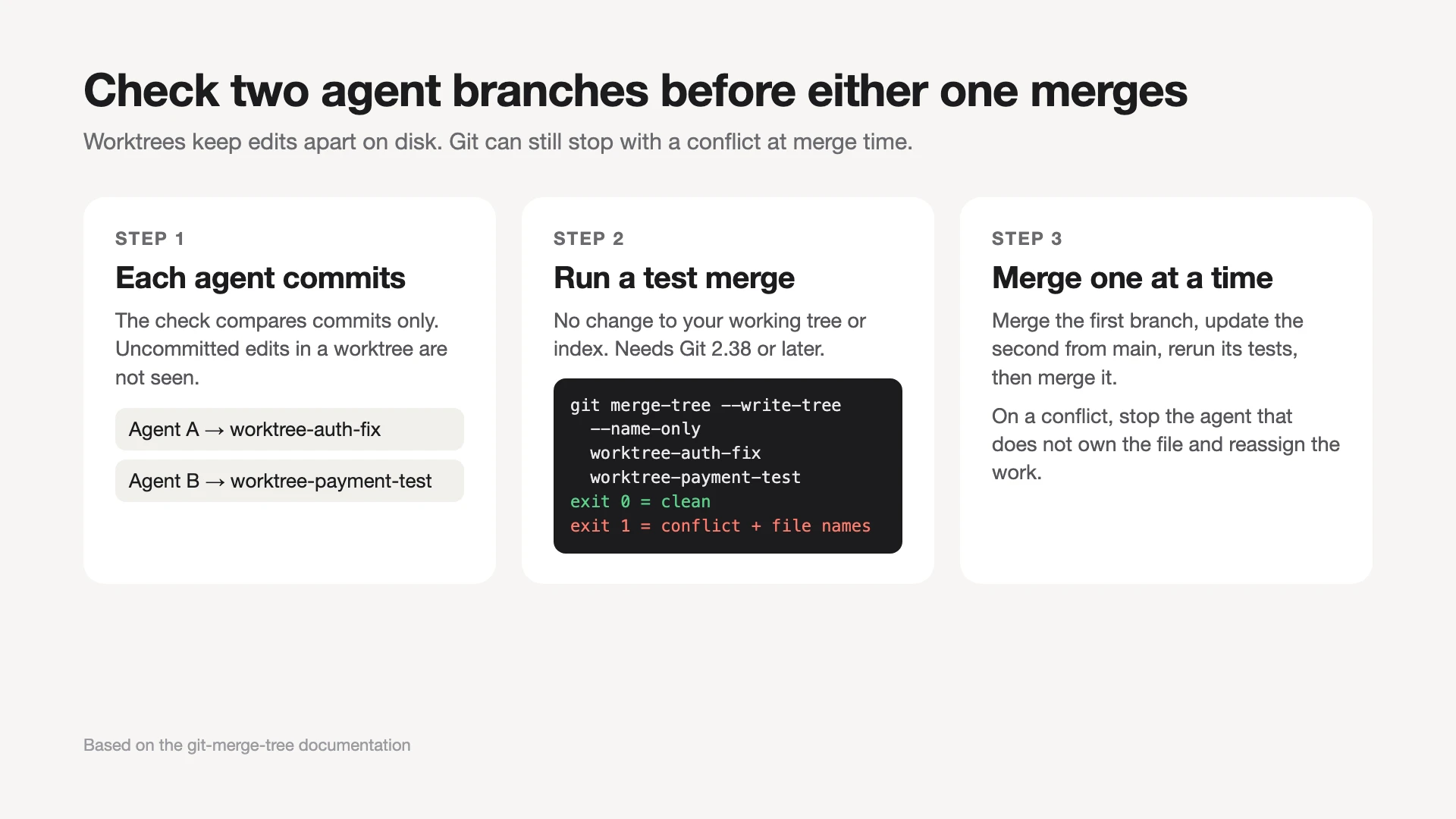
You can check two agent branches before either one merges. Git's merge-tree command runs a test merge without touching your working tree or index, so it is safe to run at any time. It compares commits, so ask each agent to commit first; uncommitted edits in a worktree are not checked, and a clean result mid-task can be a false all-clear. The --write-tree mode needs Git 2.38 or later:
git merge-tree --write-tree --name-only worktree-auth-fix worktree-payment-test
Git documents exit status 0 for a clean merge and 1 for a conflict. On a conflict, the output lists the conflicted file names and CONFLICT messages after the tree ID, which tells you which agent to stop before you spend time reviewing both diffs.
The fix that works in any tool is file ownership: give each task a list of files it may change, and run tasks that need the same file one after the other. Our worked merge-conflict example walks through two agents colliding in one file, the rebase that fixes it, and the rule that would have prevented it.
Where Harness Pro fits (it is not a Conductor alternative)
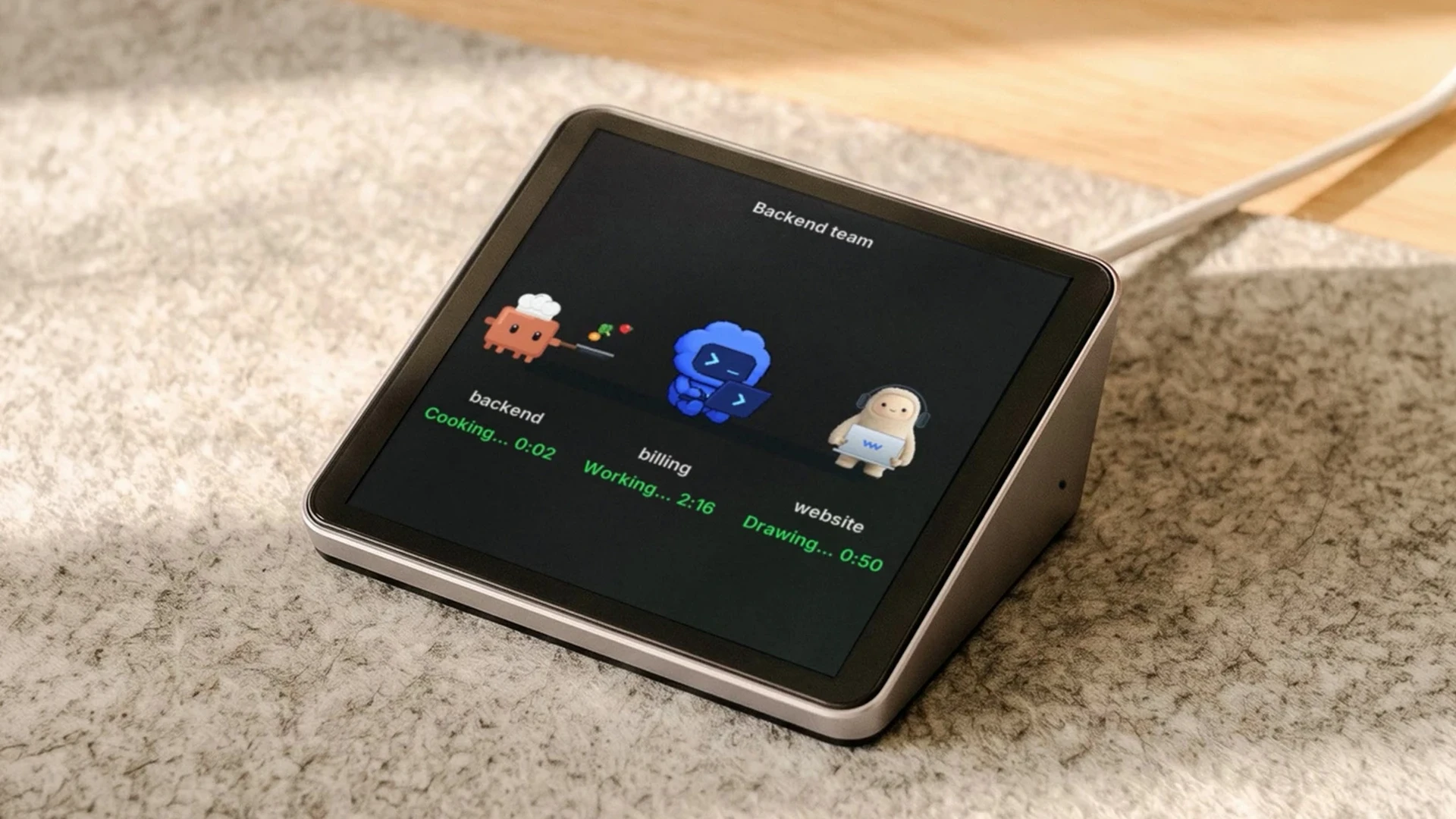
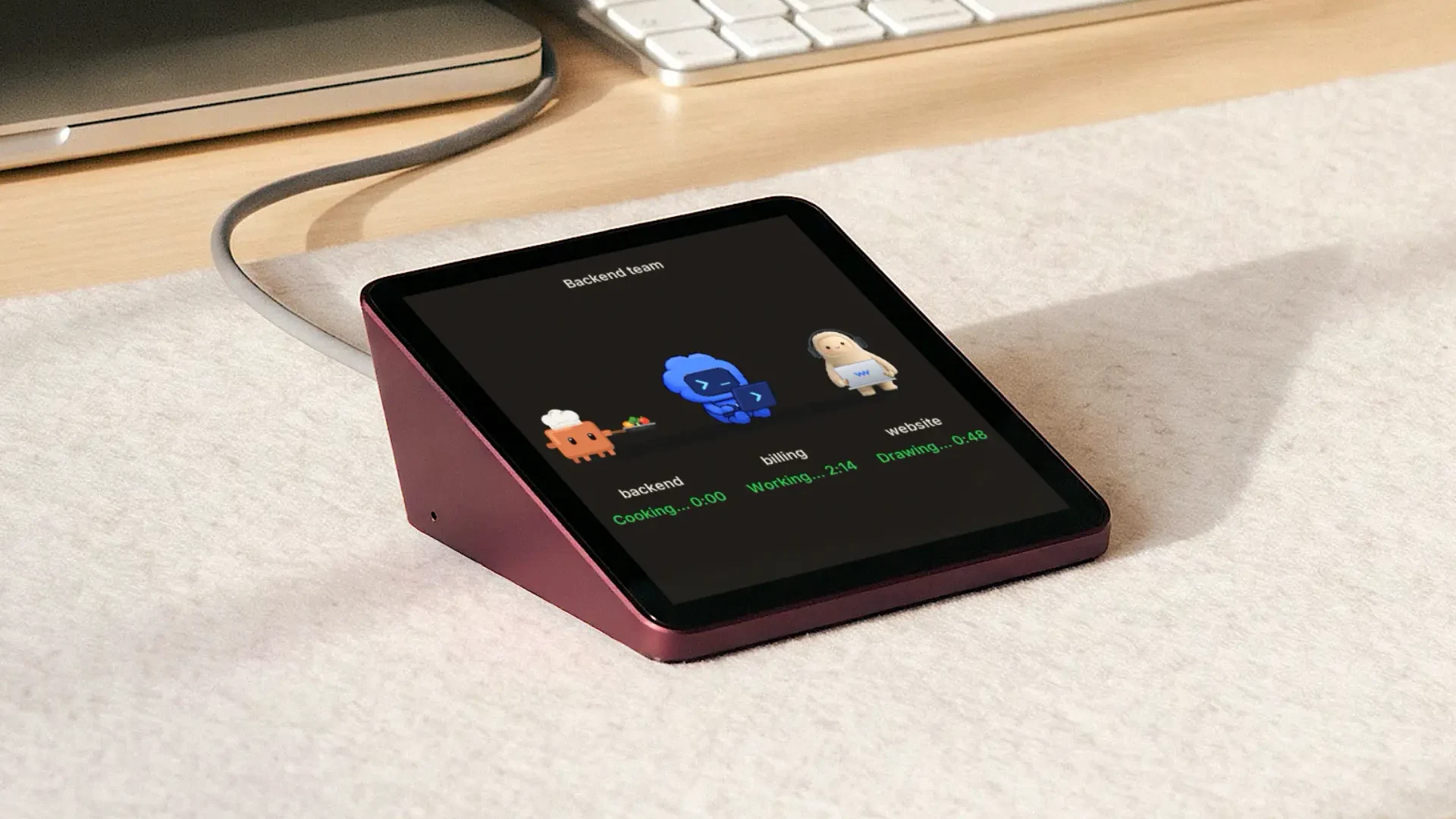
Harness Pro is not a Conductor alternative: it is a desk screen that shows the agents you already run, across your machines, and it works next to any tool on this list. Autonomous makes it, which is why it sits here and not in the list above.
Harness Pro is a 3.95-inch square touch screen that connects by USB-C to a computer running the Harness app. The app reaches your agents on every computer you use, so Claude Code, Codex, Cursor and more show up side by side, one agent per screen. You tap an agent and speak to send it an instruction, and the screen pings you when an agent is done.

It does not create worktrees, review diffs or merge branches; that stays in Conductor, Pane or whichever tool you pick. The Harness app works with Mac and Linux, so it does not fit a Windows-only setup. On a single machine, agent view or your tool's own notifications give a free done signal, so the screen earns its place only when agents run on more than one computer.
Each agent gets the whole screen, and a swipe moves to the next one.
FAQs
Is Conductor only for Mac?
Yes. Conductor's desktop app runs only on macOS, and its install docs say it is not available for Windows or Linux yet, with a waitlist for both. Pro adds an iOS app and cloud workspaces, but you still need a Mac to run the desktop app and local workspaces.
What are the alternatives to Conductor for Windows?
Pane, Emdash, Orca, Paseo, T3 Code and Nimbalyst all list Windows builds on their own sites. Pane also documents running agents inside WSL. Claude's desktop app runs parallel worktree sessions on Windows too, and Claude Squad has Windows release builds but depends on tmux.
How much does Conductor cost?
Conductor is free for local workspaces on your Mac. Pro costs $50 a month and adds cloud workspaces, live collaboration with up to five Pro users, the API and the mobile app. Teams costs $60 per user per month, and Enterprise is custom. Model usage is billed by your provider.
Is there a free, open-source Conductor alternative?
Yes. Pane (AGPL-3.0), Emdash (Apache-2.0), Paseo (Apache-2.0), Orca (MIT), T3 Code (MIT), Nimbalyst (MIT) and Claude Squad (AGPL-3.0) all publish their source. Pane and Claude Squad have no paid plan at all; the Paseo app is free, and only its optional managed Hub has a $15 per seat Pro plan. You still pay your model provider for agent usage.
Which Conductor alternatives run on Linux?
Pane, Emdash, Orca, Paseo, T3 Code and Nimbalyst list Linux builds, and Claude Squad runs in any Linux terminal with tmux. Superset (Paradev) offers only an experimental Linux AppImage, and Claude's desktop app supports Linux as a beta.
Is Superset the same as Paradev?
Yes. Superset now goes by Paradev: superset.sh redirects to paradev.com, the footer still reads Superset Inc., and the command-line tool is still called superset. It is unrelated to Apache Superset, the business-intelligence tool, which Paradev's own FAQ points out.
Does Conductor require GitHub?
Yes, for setup. Conductor checks for GitHub authentication in your terminal environment, which you can confirm with gh auth status, plus at least one agent provider such as Claude Code, Codex or a Cursor API key. Without both, you cannot create workspaces.
Can I run parallel Claude Code agents without Conductor?
Yes. Start each task with claude --worktree and a task name in its own terminal, or dispatch background sessions from agent view with claude agents. The Claude desktop app also runs parallel sessions once you turn on its Worktree toggle.
Conclusion
A Conductor alternative only helps if it fixes your reason for leaving. That means Pane, Emdash, Orca, Paseo or T3 Code for Windows and Linux, Superset (Paradev) for a terminal-first Mac app, and Claude Code's own tools if you only run Claude. Whichever you pick, give each agent its own files, check branches with git merge-tree before merging, and merge one at a time.
References
- Conductor, Pricing.
- Conductor, Install.
- Conductor, Harnesses overview.
- Conductor, FAQ.
- Conductor, Review and merge a workspace.
- Conductor, Configure your project.
- Conductor, conductor.json (legacy repository configuration file).
- Conductor, Workflow.
- Anthropic, Run parallel sessions with worktrees, Claude Code documentation.
- Anthropic, Manage multiple agents with agent view, Claude Code documentation.
- Anthropic, Claude Code Desktop, Claude Code documentation.
- Anthropic, Run agents in parallel (Projects), Claude Code documentation.
- Pane, RunPane product site and Pricing.
- Paradev (formerly Superset), Pricing and Workspaces documentation.
- Paradev, Paradev product site and FAQ.
- Paradev, Paradev vs Conductor (vendor-written comparison).
- Emdash, Emdash product site.
- Orca, Orca product site.
- Paseo, Paseo product site and Getting started.
- Paseo, Paseo Hub pricing.
- T3 Code, GitHub repository and README.
- T3 Code, Project settings and Source control user docs.
- Claude Squad, GitHub repository and README.
- Agentastic, Agentastic.dev product site and FAQ.
- Nimbalyst, Pricing.
- cmux, cmux product site and FAQ.
- Git, git-merge-tree documentation.