Headway App Review: Honest Take After 21 Days


60-Second Verdict: Is Headway Worth It?
After 21 days, I kept my subscription — not because of the gamification or challenges, but because my commute started producing something instead of nothing. That's the honest case for it.
Is Headway worth it? It depends on one thing: how actively you engage with the content. By Day 21, I could accurately recall the core argument from 6 of the 14 summaries I'd completed. The 8 I forgot were read passively. The 6 I retained weren't. The app does not compensate for passive use.
At $90 a year, the value holds at two active sessions per week. Below that, it doesn't.
Worth it if you have consistent dead time daily and will engage with the content — not just consume it.
Not worth it if you already finish books regularly, need depth beyond key points, or expect the format to do the retention work for you.
One thing to know before subscribing: the free trial is not consistently available across all markets as of early 2026, and deleting the app does not cancel the subscription. Both are covered in full later in this review.
Table of Contents
Most of us aren't reading less because we're busy — we're reading less because doomscrolling is frictionless and books aren't. Headway positions itself as the fix for that. Three weeks ago, I committed to using it every day — not to give it a fair chance, but to find out whether it would survive contact with an actual routine. This Headway app review tracks what happened across 21 days: which features held up, what I actually retained, and where the format hit its limits.
Getting to Know Headway App
Headway is a mobile app that turns nonfiction books into 15-minute summaries you can read or listen to. It launched in 2019 and currently offers over 1,700 titles across business, psychology, productivity, relationships, and personal development.
The core idea is simple: instead of spending 6-8 hours reading a full book, you get the main concepts extracted and presented in a format that fits into your commute or lunch break. The app has over 1,700 summaries covering business, psychology, productivity, relationships, health, and personal development topics.
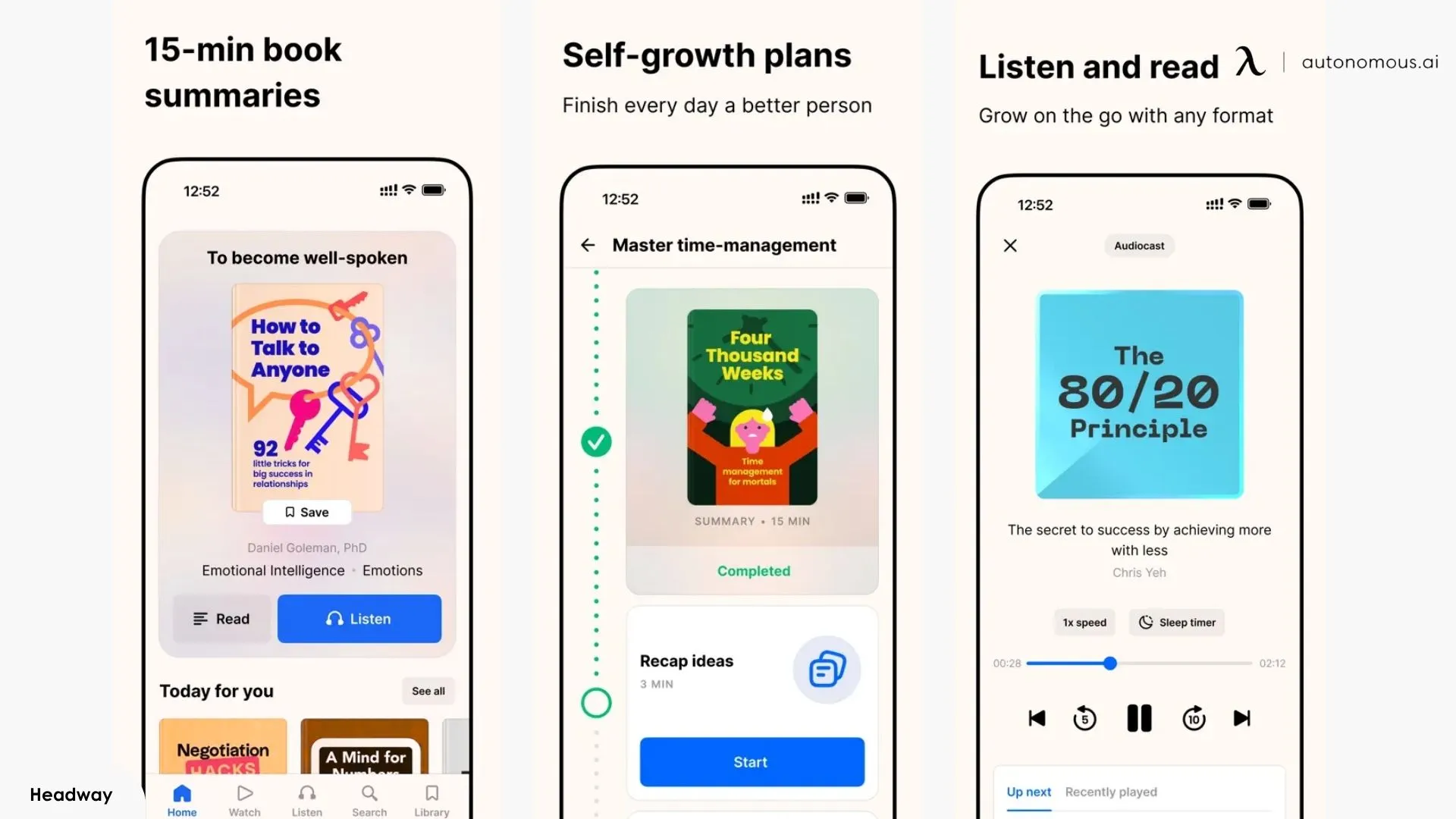
How the summaries work: Each book is broken into 8–12 key ideas presented as structured text. Audio narration runs in parallel, so if you start reading at home and need to switch to listening mid-commute, the app holds your place across both formats. Offline downloads mean the switch works without a connection.
Main features beyond basic summaries:
- Highlights and flashcards — save passages and convert them into spaced repetition review cards
- Challenges — 7-day or 28-day programs built around specific goals like communication or focus
- Streak tracking — daily engagement nudges to build a reading habit
- Shorts — swipeable text, infographic, and video introductions to books, similar in format to short-form social content
The app works on iOS and Android with full functionality. The web version exists but is limited — no downloads, no highlights, no dark mode. Headway is designed for mobile-first learning.
The most accurate way to frame what Headway offers: it sits within a broader category of apps that read books for you, though its focus is specifically on structured nonfiction summaries rather than full narration or text-to-speech. It's not meant to replace deep reading — it's reconnaissance to help you decide which books deserve your full attention and which ones you can understand well enough through summaries.

How Much Does The Headway App Cost?
Headway is free to download, with one randomly selected summary available per day at no cost. That free tier is functional — you can read or listen to one full summary daily — but it gives you no control over which book is served. For full library access, a paid plan is required.
As of 2026, Headway offers three subscription tiers. Headway states openly that pricing varies by country, active promotions, and personalized offers.
Plan | Price | Effective Monthly Rate |
Monthly | $12.99/month | $12.99 |
Quarterly | $29.99 / 3 months | ~$10.00 |
Annual | $89.99/year | ~$7.50 |
The annual plan is where most of the value sits. At $7.50 a month, you're paying less than the cost of one paperback for access to 1,700+ summaries. That math holds if you complete at least two summaries per week. Below that, the monthly plan is the more honest commitment.
On the onboarding discount: If you complete Headway's three-minute quiz and proceed directly to subscribe, a discounted rate typically appears with a countdown timer. If you exit and return later, the offer generally reappears. Don't let the timer pressure a decision you haven't thought through.
On the free trial: Headway's official pricing page references a 7-day free trial, but recent user reports from early 2026 indicate it is no longer consistently available across all markets. Whether you see a trial offer will likely depend on your region and how you enter the onboarding flow.
My 21-Day Experience — What the App Is Actually Like to Use Daily
Habit-building apps are easy to like in the first few days. The novelty carries you. The real test is what the app looks like on day 11, when the novelty is gone and it has to compete with everything else in your routine. That's the frame for this section — not whether Headway impressed me early, but whether it held up across three weeks of normal life.
I used the app every day for 21 days. My primary window was a 25-minute morning commute. Secondary sessions happened during lunch or before bed when I had an extra 10–15 minutes. I completed 14 summaries in total — some by reading, some by audio, a few by switching between both mid-session. The first week felt deliberate. By week two, opening the app had become closer to automatic. By week three, I had a clearer sense of which parts of the app were genuinely useful and which ones I had quietly stopped returning to.
1. What I Used Every Day — Features That Held Up
The features that survived three weeks of daily use share one quality: they fit into time I already had, without asking me to change how I was spending it.
Audio summaries during the commute were the most consistent part of my routine across all 21 days. At 1.25x playback speed, most summaries ran between 11 and 14 minutes — short enough to finish before reaching my stop, long enough to cover the material without feeling rushed. The voice narration is generally professional and well-paced, though this is one area where experience varies. Some narrators carry the material well; others come across as flat or slightly mechanical depending on the title. It's worth sampling audio on a few different books before deciding whether the listening experience works for you specifically. Some titles use narrators that are noticeably flatter in delivery than others — sampling audio on a book or two before committing to the listening format is worth the few minutes it takes.
Offline download worked without issues. On days when my phone lost signal mid-commute, the summary continued uninterrupted. Users who layer ambient sound underneath their listening sessions might pair it with something like what's covered in the Endel app review.
Switching between text and audio mid-summary was something I used more than I expected. I would start reading over breakfast, then switch to audio when I needed my hands. The app held my exact position across both formats every time. This is a small feature that removes a real friction point.
The highlights library became useful around day five, once I understood how it worked. When you highlight a passage, it is automatically tagged to the book it came from and saved without any manual filing. The end-of-summary Insights layer — a set of condensed one-liners that distill the key points further — also functions well as a quick retention prompt. Returning to both highlights and Insights two weeks later, I could skim core ideas from multiple books in a few minutes.
Streaks worked as a cold-start mechanism. For the first 12 days, the streak notification was a reliable prompt on days when I might have skipped. After that point, it became background noise rather than a motivator. That is not a criticism — a streak's job is to get a habit started, not to sustain it indefinitely. That said, the notification volume in the early days is higher than most apps. If you download Headway and immediately receive multiple nudges to start a streak, that is consistent with what other users report and worth knowing before the first session. You can manage notification settings from your device — doing it early makes the experience considerably less cluttered.
After downloading, I immediately started getting bombarded with notifications to get a “streak” going.
— A Headway app review on Apple Store
Summary quality held up well across most of the 14 books I completed. The structure is clear, the key ideas are accurately represented, and the 15-minute estimate is reliable. A small number of summaries felt thinner than others — covering the surface argument of a book without engaging with what made the original worth reading. This was the exception rather than the pattern, but it was noticeable enough to mention. Users whose reading spans niche or densely argued titles may find the gap between the summary and the source material more pronounced than those reading broadly in self-improvement or productivity.
It seems like the summaries were written by very clumsy AI or someone who skimmed the back covers of the book at most
— A Headway app review on Apple Store
I find the summaries far too general and some of the narrators either too fast or too monotonous. They’re not getting the unique essence of many books
— A Headway app review on Apple Store
2. What I Stopped Using — And What That Tells You About the App
The features below are not broken. They stopped getting used because they serve a different type of engagement than what my routine supported. Understanding this gap is more useful than a simple "pro or con" label.
The 28-day challenge was the first thing I dropped. I started the wealth-focused challenge on day six and abandoned it by day ten. The format assumes your goal is thematic — that you want the app to guide your direction, not just supply the material. My sessions already had a direction: I came in with specific books I wanted to cover. The challenge pulled against that rather than supporting it. If you have no reading agenda and want structure imposed on you, this feature will serve you better than it served me. If habit formation is the actual goal rather than reading, the Fabulous app review is a more direct starting point.
To make the most of this app, one def has to be able to make start commitments and build on that foundation.
— A Headway app review on Apple Store
Spaced repetition flashcards required more deliberate session investment than my routine allowed. My highlights were solid, but opening the flashcard deck required a separate, intentional session — it didn't surface naturally in the daily flow. I used it twice in 21 days. Users who build a separate 10-minute review session into their day will get more from this feature than I did.
Shorts — the swipeable text, infographic, and video introductions to books — I opened several times in the first week and rarely after that. The format is well-executed, particularly the video shorts, which have noticeably higher production quality than similar features in competing apps. They fell out of my routine not because they were poor but because I already had a queued book each session. Shorts function best as a discovery tool when you don't know what to read next. A Headway review on Reddit captured it perfectly:
This is basically your TikTok for microlearning. You can swipe through bite-sized ideas, facts, visual infographics, quizzes, and interactive videos where you choose what happens next. It sort of scratches the scrolling itch without the brain fog later.
The in-summary feedback prompts — brief congratulatory messages that appear after completing each key point — are a minor but real friction point worth naming. This is subjective, and some reviews of the Headway app will find the reinforcement helpful for building consistency. Others will find it condescending by week two. There is no option to disable it.
I also feel there’s too many “great job, you just finished another key point”
— A Headway app review on Apple Store
Landscape mode on iPad is absent. This is a genuine limitation for tablet users with attached keyboards. Phone-primary users won't notice it. If you read on a tablet with a case or keyboard attached, the forced portrait orientation disrupts the physical workflow in a way that adds up over time.
The pattern across everything I stopped using is consistent: these features require either a non-specific reading agenda or a more structured daily investment than a 15–25 minute commute window provides. That is useful information before you subscribe — not because it makes the app worse, but because it tells you which version of your routine Headway actually fits.

Headway vs. Blinkist vs. Shortform
Headway, Blinkist, and Shortform are the three apps most people are comparing when they search for book summary apps in 2026. They serve the same broad purpose but approach it differently enough that the right choice depends on what you actually need from the format.
The table below covers the decision-relevant differences. The narrative that follows unpacks the three comparisons that matter most.
Headway | Blinkist | Shortform | |
Library size | 1,700+ titles | 7,500+ titles | 1,000+ titles |
Summary format | Key points + Insights | Chapter-based "Blinks" | Chapter-by-chapter & analysis |
Summary depth | Moderate | Moderate | High |
Audio quality | Good, variable by narrator | Strong, consistent | Limited |
Mobile experience | Excellent | Good | Good |
Desktop experience | Limited | Full-featured | Full-featured |
Gamification | Streaks, challenges, badges | Minimal | None |
Annual price | $89.99/year | ~$95.27/year | ~$197/year |
Free tier | 1 random summary/day | 1 random summary/day | 5-day trial only |
Best for | Habit building, commuters | Variety, desktop users | Deep comprehension |
1. Headway vs. Blinkist
Headway wraps its content in a behavioral layer: streaks, challenges, progress markers designed to make returning tomorrow more likely. For users building a habit from scratch, that structure helps. For users who already read consistently, it registers as noise. Blinkist skips that layer entirely — you open it, read or listen, and close it.
The device gap is the other distinction the table doesn't fully capture. On Blinkist, switching from phone to laptop costs you nothing. On Headway, the web version loses highlights, downloads, and dark mode — a meaningfully worse experience. If you read across multiple devices, that asymmetry matters.
Bottom line: The choice between these two comes down to where you read and whether behavioral nudges help or bother you — not price, not summary quality.
2. Headway vs. Shortform
Shortform is built for understanding a book. Headway is built for staying in contact with ideas across many books. A user who finishes a Shortform summary has worked through an argument. A user who finishes a Headway summary has been introduced to one. Most headway app reviews treat these outcomes as interchangeable — they aren't.
The $107 annual price gap reflects that difference. It's not one app charging more for the same thing.
Bottom line: If you're deciding between the two, the cleaner question is: do you want to go deep on fewer books, or stay consistent across many? That answer points more reliably to the right app than any feature comparison will.
Users who find none of these three apps fit their specific learning style may find the Wiser app review and Mygrow app review cover two alternatives that take a structurally different approach to the same category. For readers whose interest is in cognitive training rather than book summaries specifically, the Brainway app review covers a different approach to structured daily learning.

How to Cancel Headway
Cancelling a Headway subscription requires a deliberate step most people miss: deleting the app does not cancel the subscription. If you delete Headway without cancelling first, billing continues until you actively stop it.
This is where a significant portion of the complaints in headway app reviews originate — not from the product itself, but from unexpected charges after users assumed deletion was enough. The process to cancel correctly is straightforward once you know it.
1. How to Cancel Headway by Platform
If you subscribed through the Apple App Store (iOS):
- Open Settings on your iPhone or iPad
- Tap your name at the top to open Apple ID
- Tap Subscriptions
- Find Headway in the list and tap it
- Tap Cancel Subscription
If you subscribed through Google Play (Android):
- Open the Google Play Store
- Tap your profile icon in the top right
- Tap Payments & subscriptions → Subscriptions
- Find Headway and tap Cancel subscription
If you subscribed directly through Headway's website: Log in to your account at makeheadway.com and navigate to subscription management under account settings. If you cannot locate the cancellation option, Headway's support team can be reached through the contact form on their website.
One timing detail that matters regardless of platform: Headway's renewal charge processes 24 hours before the end of your current billing period. Cancelling before that window closes ensures the next period is not charged.
2. What to Do If You've Already Been Charged
If a charge appeared that you did not expect, the resolution path depends on where you originally subscribed.
For App Store subscribers, visit reportaproblem.apple.com, locate the Headway charge, and submit a refund request. For Google Play subscribers, open the Play Store, navigate to order history, find the relevant charge, and select Request a refund.
For direct website subscribers, contact Headway through the support form on makeheadway.com with your account details and the date of the charge. Keep your original subscription confirmation email — it will speed up any support interaction.
3. Is the Headway Subscription Model Transparent?
The product itself is legitimate — the content library exists and functions as described. The complaints that surface in Headway app reviews consistently relate to the subscription mechanics rather than the content: auto-renewal that processes before users realize the period has ended, and cancellation steps that vary by platform and are not prominently communicated during sign-up.
These patterns appear consistently across App Store reviews and user forum threads. They are not evidence of fraudulent activity, but they are a real friction point that a straightforward subscription model would not generate at the same volume. Knowing the cancellation process before you subscribe — which the steps above provide — removes most of the operational risk.

Who Should Use Headway — And Who Should Not
Headway is a good app for a specific type of person in a specific situation. Outside of that situation, the same features that make it work well become reasons it won't.
Headway Works Well If
- You have consistent dead time you're not using:
Commutes, gym sessions, lunch breaks, household tasks — Headway's 15-minute format is built for exactly these windows. If that time currently produces nothing, the app gives it structure without requiring you to carve out something new.
- You're building a reading habit from scratch:
The streak system, daily challenges, and low-commitment format lower the barrier to entry in a way that full books don't. Users who haven't read consistently in years tend to find the format more sustainable than they expect — the app meets them where they are rather than demanding an existing habit.
- Broad idea exposure is what you're after
If your goal is familiarity with the core arguments across a wide range of nonfiction — rather than deep expertise in any one area — Headway's format delivers that efficiently. Professionals who need working knowledge across psychology, productivity, communication, and business without committing to full books will find consistent use-case fit here.
- You engage actively with the content:
The 21-day retention data in this review of headway app experience makes this clear: users who highlight, revisit the Insights layer, and apply ideas from what they've read retain significantly more than those who treat it as background listening. The app supports active engagement — it just doesn't enforce it.

Headway Is Likely the Wrong Choice If
- You already read books regularly and finish them:
If full books are already part of your routine, Headway adds a parallel habit without meaningfully deepening it. The format will feel thin compared to what you're already doing.
- You need depth over breadth:
Academic work, professional research, or any situation where you need to understand an argument rather than be introduced to it — Headway's key-points format is not built for this. Shortform serves this use case more honestly, at a higher price.
- You're unlikely to use it more than once a week:
Below that threshold, the cost-per-session math deteriorates quickly and the habit layer — streaks, challenges, progress tracking — loses its function entirely. A library card and a lunch break would serve the same purpose at no cost. Users looking for daily structure around mindfulness or self-care rather than reading may find the Calm app review or Finch app review more relevant starting points.
- You read primarily on a desktop or laptop:
Headway's web version is limited enough that it functions as a different, lesser product. If mobile isn't your primary reading environment, this is a practical barrier worth taking seriously before subscribing.
Is Headway good? For the right user, yes — and the profile above defines that clearly enough to be useful. The more common mistake is subscribing based on what the app could theoretically fit into, rather than what a real routine actually supports. Most headway app reviews don't make that distinction explicitly. It's the one that matters most before you pay.
FAQs
What is the Headway app for?
Headway is a mobile app that summarizes nonfiction books into 15-minute text and audio formats. It’s designed for people who want to learn key ideas from books quickly without reading them in full. The app focuses on habit-building with features like daily goals, streaks, and personalized recommendations.
Is the Headway app free?
Headway is free to download and provides one randomly selected summary per day at no cost. Full access — including the entire library, offline downloads, and all features — requires a paid Headway subscription. A free trial may be available depending on your region and onboarding flow.
How much does Headway cost?
Headway costs around $89.99 per year for full access, though pricing may vary depending on promotions and region. The subscription unlocks the full library of 1,700+ summaries, audio versions, offline access, and all features.
Is the Headway app worth paying for?
Yes — the Headway app is worth it if you regularly use short time blocks like commuting, workouts, or breaks to learn. At about $89.99/year, completing just two summaries per week brings the cost to under $1 per title, making it a cost-efficient way to consume nonfiction ideas.
Which is better, Headway or Blinkist?
Headway and Blinkist both offer nonfiction book summaries, but they differ in experience. Headway focuses on shorter, habit-driven daily learning, while Blinkist has a larger library and more traditional summary formats. If you want quick, structured daily learning, Headway fits better; if you want broader selection, Blinkist may be the better option.
Is the Headway app legit?
Yes, the Headway app is a legitimate book summary app developed by LibroTech Inc. Most Headway app reviews confirm that the product works as described. Common complaints are usually related to subscription billing and auto-renewal rather than the content itself.
How do you cancel the Headway app subscription?
To cancel Headway, you need to go through the platform where you subscribed — Apple App Store, Google Play, or Headway’s website. Deleting the app does not cancel the subscription. Billing renews about 24 hours before the next cycle, so you need to cancel before that to avoid being charged.
Does the Headway app actually help you retain information?
Headway can help with retention if you actively engage with the content. Using features like highlights and review (“Insights”) improves recall compared to passive listening. However, like most summary apps, retention depends more on how you use it than the format itself.
What kind of books does Headway have?
Headway focuses on nonfiction books across productivity, psychology, business, health, and personal development. The library includes 1,700+ titles and leans toward popular, widely read books rather than niche or academic content.
Can you use Headway offline?
Yes, Headway supports offline access on iOS and Android. You can download summaries to read or listen to without an internet connection. This feature is only available on mobile — the web version does not support offline use.
Final Thoughts
Three weeks with Headway didn't change how I think about reading — it changed how I think about the time I was already wasting. That's a narrower outcome than the app's marketing suggests, and a more honest one.
This Headway app review set out to find whether the app survives contact with a real routine. It does, but only under specific conditions: mobile-first use, active engagement, and realistic expectations about what a 15-minute summary can and cannot deliver.
The product is sound. The subscription mechanics require attention before you commit. And the question of whether it fits your life is answered more accurately by your actual daily schedule than by any feature list.
If the conditions in the Who Should Use section match your situation, the app earns its place. If they don't, no amount of streaks or challenges will manufacture the fit.