The 7 Best Brick Alternatives for iPhone and Android
The best Brick alternative depends on the action you want to make difficult. Autonomous Key keeps chosen apps locked until you scan its physical key and gives a timed access window; Brick and Bloom begin a block when you tap their devices. Foqos offers the NFC-or-QR approach without a paid app on iPhone, while Lock and Switchly bring similar physical controls to Android without requiring proprietary hardware. The important difference is not just the object or price. It is what happens when you reach for a distracting app.
This comparison covers seven Brick alternatives for iPhone and Android, including complete NFC devices, free open-source apps, and one premium-tag system. It compares the ongoing cost, phone requirements, blocking behavior and common escape routes. A free app can be the right answer, but it takes more setup; a finished device can be easier to start with, but does not make your phone impossible to bypass.
Brick alternatives compared: price, platform and unlocking
The fastest way to narrow your choice is to separate a finished NFC device from a free app that uses your own tag or QR code. Brick is included as the reference point, not counted among the seven alternatives.
| Option | Phone support | Listed US starting price | Ongoing payment | Best reason to consider it |
|---|---|---|---|---|
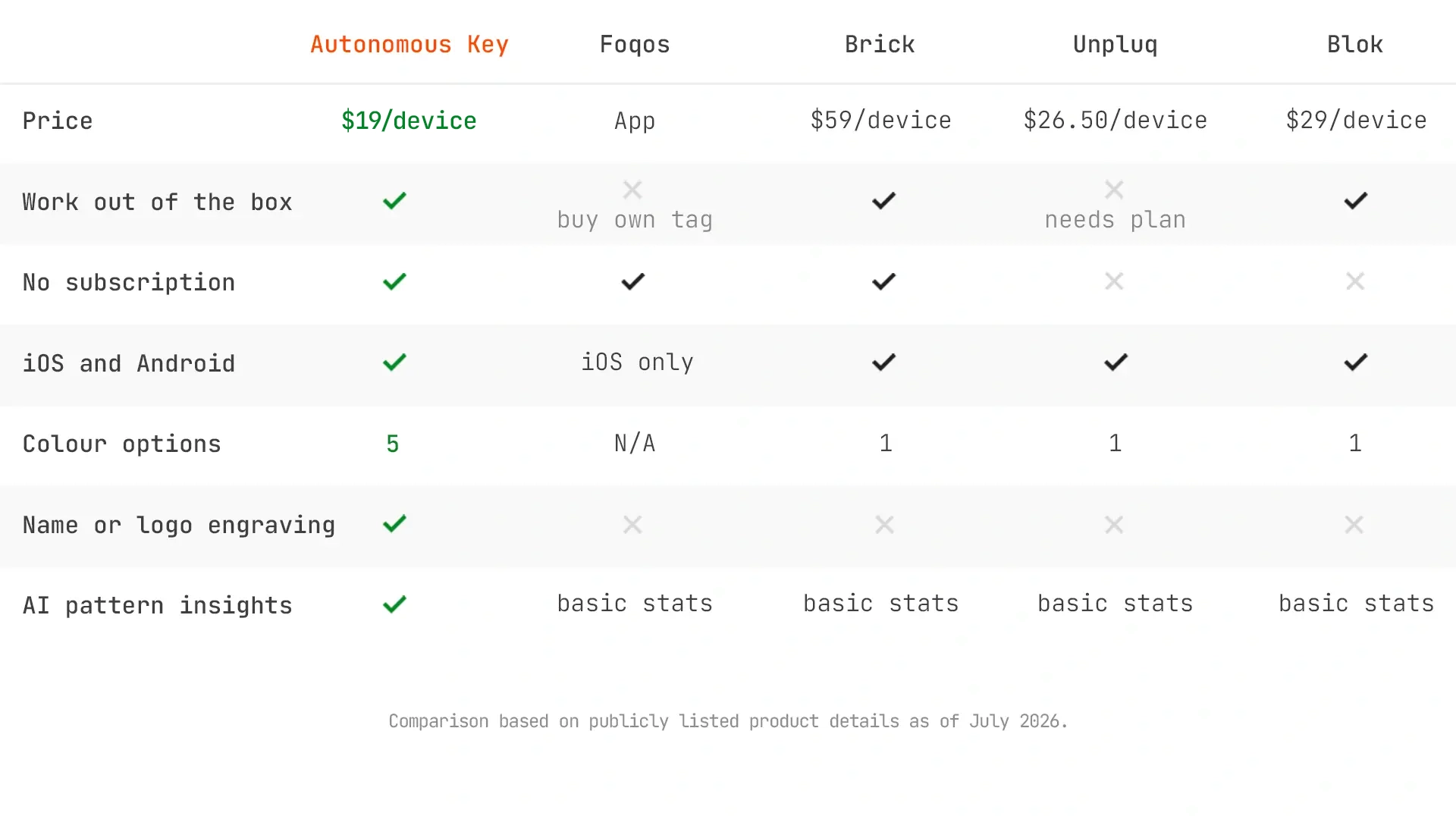
| Autonomous Key | iOS 15+; Android 8+ | $19 device | None for core use | Apps locked by default; timed access |
| Foqos | iPhone | $0 app; any NFC tag or printed QR | No required subscription | Free, open-source iPhone setup |
| Lock | Android with NFC | $0 app; supply NFC tag | No subscription | Minimal free Android NFC toggle |
| Bloom Card | iPhone and Android | $39 card | No subscription | Metal card with breaks and Child Mode |
| Blok Card | iPhone and Android, per card listing | $29 card | Core included; paid extras exist | Card, schedules and emergency access options |
| Unpluq Tag | iOS 16+; Android with NFC | $26.50 tag, plus Premium | Premium required for Tag | Portable tag and flexible barriers |
| Switchly | Android | $0 core app; own NFC/QR | Optional Premium | Profiles, schedules, NFC and QR |
| Brick (reference) | iOS 17+; Android 12+ | $59 device | No subscription | Magnetic NFC block and Strict Mode |
The 7 best Brick alternatives for iPhone and Android
Start with the option that matches your operating system and how you want a block to end. The picks include both paid hardware and free apps; each has a specific drawback worth understanding before you change your routine.
1. Autonomous Key, best for automatic relocking
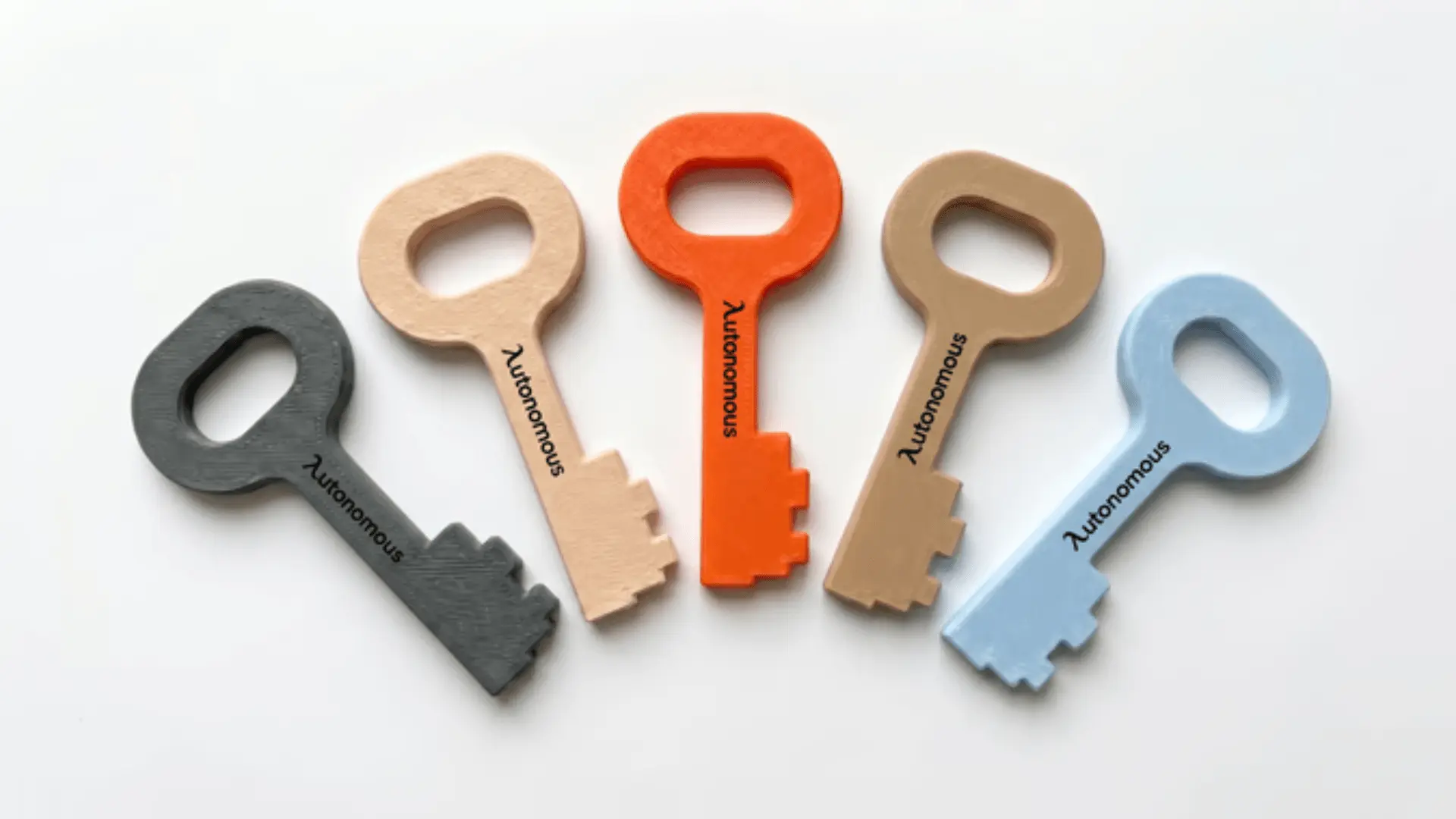
Autonomous Key is a passive NFC device that leaves selected apps locked by default. You scan the key to open an access window for up to 60 minutes; when that window ends, the apps are supposed to lock again without another tap. That is a different default from physical blockers that require you to begin a session manually. It is useful if your recurring problem is forgetting to turn a blocker back on after a quick exception.
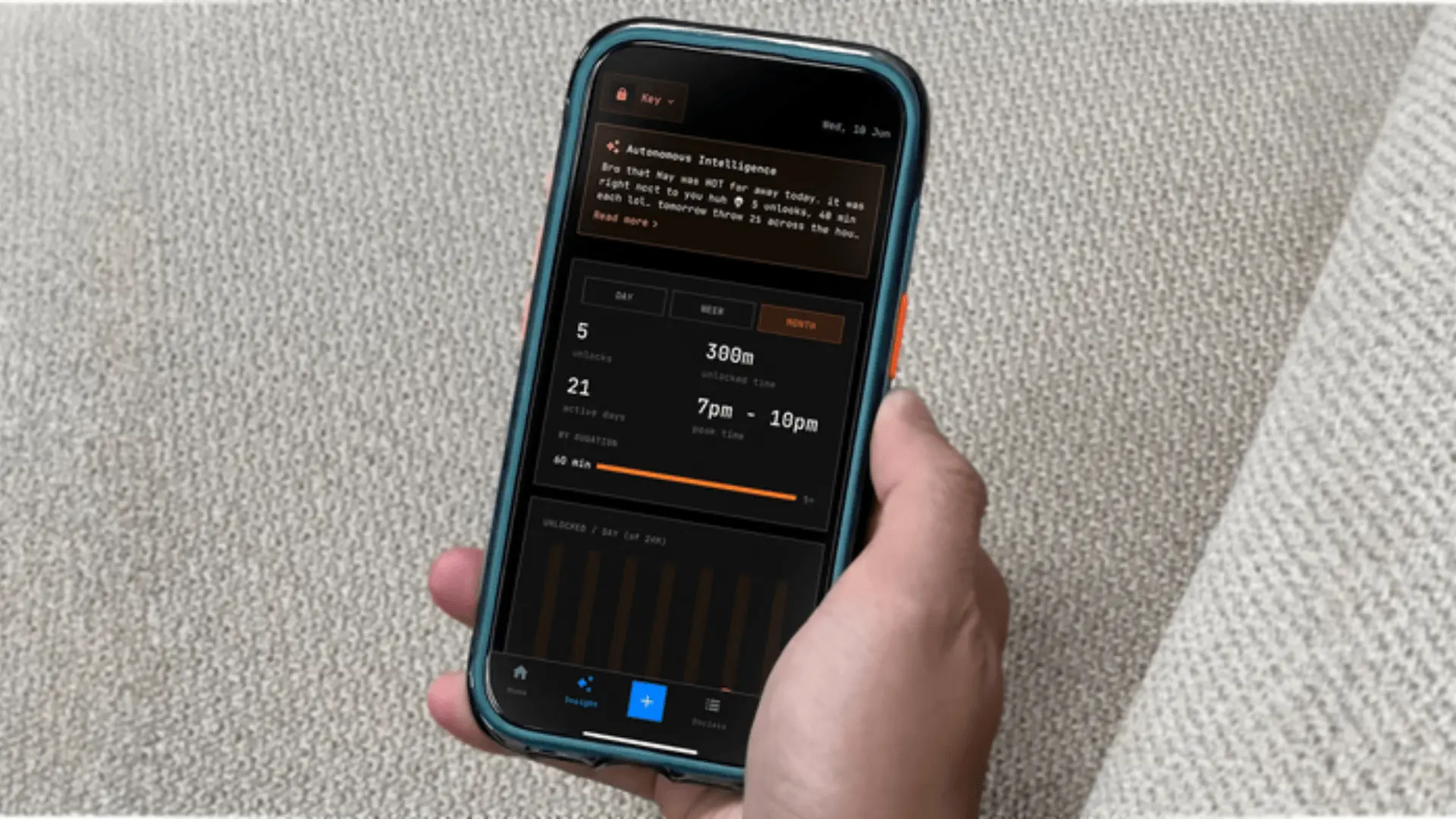
The current Key page lists a 3.1 × 1.5 × 0.1-inch PLA body, Android 8+/iOS 15+ compatibility and no recurring charge. Five standard colors and free engraving are offered on the current product selector; additional seasonal designs may vary. Key Intelligence records unlock counts, timing and duration, and the brand advertises AI summaries. Those reports describe behavior; they are not proof the hardware improves focus for every person.
The limiting factor is software behavior and how you use the object. Leaving the key next to your phone makes it simple to scan repeatedly. Like other phone-based blockers, its effectiveness also depends on OS permissions and the companion app. Check device compatibility and test the relock behavior during the return period.
| Pros | Cons |
|---|---|
|
|
.webp)
2. Foqos, best free Brick alternative for iPhone
Foqos is a free, open-source iPhone app that can turn ordinary NFC tags or printed QR codes into physical steps for blocking distractions. You set up a profile, choose which apps or websites to restrict, and decide whether a scan or timer is needed to start or end the session. A printed QR code works if you want to test the behavior without buying an NFC tag.
The main advantage is control over the setup, not a hidden hardware feature. Foqos offers manual blocking, timed sessions, smart breaks and session history. It uses Apple Screen Time APIs and publishes its source code, which is helpful for a reader who wants to inspect how an app uses permissions. The developer describes the core app as free without a subscription; voluntary support purchases may appear in the App Store.
Foqos is not available as an official Android app. It also places the work of picking and positioning a QR code or compatible tag on you. For someone who would rather open a box and start with a finished physical object, the extra setup can outweigh the savings.
| Pros | Cons |
|---|---|
|
|

3. Lock, best minimal open-source alternative for Android
Lock is a free Android app that uses an ordinary NFC tag as the physical switch for selected distracting apps. Once you pair a tag, tapping it begins or ends a blocking session. Its design emphasizes a small number of functions instead of a broad dashboard, making it a close Android answer to the basic “leave the tag somewhere else” habit.
The project publishes its Kotlin source under the MIT license and offers downloads through Google Play or GitHub. It uses Android Accessibility Service to notice a blocked app opening and return the user to the home screen. Profiles, session history, limited emergency access and a session timeout are described in its public documentation. Data is described as staying on the device without an account.
Android compatibility and NFC hardware need checking, especially on older devices. It also does not offer the same rich schedules or website controls as Switchly. Android Accessibility enforcement is not identical to iOS Screen Time restrictions, and uninstalling or changing Android permissions may still provide a way around the block.
| Pros | Cons |
|---|---|
|
|
4. Bloom Card, best no-subscription metal card
Bloom Card offers a finished stainless steel NFC card for people who prefer wallet-sized hardware to a puck on a desk. Its official product page confirms both iPhone and Android support, a free companion app and no ongoing subscription. You tap the card to begin or end a blocked period, with optional schedules and short breaks if you need planned access.
Bloom is notably flexible about exceptions. It advertises strict mode and Child Mode, making it worth comparing for shared households where the person setting restrictions should not be the same person who can casually disable them. The same brand also offers a larger magnetic Pod, but the Card is the model compared here and carries a different price.
That flexibility can be a disadvantage for someone who repeatedly extends short breaks. A slim card is also easy to carry alongside the phone; if the point is to create distance, deliberately keep it somewhere inconvenient. Android NFC and strict-mode behavior should be tested on the actual device rather than assumed identical to iOS.
| Pros | Cons |
|---|---|
|
|

5. Blok Card, best for a card with optional paid extras
Blok Card is another NFC card for starting and ending focus sessions. Its product listing advertises iPhone and Android support, custom blocking modes, scheduled sessions, streaks and a free companion app with core features included when you buy the card. That is why labeling Blok as a mandatory yearly subscription is misleading.
The full pricing picture is less simple. The iOS App Store lists optional Pro purchases and paid emergency unlock packs, while the product page says the device includes access to core app functions. The brand also has older Card, Keychain and Magnet listings with different compatibility wording. Check the Card configuration and current app terms rather than assuming every Blok product has the same platform support.
Blok offers more ways to manage exceptions than a simple physical toggle, which can be useful if you sometimes need to regain access unexpectedly. Availability should be checked before purchase: the indexed Card store page has shown a sold-out state, and the direct shop URL was not consistently accessible during this review.
| Pros | Cons |
|---|---|
|
|
6. Unpluq Tag, best portable option for premium barriers
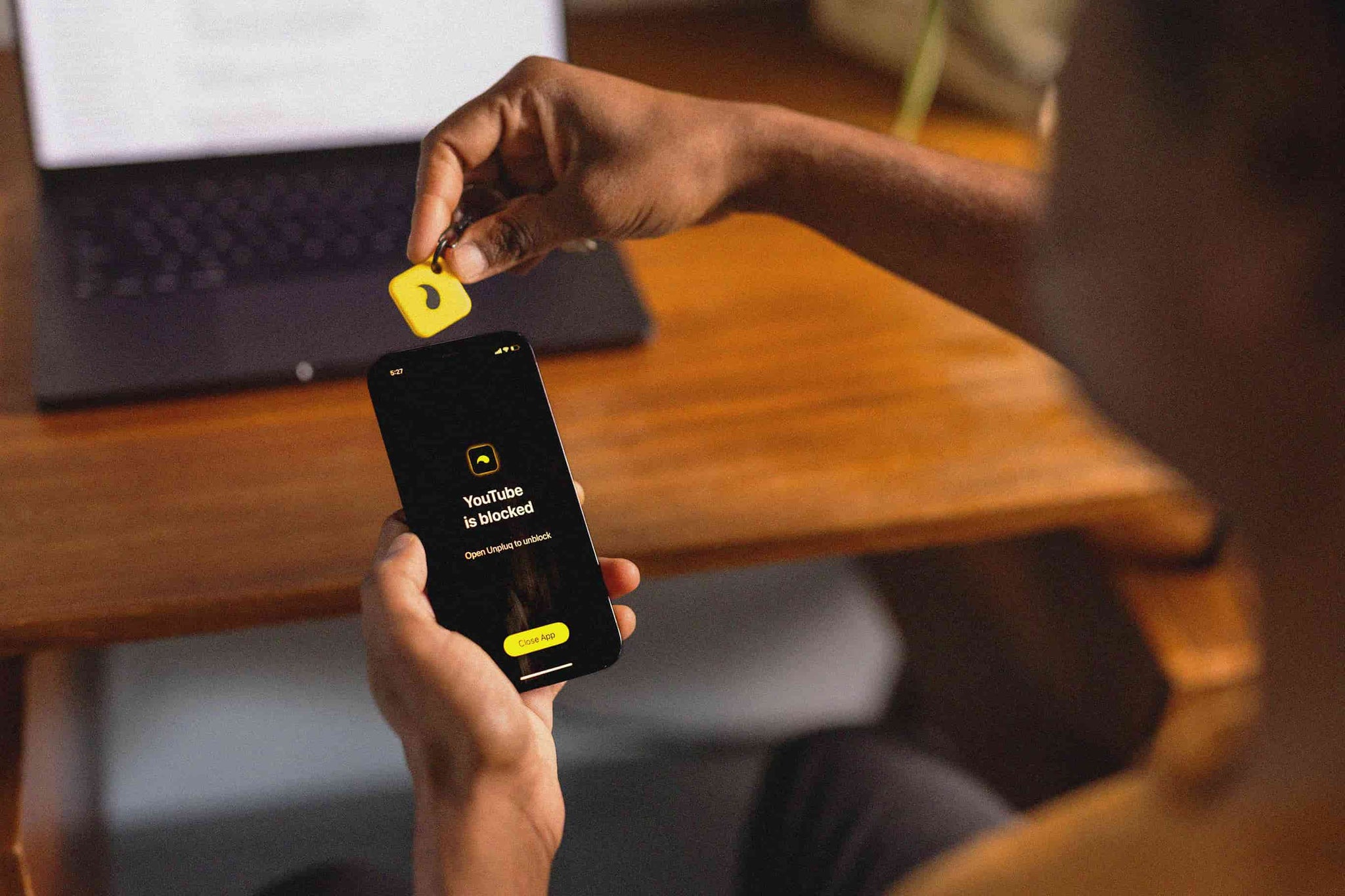
Unpluq Tag is a compact NFC keychain accessory that works with Unpluq’s app on iPhone and compatible Android devices. It can sit on a keyring or in a bag, and the app supports custom blocking schedules and multiple intentional-friction barriers. It is worth investigating if you want physical unlocking alongside a more configurable habit-management system.
The major cost detail is that the Tag-only purchase does not include a subscription. Unpluq explicitly says Premium is required to use the NFC Tag, even though the app has a free tier that can block two apps on one schedule without the Tag. Buying the hardware alone is therefore not the same as buying a ready-to-use, subscription-free blocker.
For a device you might use for years, confirm the subscription term, renewal method and whether the plan includes the Tag before checking out. This option favors scheduling flexibility and portable hardware, but its recurring software requirement may be a poor fit for someone specifically searching for a cheaper one-time replacement for Brick.
| Pros | Cons |
|---|---|
|
|
7. Switchly, best Android alternative with more automation
Switchly is an Android app blocker that can use NFC tags, QR codes or barcodes as physical controls, alongside schedules and phone-context triggers. You can create different profiles for work, sleep or study and choose which actions are allowed to change them. It is useful if you want a Foqos-style DIY approach on Android but need more than a simple tap-to-lock toggle.
The current official site describes a free core app, no ads and optional Premium, without requiring an official Switchly Tag. Its Google Play listing includes app and website blocking, supported in-app restrictions, schedules, usage insights and emergency access. Some of those features depend on Accessibility permissions and the Android configuration, so test them before relying on the app during an important work or study block.
More controls mean more settings to understand. For someone whose priority is the smallest possible app with a physical key, Lock may be simpler. For someone who needs timed rules and QR/NFC control at different locations, Switchly gives more flexibility without demanding a proprietary device.
| Pros | Cons |
|---|---|
|
|
Which cheaper Brick alternative actually costs less over time?
The true cost of a physical phone blocker is the device plus whatever the companion app requires after purchase. A free QR setup has no necessary hardware expense, whereas a tag that depends on Premium can cost more than a one-time card after continued use. Compare like-for-like plans rather than just the price on the NFC object.
| Buying route | Upfront expense | What changes long-term cost |
|---|---|---|
| Foqos or Lock with own tag | Free app; QR is free for Foqos, NFC tag extra | No required app subscription |
| Switchly with own NFC/QR | Free core app; hardware optional | Premium extras may be optional |
| Autonomous Key | Finished device, listed in first table | No subscription for core use |
| Bloom Card or Brick | Finished device, listed in first table | No required subscription |
| Blok Card | Finished card, listed in first table | Core app included; paid features or unlock credits available |
| Unpluq Tag | NFC Tag plus Premium | Subscription renewals and plan selection |
The key distinction is between a required fee and an optional extra. Unpluq requires Premium to use its physical tag. Foqos and Lock do not require an app subscription; Switchly offers a free core with optional Premium. Blok’s core card workflow is included with the device, but its App Store lists separate purchases. These are materially different buying models.
What should Android users choose instead of Foqos?
Foqos is an iPhone-only app, so Android buyers looking for a similar cheap or open-source Brick alternative should compare Lock and Switchly before purchasing a branded NFC device. Both offer physical-control workflows using ordinary tags. Lock is the simpler option; Switchly adds profile automation, QR codes and broader blocking controls.
Android apps often use Accessibility Services to detect when a distracting app opens. That gives them a different enforcement mechanism from an iPhone app using Apple Screen Time APIs. Check the permissions requested, whether the app works on your Android release and how to regain access if you lose the NFC tag. Avoid installing unknown “Foqos for Android” APKs under a lookalike name when the official developer does not offer an Android version.
Physical Brick alternatives vs software-only blockers
A physical app blocker adds distance to the unlock decision; a software-only blocker uses timers, delays or schedules on the same device. That extra physical step can be useful for someone who repeatedly dismisses reminders, but it is a design choice rather than a guarantee that a session cannot be bypassed.
If hardware feels excessive, programs such as Freedom, Opal or Focus Bear cover different needs. Freedom focuses on blocking across multiple devices, Opal emphasizes phone-side focus controls, and Focus Bear adds routines around task initiation. These are better investigated as subscription software tools than counted as interchangeable NFC tags. For a direct comparison between two physical models, see Brick versus Bloom.
A more useful test than buying the most expensive device is to place an NFC tag across the room, block one distracting app for a short work session, and check whether you actually walk over to unlock it. If you keep moving the tag closer, the habit matters more than the model.
How to choose a Brick alternative without buying twice
Choose an app blocker by its unlock rule first, then by operating system, total cost and privacy requirements. Two products can both use NFC while giving opposite results when you forget to start a focus session.
- Decide how the lock begins. If you want selected apps unavailable by default, look for that behavior explicitly. If you prefer switching between modes, a tap-to-lock system may be more intuitive.
- Check your phone and NFC. Verify the operating-system minimum and whether Android NFC hardware is present. An app-store badge alone does not establish feature parity between platforms.
- Separate hardware and software charges. Ask whether the accessory works with free core features, requires a Premium plan or has pay-per-use emergency unlocks.
- Keep essential services accessible. Before enabling strict rules, verify calls, navigation, two-factor authentication and the apps you legitimately need at work.
- Plan for a lost tag. Read the emergency-unlock procedure and uninstall restrictions in advance, and test the device during its return or trial window.
For people deciding between a locked-by-default key and a deliberate tap-to-lock puck, Brick and Autonomous Key provide a more focused comparison of the two mechanisms. There is no need to pay for advanced analytics if a printed QR code already solves the problem.
Frequently asked questions
What is the best Brick alternative for iPhone and Android?
Autonomous Key is a finished NFC alternative for both iPhone and Android, while Bloom Card and Blok Card also advertise support for both platforms. Foqos is a free iPhone-only app; Lock and Switchly serve Android. The best choice depends on whether you want default locking, scheduled sessions or a free DIY tag.
What is the cheapest alternative to Brick?
Foqos is a free option for iPhone when you use a printed QR code, and Lock offers a free Android app with an ordinary NFC tag. Among finished devices, compare the one-time price and subscription terms for Autonomous Key, Bloom and Blok. An inexpensive physical tag that requires Premium may cost more over time.
Is there a free, open-source Brick alternative?
Yes. Foqos is an open-source iPhone app with NFC and QR blocking, while Lock is a free, open-source Android NFC blocker. Switchly also publishes Android source and offers a free core tier with optional Premium. Check the official project website and app store before downloading, especially for similarly named unofficial builds.
Is Foqos available on Android?
No. The official Foqos developer publishes the app for iPhone and points Android users toward independent alternatives such as Lock and Switchly. Both can use ordinary NFC tags to create a physical unlock step, although their feature sets and permission requirements differ. Avoid assuming an unofficial Android port is supported by Foqos.
Do Blok and Unpluq require subscriptions?
Unpluq Premium is required to use its physical NFC Tag, even though its app has a limited free tier. Blok Card includes access to the core app, but optional Pro features and emergency unlocks can cost extra. Check the current plan and Card variant rather than treating both devices as either fully free or always subscription-based.
Can I use a generic NFC tag instead of a Brick device?
Yes, with apps designed for user-supplied tags. Foqos, Lock and Switchly support compatible NFC tags, and Foqos also supports printed QR codes. Brick itself is sold around its proprietary physical object and app. Check that the tag type works with your phone and that the app can pair and read it reliably.
Are physical app blockers impossible to bypass?
No. A physical blocker creates additional steps, but its restrictions still rely on a companion app, system permissions and available emergency routes. Some products provide strict modes; others support timed breaks or paid overrides. Putting the NFC object away from the phone is usually more meaningful than relying on an absolute “unbreakable” claim.
Does Autonomous Key work without a subscription?
Yes. The current Autonomous Key page advertises a one-time device purchase and companion app without recurring charges. The key uses passive NFC, works with the listed iOS and Android versions, and allows time-limited access to apps locked by default. Test the setup on your own phone and check the product page for current compatibility.
Bottom line
The most useful Brick alternative is the one whose unlock rule fits your habit. Autonomous Key is a complete, locked-by-default option with timed access; Foqos lets iPhone users try the same idea with an inexpensive tag or printed QR code; Lock and Switchly give Android users free physical-control routes. Bloom and Blok favor card-shaped hardware, while Unpluq is better suited to people who accept a Premium subscription in exchange for its extra barriers.
Check the exact plan, OS requirements and escape procedure before buying. A physical blocker is only as helpful as the distance you put between the phone and the object that unlocks it.
References
- Brick product price and operation
- Brick compatibility and emergency unlocks
- Foqos official app documentation
- Foqos source code
- Lock documentation and Android requirements
- Switchly developer documentation
- Bloom Card product and app features
- Unpluq Tag and Premium requirement
- Unpluq free app tier FAQ
- Blok product lineup and Card pricing
- Blok App Store in-app purchases