The 10 Best AI Video Generators for Every Workflow


Making a video used to require a camera, editing software, and hours of production time. AI video generators changed that: a text prompt or a single image can produce a publish-ready clip in minutes, with no crew or technical background. But not every tool delivers the same results, and output quality, audio, free-tier limits, and use cases vary widely.
This guide breaks down the best AI video generators available now, matched to what you actually need to produce, and covers one option the others do not, running open video models on your own hardware.
Which AI video generator is right for you?
The table below sums up the ten tools by use case, free tier, and key features. Details follow for each.
Tool | Best for | Free tier | Native audio | Avatars | Max resolution |
InVideo AI | Marketing, faceless YouTube | Yes, 4 exports/wk | Yes | Yes | 1080p |
CapCut | Social, footage editing | Yes | Yes | Yes (100+) | 1080p |
Canva (Veo 3) | Clips in the design workflow | No | Yes | Yes | 1080p |
Adobe Firefly | Commercial, brand-safe | Limited credits | Yes | No | 1080p |
Runway Gen-4.5 | Creative filmmaking | Yes, 125 credits | Yes | No | 4K (paid) |
HeyGen | Presenter-led, multilingual | Yes, limited | Yes | Yes (700+) | 1080p |
Synthesia | Enterprise training | Yes, 1 video/mo | Yes | Yes (200+) | 1080p |
Kling | Character consistency | Yes, daily credits | Yes | No | 1080p |
Pika | Short stylized clips | Yes, limited | No | No | 1080p (paid) |
Google Veo 3 | Cinematic, photorealistic | No | Yes | No | 1080p |
The 10 best AI video generators
The tools below are organized by what you are trying to produce, not by overall ranking. Matching the tool to the output type saves the trial-and-error most people hit after their first generation.
1. InVideo AI: best for social and marketing
InVideo AI is built around a prompt-to-publish workflow for consistent short-form content. You input a topic or script, set the platform and length, and it handles scene selection, voiceover, subtitles, transitions, and music automatically. The edit layer takes natural-language commands after generation.
Output is prompt-dependent and punishes casual inputs. Veo 3.1 scene generation is locked to paid plans, and the free tier leans on stock media rather than generation. Free tier is 4 exports a week, watermarked; paid from around $25 a month.
2. CapCut: best for footage-based editing
CapCut approaches video from the editing side. It handles auto-captioning, scene pacing, background removal, and platform formatting automatically, detecting the target platform and reformatting without manual work. The free tier is genuinely usable at 1080p with selective watermarking.
Where it underperforms is original scene generation: it does not build scenes from a prompt the way InVideo or Veo-powered tools do. It works best when footage already exists and needs fast shaping. Paid from around $9.99 a month.
3. Canva (Veo 3): best for clips inside a design workflow
Canva suits designers and marketing teams already in its ecosystem who want short generative clips without a new tool. Veo 3 integration produces cinematic 16:9 clips up to eight seconds with synchronized audio, directly in the design workspace.
The eight-second ceiling is a hard limit at the current tier, so for anything beyond short B-roll or social clips it reaches its boundary fast. There is no free Veo 3 access; Pro from around $15 a month unlocks generation.
4. Adobe Firefly: best for commercial, brand-safe content
Adobe Firefly's differentiator is commercial clearance. It is trained on licensed and public-domain content, so generated video carries lower legal risk for paid media than tools trained on scraped data. Camera angle, aspect ratio, and motion are adjustable before generation.
The trade-off is creative range, since its moderation is tighter and edgier directions get filtered. Credits deplete faster than expected. Included in Creative Cloud from around $54.99 a month, or via standalone credits.
5. Runway Gen-4.5: best for creative filmmaking
Runway is built for directorial control. Gen-4.5 accepts text, reference images, and existing footage at once, producing more directed results than prompt-only tools. Camera choreography is a strength: pan, truck, and handheld can be specified in filmmaking language.
The learning curve is steeper than most tools here, and users treating it as a basic prompt tool will underuse it. Free tier is 125 one-time credits, watermarked, 720p; paid from around $15 a month.
6. HeyGen: best for presenter-led video
HeyGen is purpose-built for avatar-driven video: presentations, explainers, onboarding, and spokesperson clips. Voice cloning is professional-grade, and multilingual output covers 175+ languages with auto-dubbing and lip sync.
It does not generate open-ended scenes from prompts, so anyone after cinematic generation is outside its use case. Within avatar video, it is more consistent than most alternatives. Paid from around $29 a month.
7. Synthesia: best for enterprise training
Synthesia occupies the enterprise-grade avatar video niche for internal and external business communication: training, compliance, onboarding, and documentation. Over 200 stock avatars are available, with custom avatars on higher plans, and it integrates with learning systems via SCORM export.
Output is controlled and predictable, which is the point for brand-consistent enterprise work. The creative ceiling is the trade-off, since it is not built for social or cinematic content. Free tier is one video a month; paid from around $29 a month.
8. Kling: best for character consistency
Kling's advantage is character and object consistency across shots. Its reference system uses input images to anchor visual elements across scenes, which makes it strong for product and character-driven content needing continuity.
For the reference-image side of that pipeline, our guide to using an AI tool to generate images covers creating the source visuals that feed into image-to-video. The free tier gives daily credits for testing; paid from around $10 a month.
9. Pika: best for short stylized clips
Pika works in the short-form generative space, producing 3 to 10 second clips from text, reference images, or existing video. Its free tier is one of the more accessible entry points, and output leans stylized and cinematic rather than photorealistic.
The ceiling hits earlier than most tools here: longer sequences and high-realism prompts push past what its current model handles. Free tier caps at 480p, watermarked; paid from around $8 a month.
10. Google Veo 3: best for cinematic quality
Veo 3 currently sets the benchmark for photorealistic AI video. Physics, lighting, and camera motion hold together with a consistency competing models have not matched at equivalent complexity, and native audio, dialogue, ambient sound, and music, comes from a single prompt.
The friction is access and cost: for individual creators the price-to-access ratio makes it a quality reference point more than a daily tool. There is no free tier, with AI Pro from around $19.99 a month for Veo 3.1 Fast access.
Generating video privately, on your own hardware
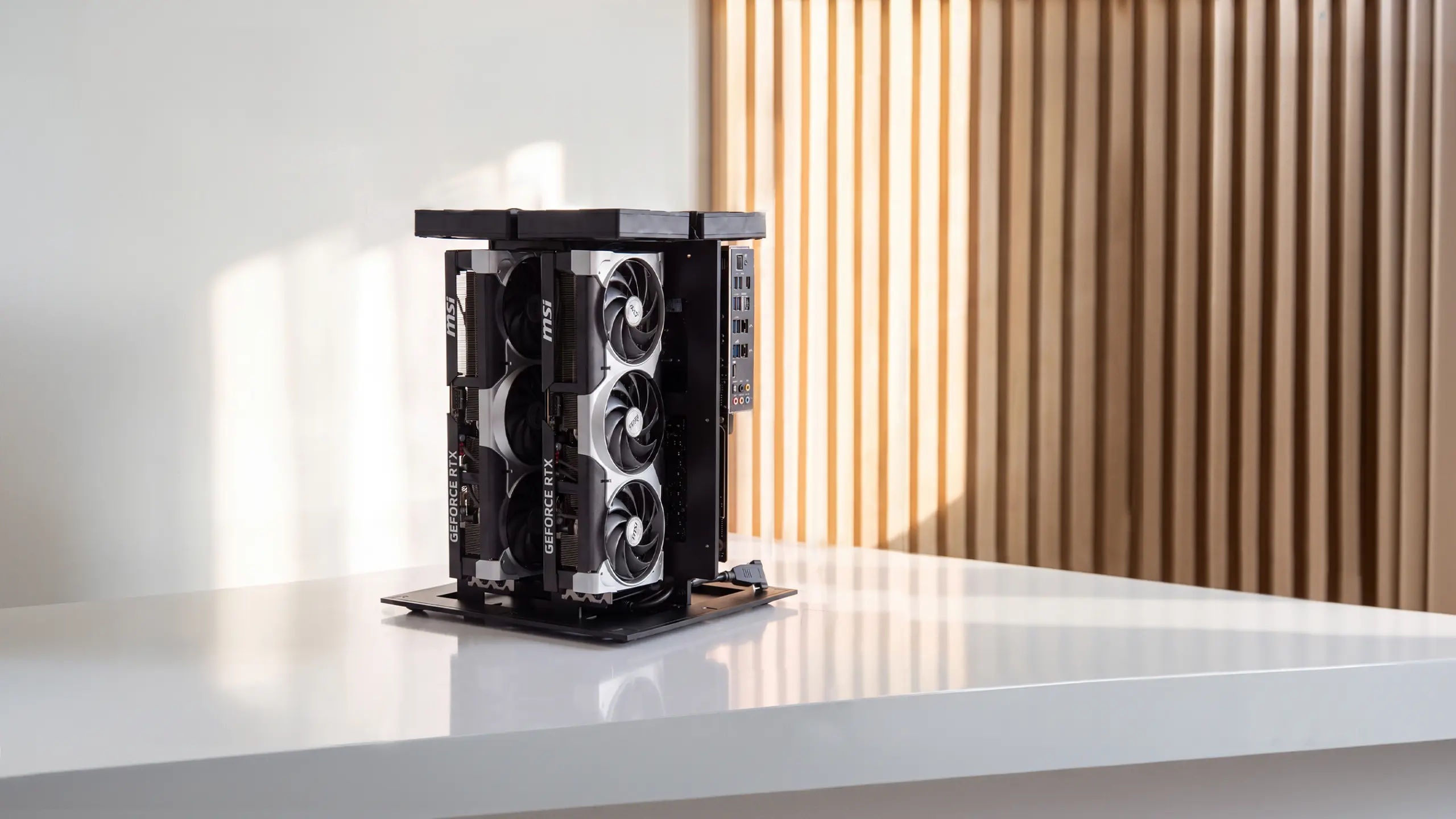
Every tool above runs in the cloud, billing per clip or per month and processing your footage on someone else's servers. The alternative is running open video models locally, where open models like Wan generate video on your own GPU with no per-clip cost and nothing leaving your machine.
The honest trade-off is quality at the top end: open local video models still trail the best cloud tools like Veo 3 on maximum realism and clip length, so for a single cinematic hero shot, a hosted tool wins.
Where local pays off is volume, privacy, and cost: iterating on sensitive or unreleased content, generating at scale, or avoiding per-clip fees. A machine built to run image and video models locally, such as the Autonomous Computer, handles this on your own hardware, while for occasional clips the hosted tools above are simpler.
Frequently asked questions
Which AI is best for creating video?
The best AI for video depends on your needs. For cinematic content, Google Veo 3 offers photorealistic quality; for social media and marketing, InVideo AI excels; and for avatar-driven or presenter-led content, HeyGen and Synthesia lead. Match the tool to your output type rather than looking for one overall winner.
Which AI video generator is best for YouTube?
For YouTube, InVideo AI is a strong pick for its fast generation with voiceovers and automatic subtitles, ideal for faceless channels and marketing content. CapCut is also excellent, with a user-friendly interface and social-media optimization that suits creators editing footage for the platform.
Is there a 100% free AI video generator?
Several tools offer free plans. CapCut and Pika provide usable free tiers with features like 1080p exports and limited credits, though free plans often include watermarks or restrict audio generation. Running open video models locally is another no-per-clip-cost path once you have the hardware.
Can AI generate videos from text?
Yes. Many AI video generators, including InVideo AI, Runway Gen-4.5, and Google Veo 3, create video from a text prompt. You describe the scene and the tool generates it, often adding voiceover, ambient sound, or music. Prompt detail strongly affects quality, so specific descriptions produce better results.
Is there an AI video generator without watermarks?
Yes. CapCut and InVideo AI both offer watermark-free exports on their paid plans, while free plans usually include a watermark. Open video models run locally also produce no watermark. If a clean export matters, check each tool's watermark policy before choosing a plan.
How much does an AI video generator cost?
AI video generators range from free plans with basic features to paid tiers starting around $8 to $30 a month, with enterprise and cinematic tools costing more. Paid plans unlock higher resolution, watermark removal, and more generation volume. Most tools offer a free tier or trial to test first.
Which AI video generator is best for social media?
CapCut and InVideo AI are among the best for social media, with fast editing, platform-specific formatting, captions, and music integration for platforms like Instagram and TikTok. Both let you produce vertical, platform-ready clips quickly, which is what most social workflows need day to day.
What are the limitations of free AI video generators?
Free AI video generators usually add watermarks, cap resolution at 480p or 720p, and limit export quantity or credits per day or week. These constraints suit testing and drafts but not high-volume production. Paid plans or locally run open models remove most of these limits.
Conclusion
The right AI video generator is set by output type and workflow fit, not by which tool ranks highest on a benchmark. InVideo AI and CapCut suit high-volume short-form content, HeyGen and Synthesia fit avatar and presenter-led video, Kling stands out for character consistency, and Runway Gen-4.5 and Google Veo 3 set the bar for cinematic quality. For teams that need privacy, volume, or no per-clip cost, running open video models locally is the fourth path.
These tools sit within a broader shift toward AI-assisted workflows, one that also includes AI assistants handling research, scheduling, and communication alongside video production. Start with a free tier, match the tool to your production requirement, and treat the output as a strong draft to refine.
References
- Synthesia, AI video research and benchmarks, synthesia.io
- Zapier, AI video generator testing, zapier.com