Autonomous
CartCart (0)
Autonomous

12 Best Ergonomic Chairs For Neck Pain (2026)
Smart Products

12 Best Ergonomic Chairs For Neck Pain (2026)

|Apr 14, 2026
8,915 Views

Neck pain is a common issue for desk workers, whether you're working from home or commuting to the office. If you find yourself struggling with discomfort after long hours at your desk, you’re not alone. 

The good news? It’s possible to prevent and relieve neck pain with the right ergonomic office chair. Today's ergonomic chairs for neck pain have evolved to offer better support for your neck, back, and shoulders, ensuring that you stay comfortable and pain-free throughout your workday.

Why Your Chair Is Giving You Neck Pain (The Actual Mechanism)

Neck pain from desk work rarely starts in the neck. It starts lower — in how your spine is stacked when you sit. 

When your lower back isn't supported, it collapses slightly forward. Your upper back rounds to compensate. Your head, which weighs around 10–12 pounds in a neutral position, drifts forward to follow. For every inch your head moves forward from its natural position over your shoulders, the effective load on your cervical spine roughly doubles. At two inches forward — a common position for anyone leaning toward a screen — your neck muscles are managing the equivalent of 20–30 pounds of sustained load.

That's not a posture problem. That's a physics problem. And it compounds over hours.

This chain reaction has a name: forward head posture. It's the primary driver of desk-related neck pain, and it explains why stretching your neck in isolation rarely helps for long. The source of the strain is further down the spine.

1. The Four Seated Posture Failures That Lead to Neck Pain

Most desk-related neck pain comes from one or more of these:

Failure Mode

What Happens

Where You Feel It

Lumbar collapse

Lower back rounds, pelvis tilts

Lower back first, then neck

Thoracic rounding

Upper back hunches forward

Mid-back, shoulders, neck

Shoulder elevation

Arms unsupported, shoulders creep up

Trapezius, base of skull

Static hold

No position change for 60+ minutes

Stiffness across neck and shoulders

These four failures often occur together, which is why neck pain from sitting tends to feel diffuse rather than pinpointed.

2. Is Your Chair Actually the Problem?

Not all neck pain at a desk is chair-related. A useful distinction:

  • Likely ergonomic origin: Pain that eases after you stand up, adjust your position, or take a short walk. Discomfort that builds gradually through the day and fades after rest.
  • Worth seeing a clinician: Pain that is constant regardless of position, radiates down your arm, or comes with tingling or numbness. These are not symptoms a chair adjustment will resolve.

If your pain fits the first pattern, your setup — and specifically your chair — is the most productive place to start.

Understanding Neck Pain and ErgonomicsWhy Your Chair Is Giving You Neck Pain (The Actual Mechanism)

What to Look for in an Ergonomic Chair for Neck Pain

Not every chair labeled "ergonomic" is built to address neck strain. The features that matter for neck pain are specific — and a few commonly marketed features have little to do with it. Here's what to actually evaluate.

1. Headrest Type — Fixed, Adjustable, or Dynamic

A headrest supports the cervical spine by maintaining contact with the skull base when you recline, reducing the load your neck muscles carry during prolonged sitting.

The three headrest types differ significantly in how well they do this:

Headrest Type

How It Works

Best For

Fixed

Set position, no movement

Only useful if it fits your exact height — rare

Adjustable (height/angle)

Manual repositioning

Most users; covers the widest range of body types

Dynamic / Articulating

Moves automatically as you recline

High-recline workers; users who shift posture frequently

One important distinction: A fixed headrest positioned too far forward pushes your head into a flexed position, which increases cervical load rather than reducing it. If a headrest doesn't fit your height, it's worse than no headrest at all.

For most desk workers who sit predominantly upright, an adjustable headrest at the correct height delivers more consistent benefit than a dynamic one. Dynamic headrests earn their value when recline is part of the regular working posture.

2. Lumbar Support — The Upstream Fix for Neck Pain

Lumbar support prevents neck pain by maintaining the lower back's natural curve, which stops the postural collapse chain before it reaches the cervical spine. This matters because the neck is downstream of the lumbar spine. A chair with strong, well-positioned lumbar support reduces forward head posture before it starts — not by holding the neck directly, but by keeping the foundation stable.

Lumbar Type

What It Does

Limitation

Fixed lumbar curve

Supports one position

May not match every body

Height-adjustable

Positions support correctly

Better fit across users

Height + depth adjustable

Controls pressure and position

Most effective; standard on better chairs

The lumbar support should sit in the lower back's natural inward curve — roughly between the top of the pelvis and the bottom of the ribcage. Too high and it pushes the mid-back; too low and it misses the curve entirely.

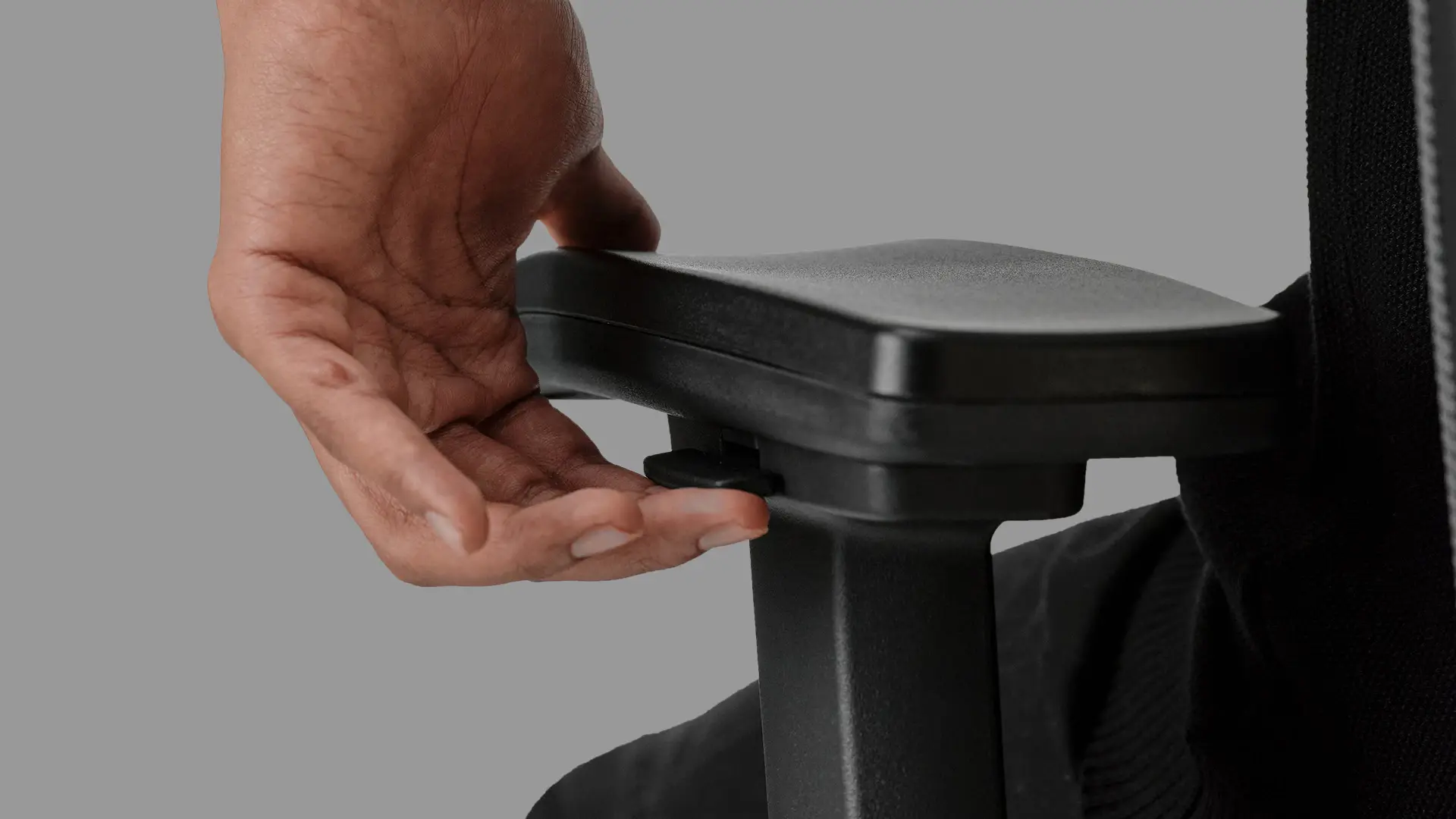
3. Armrest Height and Its Effect on Neck Tension

Armrests directly affect neck pain through shoulder elevation. When armrests are set too low — or absent — the arms hang unsupported, the shoulders lift slightly to compensate, and the trapezius muscle holds that load continuously. Over hours, this produces the classic tension pattern across the upper shoulders and base of the skull.

The fix is mechanical: armrests set at the correct height allow the shoulders to drop to a relaxed position, offloading the trapezius.

  • 2D (height only): Basic vertical adjustment. Addresses the most common cause of shoulder elevation.
  • 3D (height + pivot): Adds lateral movement. Useful for varied task postures.
  • 4D (height + pivot + depth + width): Full positional control. Best for users with chronic upper trap tension.

For neck pain specifically, height adjustment is non-negotiable. The additional axes of 3D and 4D become more relevant for shoulder and wrist comfort.

4. Seat Depth and Pelvic Stability

Seat depth determines whether you can sit fully back in the chair and use the backrest — which is the foundation of everything above it.

If the seat is too deep, most people slide forward to avoid pressure behind the knees, losing contact with the lumbar support and backrest entirely. The spine then has no support structure to lean on, and the postural collapse chain starts immediately.

The correct fit: with your back against the lumbar support, there should be roughly a 2–4 finger gap between the back of your knees and the front edge of the seat.

5. How to Use This to Make a Decision

The best ergonomic chair for neck pain depends on your working posture, not just features. Before looking at specific chairs, identify your primary working posture:

  • Sit upright, type-focused → Prioritize lumbar support depth + adjustable armrests.
  • Recline during work → Prioritize dynamic or adjustable headrest + recline range.
  • Shift postures frequently → Prioritize seat depth adjustment + flexible lumbar.
  • Have chronic upper trap tension → Prioritize 4D armrests + adjustable headrest.

Choosing an ergonomic desk chair for neck pain based on your actual posture pattern — rather than a generic feature checklist — is what separates a chair that helps from one that just costs more.

ergonomic chair for neck pain

The Best Ergonomic Chairs For Neck Pain

Choosing the right ergonomic chair for neck pain comes down to fit, adjustability, and how well the chair supports the specific posture patterns that cause cervical strain. The 12 chairs below cover a range of budgets, body types, and working styles — each selected for a distinct reason, not just brand recognition.

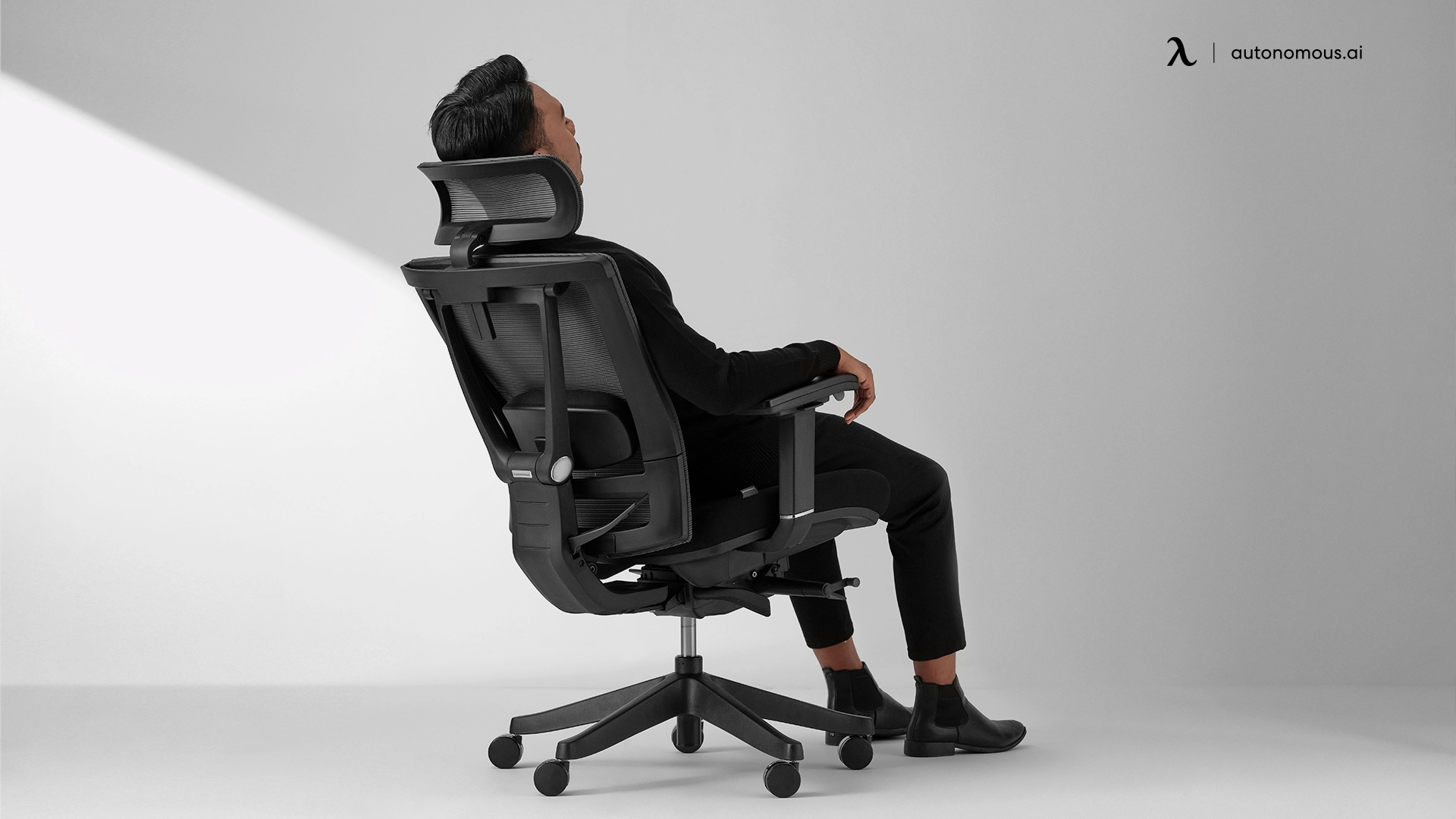
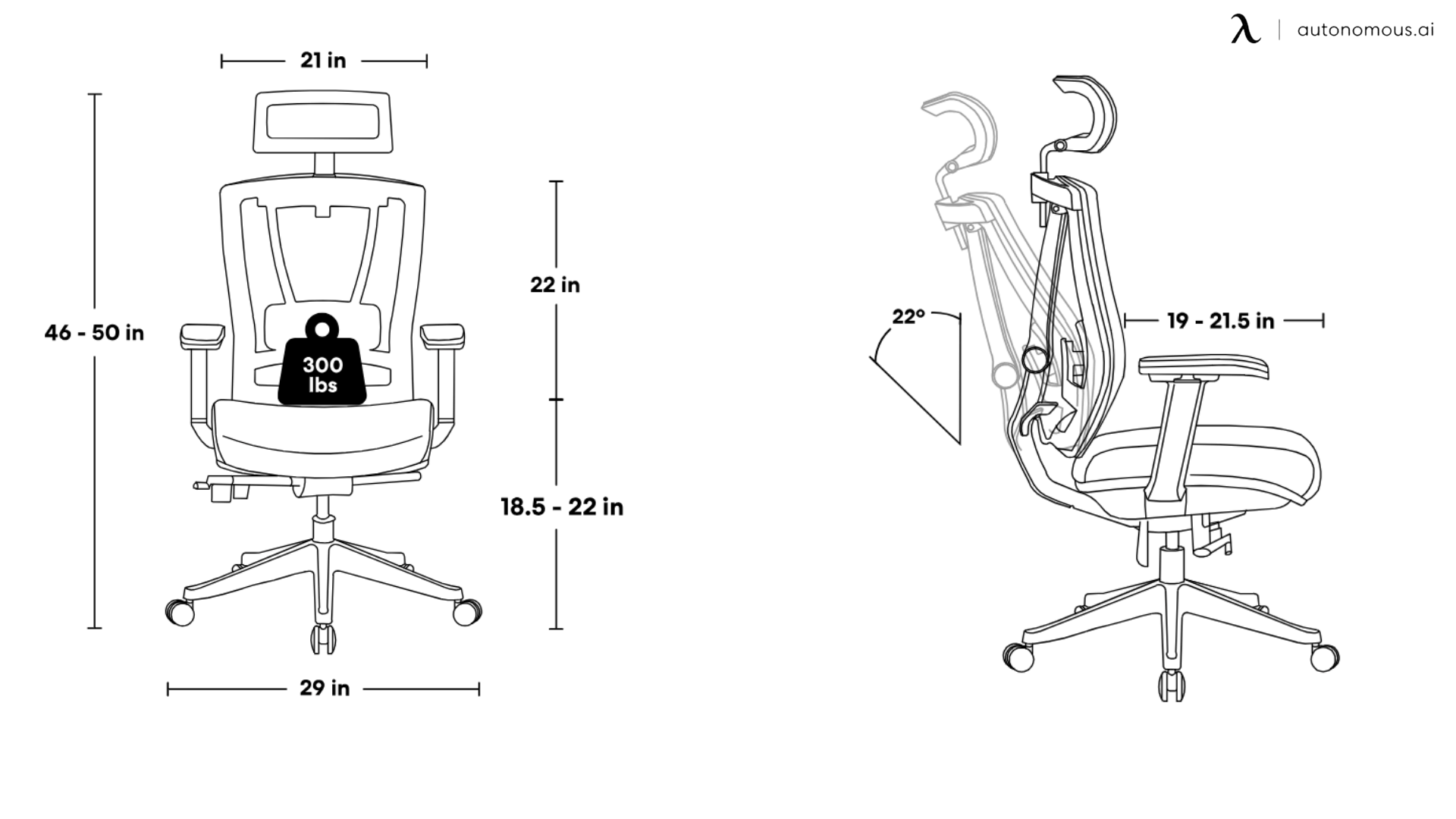
1. Autonomous ErgoChair Pro — Best Overall for Neck Pain Relief

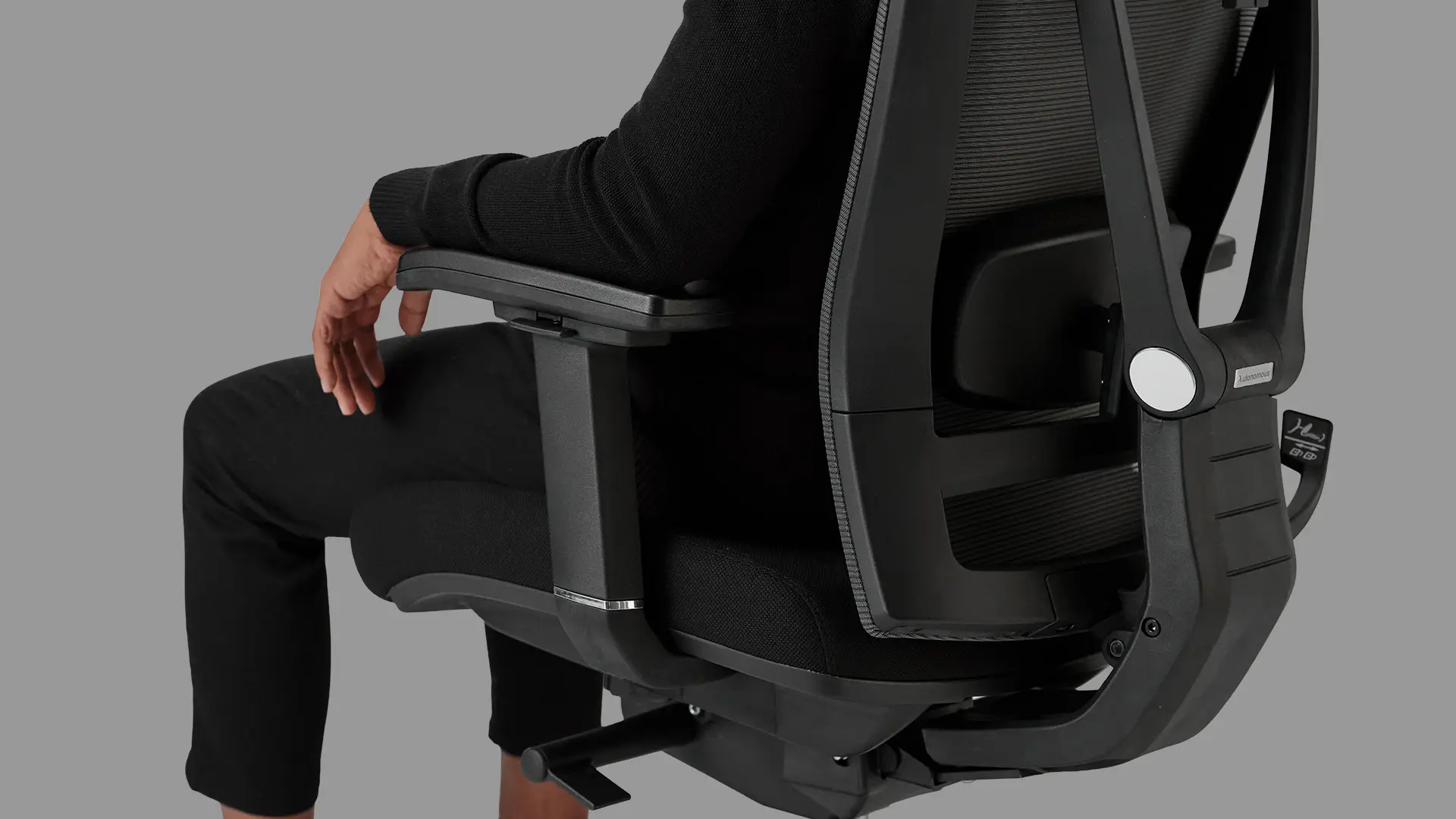
The Autonomous ErgoChair Pro is built as an office chair for long hours, with a headrest, adjustable lumbar, and 4D armrests that work together to address the postural chain behind neck strain. At its price point, few chairs match the breadth of adjustability it offers.

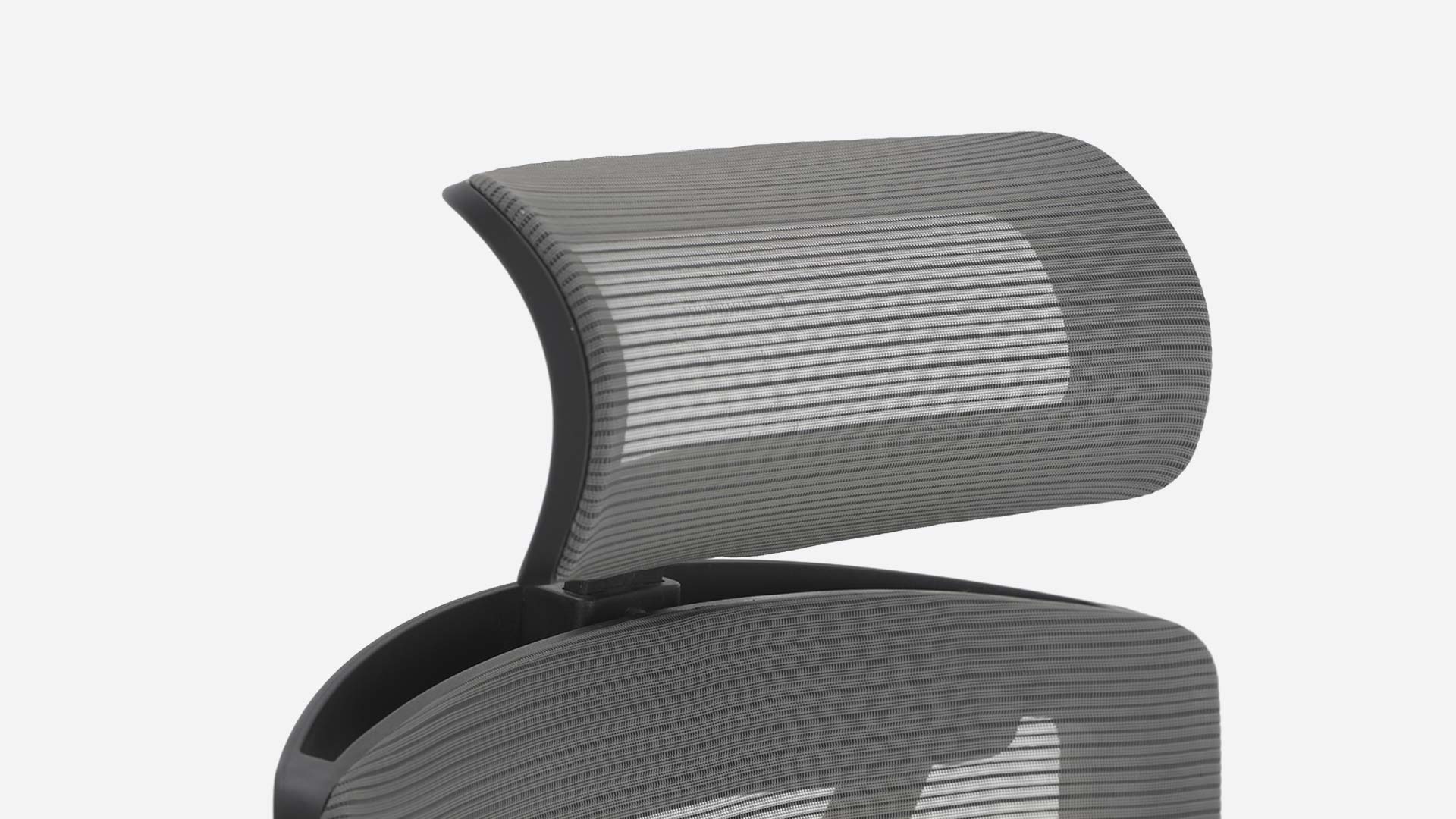
The headrest positions at skull-base height rather than mid-cervical — the distinction that separates a headrest that genuinely reduces load from one that just pushes the head forward. The lumbar depth adjustment stabilizes the lower back foundation, which matters more for neck pain than lumbar height alone. And the 4D armrests allow the shoulders to drop fully to a neutral position, releasing the trapezius tension that builds across a full workday.

Neck-specific strengths:

  • Headrest adjusts in height and angle — positions at skull base, not mid-cervical
  • Lumbar depth adjustment stabilizes the lower-back foundation upstream of the neck
  • 4D armrests enable full shoulder drop to neutral, reducing trap tension

Worth knowing: The seat foam is on the firmer side. Users who prefer a softer seat may need a short break-in period.

Best for: Desk workers using this as an 8-hour office chair, spending long hours seated who need full adjustability across headrest, lumbar, and armrests at a mid-range price.

2. Autonomous ErgoChair Ultra 2 — Best for Advanced Ergonomic Needs

The Autonomous ErgoChair Ultra 2 approaches neck pain from a different angle than most chairs on this list. Rather than managing cervical strain directly through a headrest, this mesh office chair works upstream — through an adaptive backrest that flexes with the body rather than holding a fixed position.

The practical difference shows up over a full workday. A rigid backrest holds one plane; the Ultra 2 maintains contact through posture shifts, which reduces the fatigue-driven forward drift that accumulates by hour five or six. For taller users, the extended backrest height reaches the upper thoracic region where most standard chairs lose contact — and losing that contact is often what allows the upper back to round and the head to follow.

The X-shaped lumbar engages the full lower-back curve rather than a single pressure point, which prevents the fulcrum effect of mid-point-only lumbar support — where the spine rounds above and below the contact zone even while it's technically "supported."

Neck-specific strengths:

  • Extended backrest reaches upper thoracic zone — reduces forward head posture in taller users
  • X-shaped lumbar engages full lower-back curve, not a single pressure point
  • Adaptive flex maintains back contact through posture shifts, reducing cumulative forward drift

One clarification worth making upfront: the Ultra 2 has no traditional headrest. Its approach to neck support is entirely postural. For users who need direct skull-base contact during recline, the ErgoChair Pro is the better fit.

Best for: Users 5'10" and above, or those whose neck pain originates in thoracic rounding rather than direct cervical strain.

3. Herman Miller Aeron — Best Premium Option

The Aeron’s approach to neck pain is indirect but mechanically sound — it works by building the most stable possible postural foundation from the pelvis up. The PostureFit SL lumbar system is what separates the Aeron from most premium chairs. Where standard lumbar supports target a single zone, the PostureFit SL uses two independent pads — one for the sacrum, one for the lumbar — that flex separately. 

This stabilizes the pelvis before the lumbar curve, which is the correct sequence for preventing the collapse chain that ends in neck strain. Users whose neck pain is driven by lower-back instability rather than a missing headrest consistently report that this is where the Aeron earns its price.

The 8Z Pellicle mesh distributes pressure across eight tension zones, which reduces the restless repositioning that gradually erodes posture over a long session. Three body-specific sizes — A, B, and C — mean the chair fits the user's actual dimensions rather than approximating them, which makes every other adjustment more effective.

Neck-specific strengths:

  • PostureFit SL stabilizes sacrum and lumbar independently — addresses the root of the cervical collapse chain
  • Three size variants ensure correct fit across body types, making all other adjustments more effective
  • 8Z Pellicle mesh reduces pressure-driven repositioning that erodes posture over long sessions

Worth knowing: No headrest included. Add-on headrest has mixed reviews — functions more as a position reminder than active cervical support.

Best for: Users whose neck pain is driven by lumbar and pelvic instability, who want a posture office chair precisely sized to their body.

4. Steelcase Gesture — Best for Multi-Posture Workers

The Gesture was designed around a specific observation: modern desk workers don't hold one position. They type, recline, lean forward, reach, and shift — often within the same hour. Most ergonomic chairs are optimized for one of these postures. The Gesture is built to support all of them.

The 3D LiveBack technology drives this. The backrest follows the spine through directional changes rather than holding a fixed curve, which means postural support doesn't drop off when the user moves away from the chair's default position. For neck pain specifically, this matters because cervical strain accumulates most during unplanned posture shifts — the moments when the back loses support and the neck compensates.

The 360° adjustable armrests are the other feature with direct neck relevance. Most armrests adjust height only. The Gesture's full rotational range means the arms can be positioned to match any working posture, keeping the shoulders dropped and the trapezius unloaded regardless of what the user is doing at their desk.

Neck-specific strengths:

  • 3D LiveBack follows the spine through posture changes — prevents the support gaps that cause compensatory neck strain
  • 360° armrests maintain shoulder-drop position across all working postures
  • Headrest adjustable in height and angle, included as standard

Worth knowing: Full value requires varied posture use. Predominantly upright workers may find the adaptive range underutilized at this price point.

Best for: Users who shift frequently between upright, reclined, and lateral working postures throughout the day.

5. Humanscale Freedom — Best Dynamic Headrest

The Freedom is an ergonomic chair with an articulating headrest that adjusts automatically during recline, maintaining skull-base contact without manual repositioning. The self-adjusting recline operates on the same principle — using body weight rather than mechanical locks to find the correct supported angle for each user.

Unlike adjustable headrests that require the user to manually reposition after each posture change, the Freedom's headrest moves automatically with recline — maintaining skull-base contact continuously. The practical consequence is that users stop unconsciously leaning forward to fill the gap between their head and a stationary headrest, which is one of the more common posture failure patterns in standard chairs.

The self-adjusting recline uses body weight and physics rather than a mechanical lock — it naturally finds the supported recline angle for each user's weight without requiring lever adjustments. The synchronous armrests move with the backrest during recline, keeping the shoulders supported through position changes rather than leaving the arms hanging mid-recline.

Neck-specific strengths:

  • Articulating headrest maintains skull-base contact automatically through recline — eliminates the forward-lean gap common in fixed headrests
  • Self-adjusting recline encourages natural movement without requiring manual lock/unlock
  • Synchronous armrests maintain shoulder support through all recline positions

Worth knowing: Recline-centered design. Predominantly upright workers will underuse the headrest's primary function.

Best for: Users who recline regularly during the workday and want continuous cervical support without manual adjustment.

6. SIHOO Doro C300 — Best Dynamic Support at Mid-Range

The Doro C300 stands out at its price point for one specific reason: the headrest adjustment range is wider than most mid-range high-back office chairs with headrest offer, and it covers the axes that actually matter — height, angle, and forward/back depth. That third axis is what most $300–$400 chairs omit, and its absence is why many headrests in this range end up pushing the head forward rather than supporting it.

The flexible backrest responds to movement rather than resisting it. It's not the same mechanism as the LiveBack, but the functional outcome for moderate posture variation is similar — the back stays in contact through leaning and shifting rather than losing support the moment the user moves off-center. Users transitioning from rigid standard office chairs tend to notice the difference in end-of-day neck stiffness fairly quickly.

The lumbar support adjusts in height, which covers the correct lower-back zone across most height ranges. It's not depth-adjustable — users who need precise lumbar pressure control will find the Autonomous ErgoChair Pro a better fit — but for the majority of desk workers it positions correctly without modification.

Neck-specific strengths:

  • 3-axis headrest adjustment including forward/back depth — prevents the forward-push problem common at this price tier
  • Flexible backrest maintains contact through moderate posture variation
  • Height-adjustable lumbar covers correct lower-back zone across average height ranges

Worth knowing: Lumbar is height-adjustable only — no depth control. 

Best for: Mid-range buyers who want a movement-responsive chair with a properly adjustable headrest without entering the premium tier.

7. OdinLake Ergo MAX 747 — Best for Cervical Alignment

Most ergonomic chairs treat the backrest as a single unit. The Ergo MAX 747 splits it into three independent sections — upper, mid, and lower — each targeting a distinct spinal zone. For neck pain specifically, the upper section is what distinguishes it: it provides direct thoracic support at the zone where most chairs simply end.

That distinction has a mechanical consequence. Thoracic rounding — the upper-back forward curve that pulls the head forward — is one of the primary drivers of desk-related neck strain. A chair that supports only the lumbar and mid-back leaves the thoracic spine to manage itself, which it does by rounding under load. Its upper backrest section resists rounding directly, reducing forward head posture without requiring the headrest to compensate for it.

The lumbar adjusts across five height levels — more granularity than most ergonomic desk chairs for neck pain at this price point, and enough precision to find the correct lower-back zone across a wide height range. The recline locks at any angle between 90° and 135°, which covers both upright working postures and the more open hip angles that reduce thoracic compression during long sessions.

Neck-specific strengths:

  • 3-section backrest provides direct thoracic support — addresses forward head posture at its structural source
  • 5-level lumbar height adjustment offers higher precision than most mid-range options
  • 90°–135° recline with angle lock supports varied hip angles that reduce thoracic compression

Worth knowing: More adjustable elements means a steeper setup curve. First-time ergonomic chair buyers should budget time for proper configuration.

Best for: Users whose neck pain is driven by thoracic rounding and upper-back collapse, rather than direct cervical strain alone.

8. Branch Ergonomic Chair — Best Mid-Range Value

The Branch Ergonomic Chair covers the full set of adjustability requirements for an office chair for neck pain — seat depth, lumbar, headrest, and armrests — at a price point where most chairs drop at least one of these. 

Seat depth adjustment is the feature most buyers overlook and most chairs in this range omit. Without it, users with shorter or longer thigh lengths can't sit fully back against the lumbar support and backrest — which means neither feature functions as intended. Its seat depth adjustment solves this at the foundation, making the headrest and lumbar effective rather than approximate.

The headrest adjusts in height and angle and reaches a natural skull-base position for most users between 5' 4" and 6' 1" without modification. The lumbar support is fixed in position — not adjustable in height — which is the main trade-off at this price. For users within the average height range it's well-placed, but taller or shorter users may find it misses the correct lower-back zone.

Neck-specific strengths:

  • Seat depth adjustment enables full backrest contact — the prerequisite for effective lumbar and headrest support
  • Headrest height and angle adjustable — correct skull-base positioning for most users in the 5'4"–6'1" range
  • Complete adjustability set at mid-range price — no major feature compromised

Worth knowing: Lumbar support is fixed in position. Users significantly above or below average height may find it doesn't align with their lower-back curve.

Best for: Mid-range buyers who want a complete feature set, particularly those in the 5'4"–6'1" height range.

9. Nouhaus Ergo3D — Best for Users Who Move Frequently

The Ergo3D is built for a specific type of desk worker: one who doesn't stay in one position. Researchers, writers, and anyone who alternates between keyboard work, reading, and reference material throughout the day puts more lateral and rotational demand on a chair's backrest than a standard mesh panel is designed to handle.

The 3D mesh addresses this directly. Where standard mesh flexes in one plane, the material flexes in three directions — maintaining back contact through lateral shifts and rotational movement rather than losing it the moment the user moves off-center. The practical outcome for neck pain is less cumulative tension: when the back stays supported through movement, the neck doesn't have to stabilize the upper body on its own.

The headrest adjusts in height, angle, and depth — the depth axis being particularly relevant for users who shift postures frequently, since it prevents the gap between head and headrest that develops when the upper body moves forward during task transitions.

Neck-specific strengths:

  • 3D mesh maintains back contact through multi-directional movement — reduces neck compensation during posture shifts
  • 3-axis headrest including depth adjustment — minimizes forward-head gap during task transitions
  • Adjustable lumbar supports the lower back through varied working postures

Worth knowing: The dynamic flex feels unfamiliar coming from a rigid backrest. Most users adapt within a few days, but it's a noticeable difference initially.

Best for: Users with varied, movement-heavy working postures who shift frequently between tasks throughout the day.

10. Hbada E3 Pro — Best Full-Body Support Setup

This ergonomic desk chair for neck pain solves a problem that most chairs ignore: what happens when the seat height required for correct lumbar and headrest alignment puts the user's feet off the floor. For shorter users or those on fixed-height desks, this is a real postural failure point — an unsupported base destabilizes the pelvis, which starts the collapse chain regardless of how well the rest of the chair is adjusted.

The integrated footrest removes that variable. Rather than introducing a separate accessory that may not align correctly with the chair's seat height, its footrest is calibrated to the chair — keeping the full postural chain stable from feet to skull. 

The 4D headrest is precise enough to reach the skull-base position for most users, with forward/back depth adjustment that prevents the forward-push problem common in chairs with simpler headrest mechanisms. The recline locks at any angle, which is useful for users who need to hold an open hip position during longer sessions to reduce thoracic compression.

Neck-specific strengths:

  • Integrated footrest stabilizes the postural chain from the base — prevents the pelvic instability that undermines all other support features
  • 4D headrest with depth adjustment reaches skull-base position and resists forward-push
  • Lockable recline supports open hip angles that reduce thoracic compression during long sessions

Worth knowing: The footrest delivers the most value for users under 5'6" or those on fixed-height desks. Taller users with feet naturally flat on the floor should weigh whether the integrated footrest justifies the price relative to other options at this tier.

Best for: Users under 5'6" or those on fixed-height desks who need full postural chain support from feet to neck.

11. Staples Dexley — Best Under $300

At under $300, most chairs make one of two compromises: a headrest that doesn't adjust meaningfully, or a lumbar that sits in the wrong position for most body types. This affordable ergonomic chair for neck support avoids both — not with premium-tier precision, but with functional coverage that holds up for the primary use case.

The headrest adjusts in height and reaches a usable skull-base position for average-height users without the forward-push problem that makes many budget headrests counterproductive. The mesh backrest maintains its lumbar curve without early compression — the most common failure point at this price tier, where cheaper foam or mesh begins to flatten within the first few months and the lumbar benefit disappears.

For users with mild to moderate postural neck pain, the combined with correct monitor height setup covers the core ergonomic variables that drive desk-related cervical strain. It won't match the adjustability precision of mid-range options, but it functions correctly for users who fit within average proportions.

Neck-specific strengths:

  • Headrest adjusts in height — reaches skull-base position for average-height users without pushing the head forward
  • Mesh backrest maintains lumbar curve without early compression — the key durability factor at this price
  • Functional coverage of core ergonomic variables for mild to moderate postural neck pain

Worth knowing: Height-only armrests. Users with chronic upper trap tension will find the shoulder-drop adjustment limited compared to 3D or 4D options.

Best for: Budget-conscious buyers with mild postural neck pain who fit within average height proportions.

12. Logicfox Ergonomic Pro — Best for Adjustability Range

The Logicfox Ergonomic Pro is one of the more configurable options for anyone looking for the best computer chair for neck pain with non-standard proportions — someone who has tried standard ergonomic chairs, found that one or two features didn't fit correctly, and needs more individual control over the chair's configuration. Eight independently adjustable points — headrest, lumbar height, seat height, seat depth, tilt tension, tilt lock, and 4D armrests — cover every variable in the postural chain.

That breadth of adjustability makes it one of the more body-type-inclusive options on this list. Users with non-standard proportions — long torso with shorter legs, or a height that falls outside the range most chairs optimize for — consistently find that the Logicfox can be dialed in where other chairs approximate. The headrest adjusts in height and angle and reaches the correct skull-base position for most users between 5'5" and 6'2".

The trade-off is setup time. Eight adjustment points require more initial configuration than a chair with three or four. Users who don't invest in the correct setup will end up with an under-configured chair that performs no better than a simpler option — the adjustability only delivers value when it's actually used.

Neck-specific strengths:

  • 8-point adjustability covers every variable in the postural chain independently — particularly useful for non-standard body proportions
  • Seat depth adjustment included — enables full backrest contact as the foundation for lumbar and headrest effectiveness
  • BIFMA certified — independently verified structural integrity

Worth knowing: Setup requires more time and attention than simpler chairs. The adjustability only delivers value when correctly configured.

Best for: Users with non-standard proportions or those who have struggled to find a correct fit in standard ergonomic chairs.

How to Set Up Your Ergonomic Chair to Actually Relieve Neck Pain

Buying the right ergonomic desk chair for neck pain is only half the equation. A well-designed chair adjusted incorrectly will underperform a simpler chair set up properly. The sequence below matters — each step builds the foundation for the one above it. Start from the bottom and work up.

Pairing correct chair setup with some simple neck posture exercises addresses both the structural and muscular sides of desk-related cervical strain.

  • Step 1: Seat Height — Set the Foundation First

An ideal seat height determines pelvic stability, which is the base of the entire postural chain. Set it correctly before adjusting anything else.

Adjust until your feet rest flat on the floor with your knees at roughly 90°. Your thighs should be approximately parallel to the floor or angled very slightly downward. If your feet can't reach the floor at the correct seat height, use a footrest rather than lowering the seat — dropping the seat to reach the floor pitches the pelvis backward and starts the collapse chain immediately.

  • Step 2: Seat Depth — Make the Backrest Usable

Seat depth determines whether you can actually use the lumbar support and backrest — without correct depth, neither functions as intended.

Sit fully back against the lumbar support. There should be a 2–4 finger gap between the back of your knees and the front edge of the seat. If the seat is too deep, you'll slide forward to relieve the pressure behind your knees, losing backrest contact entirely. If it's too shallow, the front edge cuts into the thighs. Either condition removes the support structure the rest of the setup depends on.

  • Step 3: Lumbar Support — Position It at the Curve, Not Above It

Lumbar support relieves neck pain by maintaining the lower back's inward curve, which prevents the thoracic rounding that pulls the head forward.

A proper lumbar support position should stay in the natural inward curve of your lower back — roughly between the top of the pelvis and the bottom of the ribcage. A common mistake is positioning it too high, where it pushes the mid-back rather than filling the lumbar curve. If your chair has height-adjustable lumbar, start low and move it up until you feel it filling the curve rather than pushing against a flat surface.

  • Step 4: Armrests — Drop the Shoulders

Armrests set at the correct height allow the shoulders to fully release downward. This directly offloads the trapezius — the muscle that accumulates the most tension when arms are unsupported and shoulders elevate to compensate.

Set armrest height so your elbows rest at 90–100° with your shoulders in a relaxed, dropped position. If your shoulders lift even slightly to meet the armrests, they're too high. If your arms hang without contact, they're too low. For users with 4D armrests, position them close enough to the body that the upper arms hang naturally — no lateral reach required.

  • Step 5: Headrest — Contact at the Skull Base, Not the Neck

A correctly positioned headrest supports the base of the skull, not the cervical spine itself. Contact at the mid-neck pushes the head into flexion, which increases cervical load rather than reducing it.

Adjust the headrest height until it contacts the back of the head just above where the neck meets the skull. The optimal contact angle depends on your working recline — for predominantly upright workers, the headrest should be close enough to provide light contact without pushing the head forward. For users who recline 15–25° during work, angle the headrest to follow that recline rather than staying vertical.

If the headrest is pushing your chin toward your chest even slightly, it's too high or too far forward. Reposition until the contact point feels neutral — head supported, neck unstrained.

  • Step 6: Monitor Height — Complete the Setup

An ergonomic monitor height is not a chair adjustment, but it belongs in this sequence because a correctly adjusted chair paired with a misaligned monitor will still produce neck pain.

Position the monitor so the top third of the screen sits at or just below your horizontal eye level when seated upright. This creates a natural downward gaze angle of 10–20°, which is the relaxed resting position for both the eyes and the cervical spine. A monitor set too low — even by two inches — is enough to reintroduce the forward head posture the chair is working to prevent.

Distance: approximately arm's length from the screen. Close enough to read without leaning forward, far enough that the head doesn't drift toward the screen during focus tasks.

How to Set Up Your Ergonomic Chair to Actually Relieve Neck Pain

FAQs

What is the best ergonomic chair for neck pain?

The best ergonomic chair for neck pain is one with adjustable lumbar support, a height-adjustable headrest, and 4D armrests that keep your shoulders relaxed. These features help maintain proper spine alignment and reduce strain on the neck. The right chair depends on your posture — reclined users benefit more from a dynamic headrest, while upright users should prioritize lumbar depth and armrest adjustability.

Can an office chair cause neck pain?

Yes, a poorly designed office chair can cause neck pain by forcing your spine out of alignment. When lumbar support is missing, the lower back collapses, the upper back rounds, and the head shifts forward. This places continuous strain on the neck muscles. Switching to an ergonomic chair for neck pain helps correct the root postural issue.

Does lumbar support help with neck pain?

Yes, lumbar support helps reduce neck pain by keeping the lower back in its natural curve. This prevents the upper back from rounding and stops the head from moving forward. Because the neck follows the spine, improving lumbar support is often more effective than focusing only on the headrest.

Is a headrest necessary on an ergonomic chair for neck pain?

A headrest is helpful if you recline frequently, as it supports the base of the skull and reduces neck muscle load. However, for upright sitting, proper lumbar support and armrest height often matter more. A poorly positioned headrest can push the head forward and increase neck strain instead of relieving it.

How do I adjust my ergonomic chair to relieve neck pain?

To adjust an ergonomic chair for neck pain, start with seat height so your feet are flat and knees are at 90°. Set seat depth with a 2–4 finger gap behind your knees. Position lumbar support in your lower back curve, then adjust armrests so your shoulders relax. Finally, set the headrest to support the base of your skull and align your monitor at eye level.

What chair features matter most for neck pain relief?

The most important features for neck pain relief are adjustable lumbar support, headrest height and angle, and armrest height. Seat depth adjustment is also critical because it allows full back contact. Without proper adjustability, even a high-end chair cannot maintain correct posture.

How do I know if my neck pain is from my chair?

Neck pain caused by a chair usually improves when you stand, move, or adjust your position. If the pain is constant, radiates down the arm, or includes numbness, it may be a medical issue. Ergonomic adjustments help posture-related pain but do not replace medical evaluation when symptoms are severe.

Is an ergonomic chair worth it for neck pain?

Yes, an ergonomic chair is worth it for neck pain if you sit for long hours daily. Mid-range chairs provide essential support, while premium chairs offer more precise adjustments and durability. Investing in a properly fitted chair reduces long-term strain and improves daily comfort.

What is the best budget ergonomic chair for neck pain?

The best budget ergonomic chair for neck pain includes adjustable lumbar support, armrests, and seat depth, even if the headrest is limited. In the $300–$500 range, many chairs provide the core features needed to improve posture and reduce neck strain without the cost of premium models.

What chair do physiotherapists recommend for neck pain?

Physiotherapists typically recommend ergonomic chairs that support natural spine alignment, especially strong lumbar support and adjustable armrests. The focus is less on brand and more on fit and adjustability, ensuring the chair adapts to the user rather than forcing a fixed posture.

ergonomic chair for neck pain

Conclusion

Neck pain from desk work is a posture problem before it's a pain problem. The right ergonomic chair for neck pain addresses it at the source — through lumbar support that keeps the spine stacked correctly, a headrest positioned at the skull base rather than the mid-neck, and armrests set low enough for the shoulders to actually drop.

No ergonomic office chair with headrest fixes poor setup, and no setup fixes the wrong chair. Both variables matter.

The 12 chairs on this list cover every budget tier and working posture type. If you're spending 6 or more hours a day at a desk and neck pain has become routine, the chair is the most productive place to start — followed immediately by monitor height and armrest calibration.

Pick the chair that fits your posture pattern and body type. Set it up correctly. Give it two weeks before drawing conclusions.

Autonomous Intern - Personal AI Assistant

Stay connected with us!

Subscribe to our weekly updates to stay in the loop about our latest innovations and community news!

Interested in a Link Placement?