.svg)



What Is an AI-Powered Financial Assistant? A Clear Guide

Table of Contents
- What Is an AI-Powered Financial Assistant?
- What Can an AI Financial Assistant Actually Do?
- AI Financial Assistant vs. Traditional Tools
- Common Use Cases for an AI-Powered Financial Assistant
- How to Choose the Right AI-Powered Financial Assistant
- How Autonomous Intern Supports Financial Admin Work
- FAQs
- Conclusion
Personal finance management is fragmented. Checking in one app, credit card spending in another, budgeting in a spreadsheet, savings goals somewhere else. Each tool shows a slice — none connect the pieces. The result is data without direction: more visibility into spending than ever, but no automated action tied to that visibility.
An AI-powered financial assistant is designed to bridge that gap. It pulls multiple financial accounts into a unified view and acts on the data — flagging unusual charges, surfacing upcoming payments, and identifying spending patterns that static reports leave unseen.
What Is an AI-Powered Financial Assistant?
An AI-powered financial assistant is a type of AI assistant that uses artificial intelligence to support everyday financial management tasks such as expense tracking, spending categorization, bill reminders, and financial summaries. Unlike standard budgeting apps that mostly log and display data, it organizes information more actively — surfacing recurring charges, highlighting upcoming payments, and generating summaries with less manual effort.
The category is sometimes confused with robo-advisors, but the functions are distinct. A robo-advisor focuses on investment portfolios: asset allocation, rebalancing, and tax strategies. An AI personal finance assistant operates at the day-to-day administrative level — transactions, bills, and spending records. The two serve different roles and can be used alongside each other.
An AI financial analyst, by comparison, is designed for institutional use cases such as market analysis, forecasting, and risk modeling — not the consumer-facing financial admin layer that an AI-powered financial assistant covers.
Across these categories, the shift from manual spreadsheets to AI-supported workflows has focused on reducing the effort required to stay organized. The latest generation builds on this by functioning as proactive AI — surfacing relevant information and streamlining routine tasks rather than simply displaying data.

What Can an AI Financial Assistant Actually Do?
An AI-powered financial assistant focuses on handling the routine, time-consuming parts of financial management. Rather than introducing new data, it works with the information you already have — organizing it, keeping it up to date, and making it easier to review.
- Budgeting and Spending Insights
There is no shortage of tools that show where money went. The difference with an AI finance assistant is that it can also help surface patterns as they develop — such as a category trending above its recent average or a subscription that renews at a different rate. Some tools may also indicate when a budget line is approaching its usual range based on recent activity.
Rather than requiring the user to check a dashboard, these signals can appear within the interface or through connected channels. The practical benefit is earlier visibility into patterns that might otherwise be noticed later.
- Expense Tracking and Management
Most people who have tried to log transactions by hand know what happens: the habit holds for a week or two, then gaps appear, and eventually the system quietly stops being used. Receipt images get saved to a camera roll and forgotten. Manually entered figures drift from reality. An AI-powered financial assistant can reduce that friction by pulling and categorizing transactions from linked accounts as they occur.
Some tools also support separation of personal and business expenses — useful for freelancers during tax preparation, as is an AI email assistant for managing invoice follow-ups and payment communication, though accuracy depends on the tool and how it is configured and reviewed over time.
- Bill Management and Payment Tracking
Missed payments are usually a volume problem — utilities, subscriptions, insurance, loans, memberships spread across services with different billing cycles. An AI financial assistant can help bring these into a single view and surface reminders ahead of due dates, operating similarly to an AI scheduling assistant that flags obligations through the channels the user already checks daily. This is a notification function, not an auto-payment function. The practical outcome is fewer missed deadlines and less time spent cross-checking multiple sources.
- Savings Awareness
Round-up transfers and fixed monthly deposits have been available for years, and they work — when the user remembers to set them up and the account balance supports them. Some AI personal finance assistants add context by displaying recent income and spending activity, highlighting periods where discretionary spending appears lower than usual, or bringing attention to upcoming obligations alongside scheduled transfers. The tool presents this information; whether to adjust saving behavior based on it remains the user’s decision.
- Financial Planning and Goal Tracking
Setting a financial goal takes minutes. Tracking it consistently is where most efforts break down — the information exists across multiple accounts, but assembling it into a clear picture requires effort. AI finance assistants can help by pulling income, spending, and savings data into a single view and showing trends over time — such as how recent activity compares to prior periods or how consistently a goal has been funded. This is context, not advice. The tool does not recommend investment strategies or suggest asset allocation — it organizes information so users can make their own decisions.
Users who already rely on a private AI assistant for work tasks often find the same organizational logic applies to financial oversight — the assistant handles the mechanical layer so attention can go to decisions rather than data assembly.

AI Financial Assistant vs. Traditional Tools
Traditional financial tools are built to record information. They help users log expenses, review balances, and track budgets, but they still depend heavily on manual upkeep. An AI finance assistant adds another layer by helping organize financial data, reduce repetitive tasks, and surface relevant information in a more timely way.
This does not mean traditional tools are obsolete. In many cases, an AI-powered financial assistant works alongside spreadsheets, budgeting apps, or banking tools by making the information inside them easier to manage and review.
Function | Traditional Tools | AI-Powered Financial Assistant |
Data capture | Manual entry or limited sync | Pulls data from connected sources with less manual input |
Categorization | User-defined rules and edits | Assisted categorization that improves with review |
Document handling | Stored separately across apps or folders | Helps group receipts, invoices, and statements in one workflow |
Spending review | Static dashboards and reports | Summaries and surfaced activity that are easier to scan |
Bill tracking | Managed through separate reminders or calendars | Brings upcoming obligations into one view |
Ongoing upkeep | Requires regular checking and manual updates | Reduces repetitive admin work over time |
Role in decision-making | Displays data for user review | Organizes and surfaces data for user review, without giving financial advice |
Traditional financial tools are built to record information. They help users log expenses, review balances, and track budgets, but they still depend heavily on manual upkeep. An AI finance assistant adds another layer by helping organize financial data, reduce repetitive tasks, and surface relevant information in a more timely way.
This difference is not only technical—it directly affects day-to-day productivity, especially for users managing financial information across multiple tools.
Common Use Cases for an AI-Powered Financial Assistant
An AI-powered financial assistant is most useful in situations where financial information is spread across multiple sources and requires ongoing manual upkeep. Its value comes from reducing that operational burden and keeping data organized over time.
- Individuals
For personal use, the primary benefit is maintaining a clearer view of day-to-day finances without constant effort.
- Track spending across multiple accounts in one place
- Keep receipts and transaction records organized
- Stay aware of recurring charges and subscriptions
- Review simple summaries of recent financial activity
An AI personal finance assistant helps turn scattered financial data into something easier to follow on a regular basis.
- Freelancers and Independent Workers
Freelancers often deal with a mix of personal and business finances, along with irregular income and multiple payment sources.
- Track income from different clients and platforms
- Organize invoices, receipts, and payment records
- Separate business and personal expenses more clearly
- Follow up on outstanding invoices
In this context, the assistant functions more like a lightweight AI financial analyst for operational tasks — helping structure financial records without replacing accounting tools.
- Small Teams and Operators
For small teams, financial admin is often shared and handled across multiple tools, which increases the chance of gaps or inconsistencies.
- Maintain shared visibility into expenses and payments
- Organize financial documents across projects or team members
- Generate simple summaries for internal review
- Keep track of recurring costs across tools and services
Here, an AI financial assistant helps standardize how financial information is collected and reviewed, reducing reliance on manual coordination.
Across all three use cases, the role remains consistent: not to advise on financial decisions, but to support the day-to-day processes that keep financial information accurate, accessible, and easier to manage.

How to Choose the Right AI-Powered Financial Assistant
Not all tools labeled as an AI-powered financial assistant serve the same purpose. Some focus on budgeting, others on investing, and some on administrative workflows. Choosing the right one depends on how well it fits into your existing financial habits.
- Account Coverage
The first practical question is whether a tool can connect to the accounts that matter — checking, credit cards, savings, and loans. Gaps in coverage lead directly to incomplete financial views. Before evaluating features, it is worth confirming which institutions are supported and whether the tool can pull data from multiple sources reliably.
- Transaction Accuracy
Categorization accuracy has a direct impact on how useful a financial tool is. Misclassified transactions can distort summaries and make financial activity harder to review. Look for tools that allow manual corrections, and pay attention to whether those corrections are reflected consistently over time. Trial periods are often more informative than feature lists.
- Structured Insights vs Basic Notifications
Most tools send alerts — a bill is due, a balance is low, a transaction posted. The more useful distinction is whether the tool organizes information beyond individual alerts: regular summaries, grouped spending views, consolidated obligation lists. In some cases, "AI-powered" features are rebranded notifications, so evaluate how information is actually presented in use.
- Security and Data Handling
Understand how a tool accesses, stores, and processes data before connecting financial accounts. Cloud-based platforms depend on provider infrastructure and encryption policies; some tools offer on-device processing where data stays on the user's hardware. Review data access, retention policies, and account permissions — financial data warrants more scrutiny than most personal information.
- Planning and Visibility
Most budgeting tools are backward-looking. Some AI finance assistants also surface trends based on recent activity or show how current spending compares to prior periods. The value of this depends on whether the goal is basic tracking or visibility across multiple financial priorities.
- Cost and Value
Paid plans for an AI-powered financial assistant typically range from basic free tiers to monthly subscriptions with expanded features. The value depends on what the tool replaces — time spent on manual tracking, multiple single-purpose apps, or missed reminders. Evaluating that trade-off is itself a productivity calculation: whether the tool reduces the total overhead of staying financially organized relative to its cost.

How Autonomous Intern Supports Financial Admin Work
The earlier criteria — account coverage, accuracy, security, and cost — lead to a practical question: can one system meaningfully reduce the amount of manual work involved in managing financial information?
Autonomous Intern approaches this differently from typical AI-powered financial assistants. It is an OpenClaw AI device that works through existing communication channels and does not rely on a subscription model. In financial workflows, this shifts the focus from tracking accounts to organizing the operational layer around them.



1. Local Processing and Financial Data
Most AI financial tools rely on cloud infrastructure, where financial data is transmitted, processed, and stored externally. This model depends on provider-level security, access controls, and data policies.
Autonomous Intern processes data locally on the device. Financial documents, messages, and interactions remain on the hardware rather than being routed through external servers. This changes how data is handled at a structural level — reducing reliance on third-party storage and limiting how information is exposed beyond the user’s environment.
For workflows that involve sharing invoices, discussing payments, or reviewing financial records through messaging, this distinction is practical. The information stays within the device instead of being processed remotely.
2. Financial Admin Through Existing Workflows
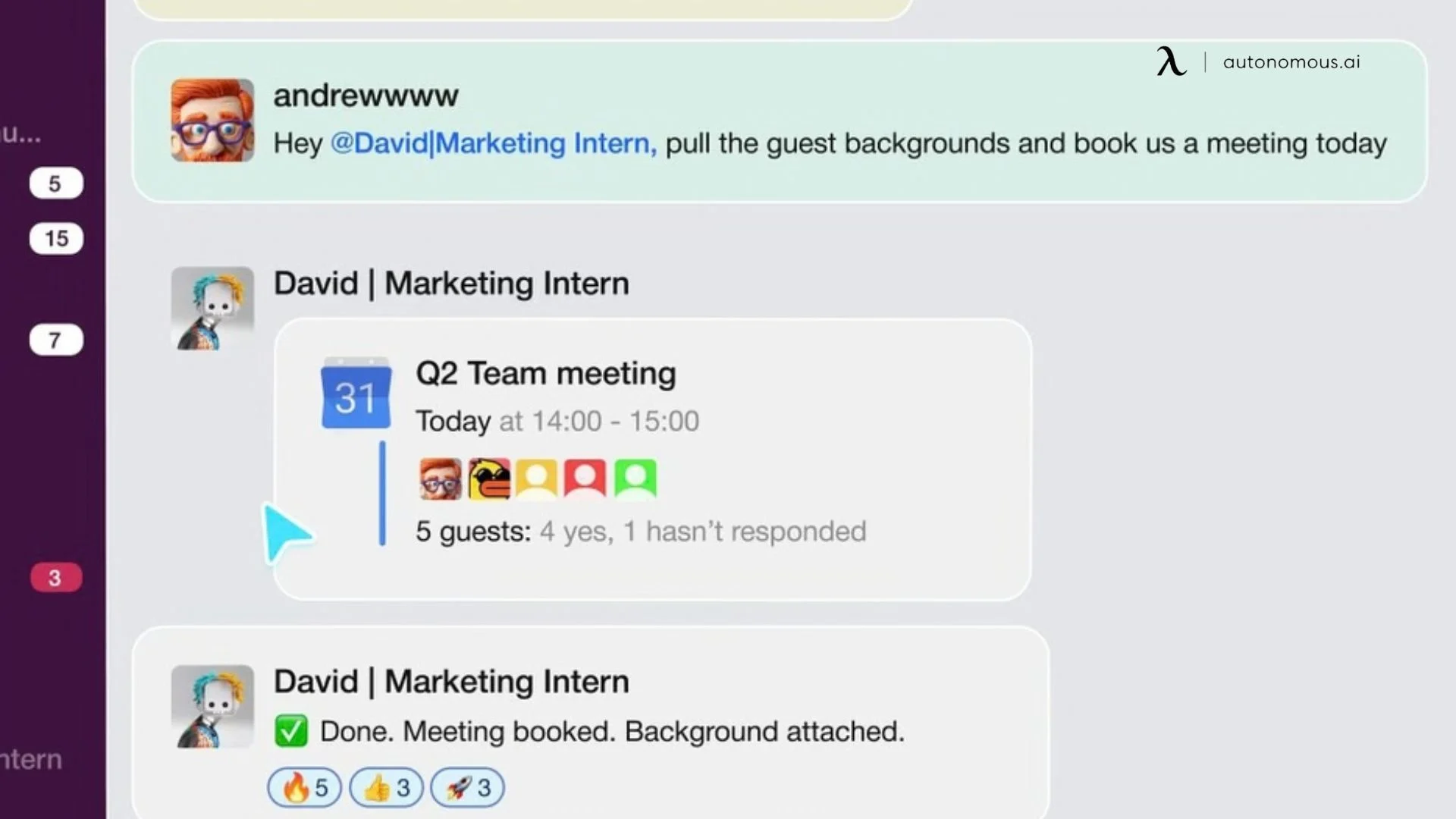
Instead of requiring a separate dashboard, this personal AI assistant operates through messaging channels such as Slack, WhatsApp, Telegram, and Discord. Financial tasks happen in the same place as ongoing communication, reducing the need to switch between tools. For knowledge workers who protect time for deep work, consolidating financial admin into existing channels removes a recurring source of context-switching.
This supports common workflows such as:
- Summarizing financial documents: Generate structured summaries from reports, invoices, or shared records directly within a conversation.
- Drafting financial communication: Prepare responses related to invoices, payment status, or client updates using existing context.
- Tracking deadlines and obligations: Surface reminders for tax filings, payments, and recurring commitments with relevant details.
- Organizing financial records: Keep receipts, invoices, and documents accessible without maintaining a separate system.
- Retrieving information on demand: Answer questions based on previously shared data, reducing the need to search across files or threads.
3. Context That Builds Over Time
Many tools treat each interaction independently. Intern retains working context across conversations — including recurring obligations, communication history, and previously shared financial information.
Over time, this reduces the need to restate details. Tasks such as drafting follow-ups or referencing past transactions require less manual input because the relevant context has already been established through prior interactions. Handling these retrieval steps automatically also reduces the kind of low-priority interruptions that function as office distractions during focused work periods.
This matters because much of financial admin work involves gathering information before acting on it. When that information is already organized, the process becomes more efficient.
4. Cost and Consolidation
Autonomous Intern is priced as a one-time purchase rather than a recurring subscription. For users currently managing multiple tools for tracking, reminders, and document organization, this changes the cost structure from ongoing payments to a single upfront investment.
The value is not in replacing every financial tool, but in consolidating the operational layer around them — reducing the need to manage multiple interfaces, subscriptions, and disconnected workflows.
FAQs
Is there an AI financial assistant?
Yes, there are tools described as AI financial assistants that help with tasks like tracking expenses, organizing financial data, and summarizing activity. Most focus on improving visibility and reducing manual work rather than providing financial advice or managing investments.
Can I use AI to help with my finances?
Yes, AI can help with organizing financial information, tracking expenses, managing documents, and setting reminders for payments or deadlines. It supports financial workflows, but decisions about spending, saving, or investing remain with the user.
What does an AI-powered financial assistant actually do?
An AI-powered financial assistant helps automate routine financial tasks such as expense tracking, document organization, and activity summaries. Its role is to structure financial information and make it easier to review, not to make financial decisions.
Is Gemini or ChatGPT better at finance?
Tools like Gemini and ChatGPT can help explain financial concepts, summarize information, and assist with general financial questions. However, they are not designed to manage personal financial data directly and should not be relied on for financial advice or decision-making.
Is it safe to use AI for financial data?
It depends on how the tool processes data. Some tools use cloud-based systems, while others operate locally on the device. Reviewing data access, storage, and permissions is important before using any financial tool.
Does an AI financial assistant replace budgeting or accounting tools?
No, it typically works alongside them. An AI-powered financial assistant helps organize and manage financial information, while budgeting or accounting tools remain the system of record for tracking and reporting.
Can an AI assistant access my bank accounts directly?
This depends on the tool. Some connect to financial institutions, while others work only with user-provided data such as documents, emails, or spreadsheets. It is important to review how data is accessed before using any tool.
Is a local AI assistant safer than cloud-based financial tools?
Local AI assistants process data on the device rather than sending it to external servers. This can reduce reliance on third-party infrastructure, but users should still review how data is stored, accessed, and protected.
Is an AI-powered financial assistant worth it?
It depends on how much manual work is involved in managing financial information. For users dealing with multiple tools, documents, and recurring tasks, an assistant can reduce time spent organizing and reviewing data.

Conclusion
Financial tools have become more capable, but the underlying challenge remains the same: keeping information organized across accounts, documents, and communication channels still requires ongoing effort. An AI-powered financial assistant helps reduce that burden by structuring data, maintaining consistency, and making financial activity easier to review over time.
At the same time, not all tools operate at the same layer. While many focus on tracking and displaying financial data, others — like Autonomous Intern — address the operational side of finance: organizing documents, handling communication, and supporting day-to-day workflows without replacing decision-making.
As financial systems continue to evolve, the role of AI is less about making decisions and more about reducing friction. For individuals, freelancers, and teams managing financial information across multiple tools, the value lies in having a system that keeps everything connected, accessible, and easier to manage.


Stay connected with us!
Subscribe to our weekly updates to stay in the loop about our latest innovations and community news!
Interested in a Link Placement?



Spread the word