Image
Cart (0)
Bevel App Review 2026: How It Works and Is It Worth It?
Latest Updates

Bevel App Review 2026: How It Works and Is It Worth It?

|Feb 8, 2026
501 Views

Health data scattered across too many apps is a familiar problem. Sleep lives in one place, workouts in another, nutrition in a third — and none of it connects into a complete picture. Bevel positions itself as the unifying layer, pulling those signals together and translating them into clearer, more actionable insights. 

The real question is whether it meaningfully reduces daily friction or simply reorganizes the same data in a new interface. In this Bevel app review, we break down what it does well, where it shows limitations, and who it’s likely to work best for.

What Is the Bevel App?

At its core, the Bevel app is an all-in-one health and wellness companion designed to help you track and understand key aspects of your well-being, including sleep, recovery, fitness, nutrition, and stress. It connects with Apple Health and wearables to pull in data and turn it into personalized insights and guidance rather than just raw numbers. 

The positioning is important. Bevel is not meant to replace a wearable. Instead, it aims to replace the multiple apps people rely on to interpret what their wearable already tracks. While Apple Health aggregates a large volume of data, its interpretation layer is limited. Bevel’s premise is that meaningful value comes from context — turning fragmented signals into daily, actionable guidance.

Bevel app review

Key Features of Bevel App That Matter in Practice

Bevel packs a lot into one app, and not all of it carries the same weight. Some modules feel fully realized, others are still catching up to dedicated alternatives. Here is what each one actually does

1. Bevel Intelligence (Health Interpretation Engine)

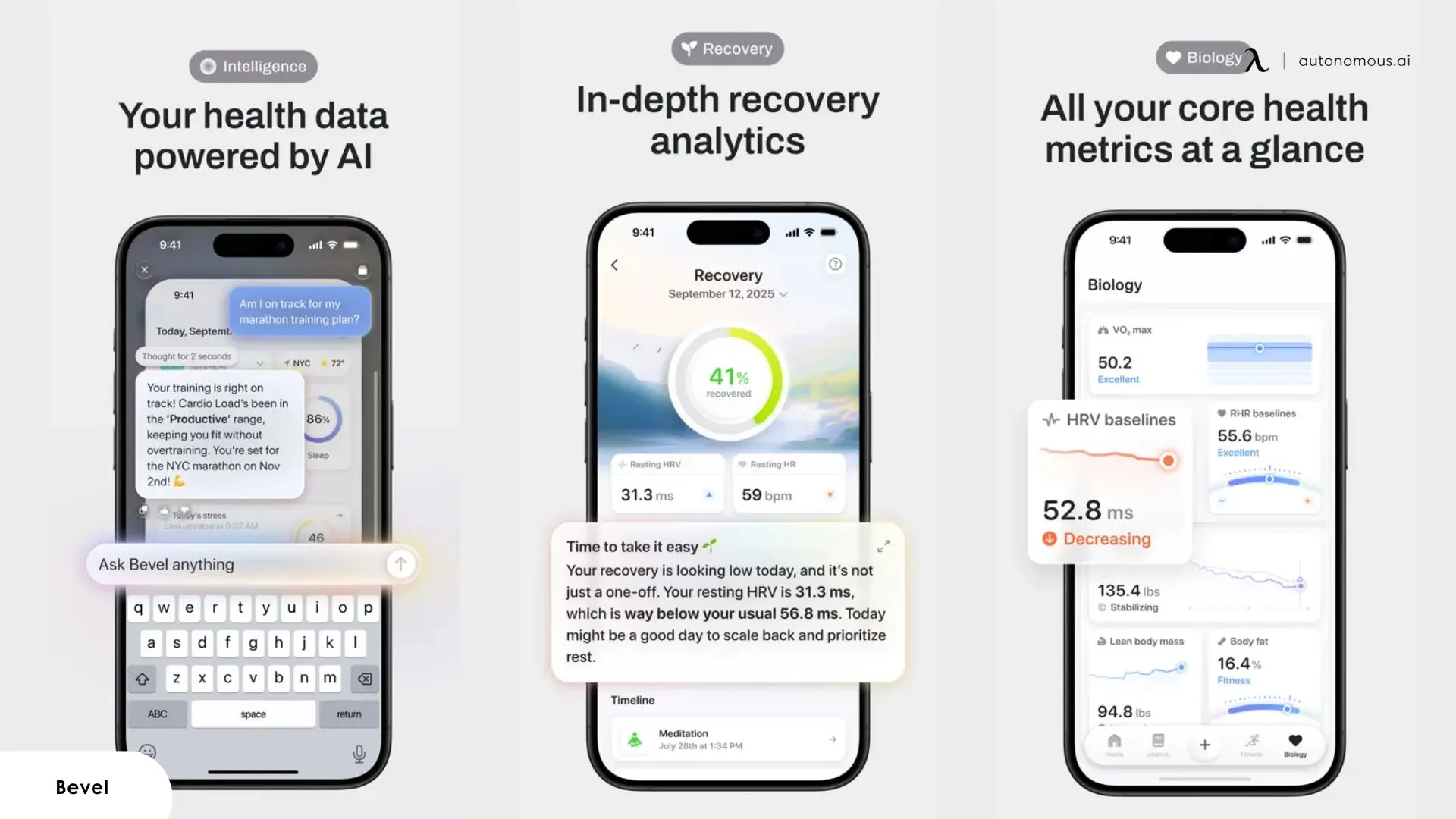
At the center of the Bevel application is Bevel Intelligence, which connects data across sleep, recovery, strain, stress, nutrition, and biology data to surface patterns and recommendations, such as when to train harder or prioritize rest. This layer addresses a common gap in Apple Health: turning data into usable guidance.

2. Recovery, Sleep, and Strain Scores

Bevel centers daily insights around three core scores:

  • Recovery Score reflects how prepared your body is to perform, aiming to reduce overtraining and injury risk.
  • Sleep Score condenses sleep stages, duration, and disruptions into a single metric and includes a smart alarm designed to wake users during lighter sleep cycles.
  • Strain Score measures how much physical stress your body accumulates throughout the day, adjusted based on sleep and recovery.

Together, these scores form the backbone of Bevel’s daily guidance.

3. Stress and Energy Tracking

The Stress Score reflects how stress appears across workouts, sleep, and daily activity. Bevel also combines recovery, sleep, strain, and stress into an Energy Bank, a single metric designed to show how energy builds and depletes throughout the day.

4. Nutrition Score and Food Logging

Bevel fitness app includes nutrition tracking via barcode scanning, image search, recipe creation, and text input across a large food database. Users can set calorie and macro targets, and glucose tracking is supported to show how food choices affect metabolism.

Compared with dedicated options like free calorie counting apps, Bevel’s nutrition tools are more focused on trend awareness than detailed dietary optimization.

5. Strength Builder and Training Support

The app offers a Strength Builder with a library of over 700 exercises. Workouts can sync between phone and watch, and Bevel provides real-time feedback on muscular strain. Users can follow preset routines, generate custom plans, or log previous workouts, making this feature particularly relevant for Apple Watch users evaluating the Bevel app Apple Watch experience.

While this works well for general tracking, it remains lighter than dedicated training platforms such as those covered in the Fitbod app or the Runna app.

6. Biology and Habit Tracking

The app tracks biological markers such as HRV, VO₂ max, and body composition to show long-term adaptation. A built-in Journal lets users log habits like hydration, sunlight exposure, and screen time, then connects those behaviors to changes in sleep, recovery, and stress. This approach aligns closely with how many of the best wellness apps focus on long-term behavior patterns rather than short-term metrics — a theme often mentioned in Bevel health app reviews.

Key Features of Bevel App

Bevel App Pricing: Is It Worth the Cost?

Understanding the Bevel app cost can be a little tricky because the pricing model has shifted over time. Originally, Bevel offered a free download with an optional Bevel Pro subscription. According to the official app listing, Pro subscriptions were available at around $5.99 per month or $49.99 per year via in-app purchase.

Free vs Paid Plan:

  • Free (base) — Includes most tracking and scoring features: sleep, recovery, strain, stress, nutrition logging, workout tools, and habit logs.
  • Paid / Intelligence — Offers enhanced interpretation, deeper contextual insights, and smarter guidance beyond basic scoring (availability may vary by account).

Is Bevel Safe? Data Privacy & Security

When evaluating safety in a Bevel app review, data privacy and handling are key concerns. Bevel collects health and activity data from Apple Health and wearables like Apple Watch to generate insights — but it does not store biometric data independently outside secure user accounts unless you explicitly permit cloud syncing.

According to the app’s privacy policy, health data shared with Bevel is used only to power your personal experience and is not sold to third parties. Apple’s HealthKit framework also prevents Bevel from accessing sensitive data unless you grant it permission on your device.

In terms of general app safety:

  • Permissions are opt-in: You choose what Apple Health metrics Bevel can read.
  • No third-party sharing for marketing by default: Data is used for app functionality and analytics.
  • Standard mobile security applies: Bevel adheres to platform security controls on iOS, including sandboxing and encrypted on-device storage.

If you’re concerned about how your health data is used, the safest approach is to review the permissions screen in the Apple Health app and adjust what you allow Bevel to access.

Is Bevel Safe? Data Privacy & Security

My Real Experience Using the Bevel App

I’ve spent several weeks using the Bevel app alongside an Apple Watch and Apple Health data stream to see how well it holds up outside of fluff. Bevel’s promise of an “all-in-one” health and fitness experience is compelling, but it’s worth unpacking what that actually means once you’re deep into daily use. 

1. What Worked Well in Daily Use

After using Bevel consistently, several strengths became clear — mostly in how it reduces long-standing friction Apple users tend to accept as “normal.”

  • A single place to interpret Apple Health data:

One frustration Apple Watch users have dealt with for years is that Apple Health collects everything but explains very little. In daily use, Bevel helped bridge that gap. Instead of bouncing between raw charts, I could open the app and quickly understand how sleep, recovery, and activity were interacting, which saves time compared to checking multiple apps just to answer basic questions like “How am I doing today?”. It doesn’t match Garmin’s end-to-end ecosystem, but it narrows a gap Apple users have felt for a long time.

  • Scoring systems that replace manual cross-checking

Apple users often rely on several apps to approximate what Garmin provides natively: readiness, strain, and recovery in one place. Bevel’s Recovery, Sleep, and Strain scores didn’t eliminate the need for judgment, but they reduced the amount of interpretation I had to do myself. I found myself checking fewer apps just to decide whether a workout made sense that day.

  • More holistic context than single-purpose apps

Apps like Athlytic do a solid job with recovery, while others like MyFitnessPal dominate nutrition tracking but come with higher cost and narrower focus. Bevel doesn’t outperform those tools in isolation, but in practice, it provided enough coverage across health, fitness, and nutrition that I stopped switching between apps as often. That trade-off — breadth over depth — is noticeable but often acceptable.

  • Day-to-day continuity that Apple Health lacks

Apple Health shows data, but it rarely connects yesterday to today in a meaningful way. Bevel does a better job of showing how sleep affects recovery, how recovery shapes strain tolerance, and how stress accumulates across the day. Using it daily, this continuity made patterns easier to recognize without exporting data or manually comparing screens.

  • Habit journaling that adds explanatory value

Logging hydration, sunlight exposure, or screen time felt optional at first, but over time it helped explain why certain days felt off even when sleep looked “fine.” The app doesn’t overstate these correlations, which I appreciated. It presents them as signals, not conclusions.

The Bevel app doesn’t fully replicate what Garmin offers in battery life or native health insights, and it doesn’t claim to. What it does offer is a more coherent interpretation layer than most Apple-focused alternatives. For Apple users who’ve long felt they needed three or four apps to get a partial picture, Bevel comes closer to a usable middle ground than most.

Bevel app review

2. Where Bevel Started to Feel Frustrating

Most of the friction I experienced with the Bevel app didn’t show up immediately. It surfaced gradually, as the app became part of a daily routine and expectations naturally increased.

  • When guidance felt polished but slightly opaque

Bevel does a good job presenting daily recommendations in a clean, confident way. That said, there were days when the conclusions felt stronger than the explanations behind them. Particularly after outlier days — very poor sleep or unusually high training load — I occasionally found myself wondering which inputs mattered most. 

Some Bevel health app reviews on Reddit have expressed a similar pattern: the app gives a usable overview, but lacks the detailed rationale many seasoned data users expect, making it harder to reconcile certain scores with personal experience. 

  • Breadth over depth becomes noticeable

A recurring theme among users is that Bevel touches many dimensions of health — sleep, recovery, nutrition, and workouts — but doesn’t aim to match specialized apps in terms of depth. In real use, this feels intentional. Bevel simplifies complex information, but that simplification becomes more noticeable if you’re accustomed to detailed analytic tools.

In practical use, this shows up in areas that typically benefit from specialization. Workout tracking works well for logging runs or general sessions, but remains intentionally simple for structured programming or long-term strength progression. Nutrition tracking follows a similar pattern: it’s sufficient for logging meals and understanding broad trends, but lacks the granularity and analytical depth found in dedicated nutrition tools. 

This, however, aligns with Bevel’s core design approach: prioritizing ease of use and integration over the depth required for long-term strength progression or highly structured training plans.

  • Score shifts don’t always match perceived effort

There were occasions when recovery or strain scores didn’t clearly mirror how I felt physically. Some users have described a similar experience, noting that they still cross-check Bevel’s numbers with other tools or personal judgment. This doesn’t suggest the scores are inaccurate, but rather that simplified models inevitably smooth out individual nuance. 

  • Interpretation depends heavily on incoming data quality

Because Bevel relies on Apple Health as its foundation, gaps or inconsistencies in source data can ripple through the experience. On days when watch data was incomplete — such as missed sleep tracking or irregular heart-rate sampling — the app handled it gracefully, but the resulting insights felt more generic and less actionable.

Where Bevel Started to Feel Frustrating

3. Things That Surprised Me (Good and Bad)

After spending enough time with Bevel to move past first impressions, a few aspects of the experience stood out in ways I didn’t initially expect — both positively and neutrally.

  • What surprised me in a good way

One unexpected strength was how quickly Bevel became part of a routine without demanding attention. I didn’t need to adjust workflows or actively manage the app for it to remain useful. The way it surfaces daily context — rather than raw data — made it easier to check in briefly and move on. Over time, that low-friction interaction mattered more than any single feature.

I was also surprised by how well the Bevel fitness app handled long-term context. While day-to-day insights can feel simplified, trends across weeks became clearer the longer I used it. Patterns around sleep consistency, stress accumulation, and recovery began to emerge naturally, without needing manual comparison or exports.

  • What caught me off guard on the downside

What I didn’t expect was how much the app assumes consistency in behavior. Bevel works best when routines are regular and data inputs are steady. During periods of travel, irregular sleep, or skipped workouts, the insights became less informative and sometimes generic. The Bevel fitness app doesn’t struggle with these scenarios, but it doesn’t fully adapt to them either.

Another subtle surprise was how much trust the app places in its scoring model. While the scores are useful as indicators, they occasionally felt more definitive than the underlying data warranted. This wasn’t misleading, but it did require me to mentally frame them as guidance rather than conclusions.

Taken together, these surprises reinforced what Bevel is — and isn’t. It’s not a tool designed to interrogate every variable or support highly irregular lifestyles. Instead, it works best as a steady interpretive layer for people with relatively consistent habits who want clarity without complexity.

Bevel app review

Bevel App vs Alternatives: How It Stacks Up

No health app truly covers everything equally well. In practice, most users end up combining tools depending on what they care about most. Below is how the Bevel app compares to some commonly used alternatives, based on real-world usage patterns rather than feature lists alone.

App

Best For

Where It Excels

Where It Falls Short

Bevel

Unified health overview

Combines sleep, recovery, stress, workouts, and nutrition insights in one place

Less detail in advanced training, nutrition, or habit analysis

Athlytic

Recovery & readiness tracking

Strong ,detailed recovery, HRV insights for Apple Watch users

Nutrition and structured workouts are minimal

MyFitnessPal

Nutrition tracking

Large food database, macro controls

Narrow focus, subscription cost, limited recovery insights

Apple Health

Data aggregation

Centralized hub for Apple ecosystem metrics

Little interpretation or guidance

Garmin Connect

End-to-end fitness ecosystem

Deep training analytics and connected hardware

Requires Garmin devices

Fitbod

Personalized strength training

Generates customized strength workouts

Not broad in health metrics like sleep or recovery

Cronometer

Detailed nutrition & micronutrients

Very granular dietary analysis

Limited fitness and recovery context

If you want the deepest analysis in one specific area — nutrition detail, advanced strength planning, or elite-level training analytics — a specialized tool will still outperform Bevel in that domain. But if your priority is making sense of aggregated health data without juggling multiple dashboards, the Bevel application strikes a usable balance for many Apple-centric users.

Who Should Use Bevel App (And Who Shouldn’t)

After using it across multiple health vectors and comparing it with other tools, here’s a practical way to think about who gets the most value out of the Bevel app and who might find it less suited to their needs.

1. Who Should Use Bevel App

  • Users who want a unified health snapshot

If you’re tired of opening multiple apps just to understand basic metrics — sleep quality, recovery readiness, stress levels, activity load, and nutrition trends — Bevel brings them together in one interface. This consolidation is especially helpful for Apple Watch users who want something beyond the raw data in Apple Health.

  • People who prefer interpretive guidance over raw numbers

Bevel app translates complex signals into daily scores and context, which is useful if you want actionable insight without having to interpret charts or raw metrics yourself. Users who prioritize clarity over granularity will appreciate this approach.

  • Moderately active individuals with consistent routines

The app’s scoring systems and trend views work best when there’s enough consistent input data. If your sleep, training, and activity patterns are reasonably stable, Bevel can reveal useful patterns and help inform small adjustments.

  • Casual to intermediate users

If you’re not chasing elite performance data or hyper-granular analytics, Bevel provides enough context to make everyday health decisions without overwhelming detail. As a Bevel health app review consistently shows, many people find this level of insight meets most of their needs.

That said, certain segments — like fitness apps for women — have matured enough that niche alternatives may cover specific gaps Bevel doesn't prioritize.

Who Should Use Bevel App

2. Who Might Not Get the Most Out of Bevel

  • Advanced athletes or performance-driven users

If your priority is structured training plans, detailed strength progression, or deep workout analytics, Bevel’s simplifications can start to feel limiting. In these areas, dedicated tools like Fitbod or performance-oriented platforms still offer more depth.

  • Nutrition power users

Although Bevel supports food logging and nutrition tracking, it doesn’t match the granularity of specialist nutrition apps such as Cronometer or MyFitnessPal when it comes to micronutrients, custom meal plans, and dietary precision. Users with strict dietary goals may still prefer those tools.  Similarly, the landscape of best fitness apps for weight loss includes options with more targeted calorie and macro management than Bevel currently offers.

  • Users with irregular routines or inconsistent data

Bevel works best when it has consistent input from Apple Health or wearables. On days with missing data — skipped workouts, erratic sleep tracking, or inconsistent heart-rate sampling — insights tend to be broader and less specific. If your routines vary a lot, that may make Bevel feel less reliable.

  • People who want maximum customization

If you like to fine-tune how scores are calculated, set custom thresholds, or deeply configure analytics behavior, Bevel’s more guided design may feel restrictive. It prioritizes simplicity and coherence over granular control.

Who Might Not Get the Most Out of Bevel

FAQs

How much does the Bevel cost?

The Bevel app is free to download, with optional paid features for deeper insights and guidance. Most core tracking works without payment, while premium access focuses on advanced interpretation rather than basic data collection.

Is the Bevel app any good?

Yes, the Bevel app is good at organizing and interpreting Apple Health data into a clear daily overview. It’s most effective for users who want simplified insights instead of managing raw health metrics themselves.

Is Bevel worth it for an Apple Watch?

The Bevel app for Apple Watch users is worth considering if you want more context than Apple Health provides. Bevel doesn’t replace the Apple Watch, but it makes its data easier to understand and act on.

What are the benefits of using Bevel?

The main benefit of the Bevel fitness app is consolidation. It combines sleep, recovery, stress, activity, and nutrition trends into one interface, reducing the need to rely on multiple apps.

How accurate is the Bevel app?

The Bevel app is as accurate as the data it receives from Apple Health and connected wearables. Bevel interprets existing data rather than measuring new signals, so accuracy depends on consistent tracking at the source.

Is Bevel worth paying for?

Yes, Bevel is worth paying for if you want a clear, daily interpretation of your health data instead of raw numbers. The paid features make sense for users who rely on recovery, stress, and readiness guidance to inform workouts or rest. If you mainly want basic tracking and trend visibility, the free version is usually enough.

Is the Bevel app legit and safe to use?

Yes, the Bevel app is legit and safe to use. It works on top of Apple Health, uses opt-in permissions, and does not sell user health data, relying on Apple’s HealthKit privacy framework for data access and security.

Can the Bevel app replace Apple Health?

The Bevel app does not replace Apple Health, but it improves how the data is interpreted. Apple Health collects and stores data, while Bevel adds context, scoring, and daily guidance to help users understand what those metrics mean.

Is Bevel better than Athlytic or similar fitness apps?

Bevel is better for users who want a broader health overview, while apps like Athlytic offer deeper recovery analytics. Bevel prioritizes consolidation and clarity, whereas specialized apps focus on depth in a single area.

Bevel app review

Final Thoughts:  Is the Bevel App Worth Using?

The Bevel app is worth using if your goal is to understand your health data without managing multiple specialized apps. It does a solid job translating Apple Health and Apple Watch metrics into a daily context around sleep, recovery, stress, activity, and nutrition, making it easier to see how different factors interact over time.

Bevel is not a replacement for dedicated training or nutrition tools, and it doesn’t try to be. Its strength lies in consolidation and interpretation rather than depth in any single area. For casual to moderately active users with fairly consistent routines, this balance works well. More advanced users may still rely on specialized apps alongside it — similar to how platforms like the Gravl app focus on outdoor activity tracking or the Liven app zeroes in on mental wellness and focus.

Bottom line: If you want clearer insight into your health data with minimal friction, Bevel is a practical and well-designed option. If you need deep analytics, structured programming, or highly customizable tracking, it works best as a complement rather than a standalone solution.

Desk 5 AI

Stay connected with us!

Subscribe to our weekly updates to stay in the loop about our latest innovations and community news!

Interested in a Link Placement?

Spread the word