AI Privacy and Security: What Happens to Your Data


Table of Contents
Every time you type something into an AI tool — a question, a document, a work message — that input goes somewhere. Most people don't think about where. AI privacy and security has become one of the more pressing conversations in tech, not because AI is inherently dangerous, but because the tools most people use daily weren't designed with data control as a priority. Understanding what actually happens to your data is the first step to using AI more confidently.
Why AI Privacy and Security Became a 2026 Problem
AI tools didn't gradually work their way into daily life — they arrived all at once. A few years ago, using an AI assistant meant experimenting with a novelty. Today, it means drafting emails, summarizing contracts, analyzing data, and managing workflows, often across multiple tools running simultaneously.
The scale of that shift created AI privacy concerns that most governance frameworks weren't built to handle. According to McKinsey's State of AI survey, 78% of organizations reported using AI in 2025, up sharply from 55% in 2023. What's harder to ignore is that sensitive data now makes up 34.8% of employee inputs into tools like ChatGPT, compared to just 11% in 2023 — not because people are being careless, but because they're doing their jobs with the tools available to them.
The AI privacy issues emerging from this are showing up in everyday work situations — not just in corporate compliance reviews at organizations of every size. The challenge isn't that AI is untrustworthy by nature. It's that most widely used AI tools were built to scale fast, and data privacy was an afterthought in that architecture — not a foundation.
That gap between how quickly AI got adopted and how slowly data protection practices caught up is where most of the risk lives today.

The 5 Real AI Privacy and Security Risks
Understanding AI privacy and security starts with knowing what the risks actually look like in practice — not in a compliance document, but in the kind of work most people do every day.
1. Your Conversations Are Training Data By Default
Most consumer and free-tier AI tools retain conversation history by design, because it's part of how models learn and improve over time. Terms of service covering this practice typically run to thousands of words, and the default setting on most platforms is opt-in to data collection rather than opt-out — which means retention is happening unless a user has actively changed it.
In practical terms, when you paste a vendor contract into a chat window to clean up the language, or ask an AI tool to summarize a client brief, that content leaves your device and is processed on a third-party server where it may be retained, reviewed, or used for model training depending on the platform's policies. Checking whether your AI tool's default settings include conversation history retention, and whether there's an option to disable it, is a straightforward first step that takes under two minutes.
2. Shadow AI — The Tool Your It Team Doesn't Know About
Shadow AI refers to AI tools used outside officially approved or monitored systems, and it represents one of the more widespread AI privacy issues in the modern workplace. According to a Microsoft survey conducted in October 2025, 71% of UK employees have used unapproved consumer AI tools for work, with 51% continuing to do so every week.
The core problem isn't that employees are being careless — most are simply using AI agents and tools they find effective to get work done faster. The problem is that when data moves through an unsanctioned tool, there is no audit trail, no governance framework, and no reliable way to contain the exposure if something goes wrong. Most organizations maintain an approved tool list for exactly this reason, and knowing what's on it before defaulting to a personal account is a practical habit worth building.
3. A Compromised Account Means Compromised History
AI privacy risks don't always originate inside the AI platform itself. In 2025, security researchers identified over 225,000 OpenAI and ChatGPT credentials available on dark web markets, harvested through infostealer malware on compromised personal devices rather than through any breach of the platforms themselves.
What makes a stolen AI login particularly significant is the scope of what it surfaces. Unlike a compromised email account, which typically exposes recent correspondence, an AI account gives access to everything — every document uploaded, every conversation held, and every piece of sensitive information shared across the entire account history. For anyone using a single AI account consistently over months of professional work, enabling two-factor authentication is the single fastest step available to reduce that exposure window.
4. AI Infers More Than You Share
One of the less immediately visible AI privacy concerns is that modern AI systems are capable of deriving sensitive attributes from data that appears unrelated on the surface. Health indicators, financial patterns, and behavioral tendencies can be inferred from a combination of inputs — fitness data, the timing of certain queries, dietary questions, sleep-related prompts — none of which a user would necessarily think of as sensitive information when entering them individually.
The practical implication is that the data profile an AI system builds about a user can extend well beyond what that user consciously chose to share. This inferred data may be used for targeted advertising, shared with third parties under broad terms of service language, or exposed in a breach without the user having any clear record of what was actually held. Reading the data sharing section of any AI tool's privacy policy — specifically whether inferred or derived data is shared with third parties — gives a clearer picture of what the tool is actually doing with the full body of your interactions.
5. Productivity Monitoring Dressed As Assistance
AI monitoring tools — productivity trackers, communication analyzers, performance dashboards — have grown significantly in workplace adoption, and many operate with limited disclosure about the full scope of what they capture. Screen activity, keystroke logs, communication metadata, and in some cases biometric data can all fall within what these systems collect, often alongside features that present themselves as simple productivity aids.
Several jurisdictions, including those governed by GDPR and Illinois's Biometric Information Privacy Act, impose specific requirements around this type of data collection, including employee notification obligations. If your employer uses AI monitoring tools, most jurisdictions require that employees be informed — asking HR what data is collected, how long it is retained, and who has access to it is a reasonable and straightforward question to raise.

How AI Tools Are Designed And Why It Matters for Your Data
Most conversations about AI privacy issues focus on behavioral fixes — stronger passwords, stricter internal policies, better employee awareness. These measures are worth implementing, but they address symptoms rather than the underlying reason the problem exists in the first place.
The majority of widely used AI tools are built on a cloud-first architecture, which means every interaction follows the same basic path: your input leaves your device, travels to a vendor's server, gets processed by the model, and returns to you as a response — making cloud security services essential for protecting sensitive data as it moves through third-party infrastructure. For most people this exchange is completely invisible — the tool works, the answer arrives, and nothing feels different. A free VPN download offers a quick way to encrypt that data in transit. But understanding that this journey happens is what makes it possible to think more deliberately about which tools handle it responsibly and which ones don't.
At each point along that path, data can be logged, retained, reviewed by vendor staff for safety and quality purposes, or in some cases used to improve the model — the specifics depend fon the platform and the tier of service in use. Enterprise plans that explicitly state "we don't train on your data" represent a meaningful step forward, but they still process that data on infrastructure the vendor controls. The privacy assurance in those cases is a contractual commitment rather than a technical one, which means it rests on trust in a policy rather than the design of the system itself.
This distinction matters because it defines what kind of protection is actually available. A policy can change, a contract can have exceptions, and vendor infrastructure can be compromised independent of anything the user does. The only architectural approach that addresses this at the source is one where private AI processing happens locally — where inputs are handled on hardware the user controls and nothing is transmitted to an external server by default. For anyone working regularly with sensitive client information, proprietary business data, or confidential communications, understanding the difference between these two models is a practical first step toward making more informed choices about the tools they rely on every day.
A Different Approach to AI Privacy and Security: Keeping Your Data Local
Most of the AI privacy and security challenges covered in this article trace back to the same structural reality: the tools people use most are built around sending data somewhere else to be processed. For individuals and teams who work regularly with sensitive information, that architecture creates a persistent tension between getting work done efficiently and maintaining meaningful control over what happens to their data.
One approach that addresses this at the source is local AI — a category of tools designed to process inputs on hardware the user owns and controls, without routing data through external servers by default. This isn't a new concept in technical circles, but it has historically required a level of setup and configuration that put it out of reach for most everyday users.
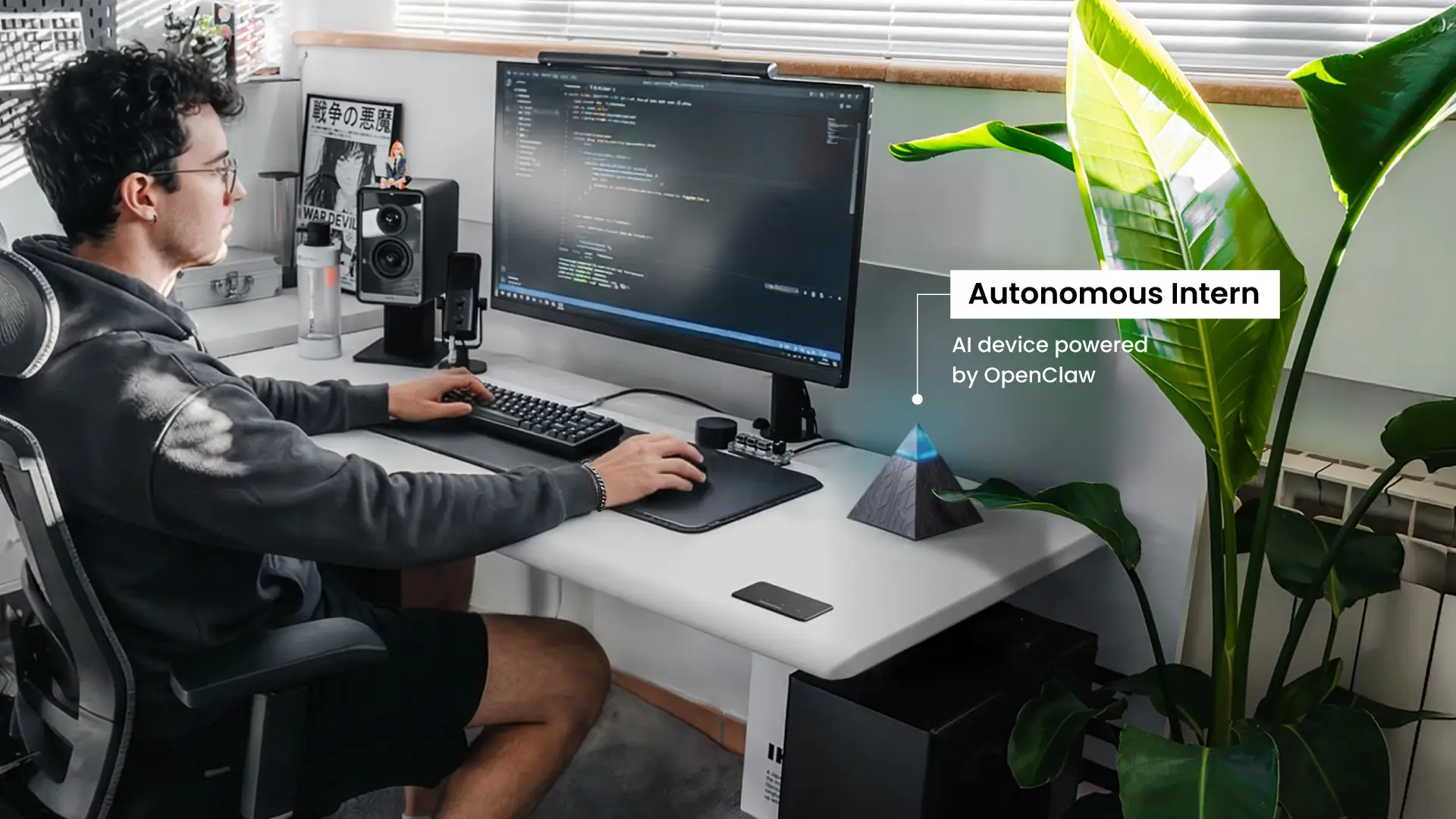
Autonomous Intern is a personal AI assistant device built on OpenClaw, an open-source self-hosted AI framework, and designed to sit on your desk as a dedicated workspace tool. Because processing happens locally within your own environment, the inputs you give it — documents, questions, work communications — are not transmitted to a third-party server by default. There is no vendor on the other end retaining your conversation history, and no cloud account whose credentials could be compromised to surface months of accumulated work data.
A few characteristics that are relevant from a privacy standpoint: the OpenClaw architecture Intern runs on is open-source, meaning its codebase is publicly auditable rather than a proprietary black box. Users control which integrations and skills are active, which defines the boundary of what the assistant can access.
It is worth being clear about what local AI does and doesn't solve. This OpenClaw AI device addresses the architectural privacy gap — data leaving your environment without your awareness — but it operates within whatever broader security practices a user or organization already has in place. It is one considered choice among several that together make for a more deliberate approach to AI privacy in the workspace.
For anyone evaluating AI tools with data control in mind, the distinction between a tool that processes locally and one that depends on external infrastructure is a practical and meaningful one — and increasingly, a category of choice that more users are actively looking for.

Practical Steps Toward Better AI Privacy and Security
Improving how you handle AI privacy and security doesn't require switching every tool you use overnight. Here are a few deliberate habit changes that cover most of the meaningful risk for the majority of everyday users.
- Review your default settings before anything else
Most AI platforms retain conversation history by default, and most users never change this. Spending a few minutes inside the privacy or data settings of any AI tool you use regularly — checking what's retained, for how long, and whether there's an option to limit or disable it — gives you a clearer picture of your current exposure without requiring any technical knowledge.
- Separate your personal and professional AI use
Using a personal, free-tier AI account for work tasks is one of the more common ways sensitive professional data ends up outside any governance framework. Where your organization provides an approved tool, defaulting to it keeps your work data within a structure that has at minimum been reviewed by someone with data security in mind. Where no approved option exists, it's a reasonable question to raise with whoever manages your team's tools.
- Enable two-factor authentication on every AI account
Given that compromised credentials are one of the more direct routes to full conversation history exposure, two-factor authentication is the lowest-effort, highest-return security step available for any AI platform account. Most major platforms support it — it takes under five minutes to set up and significantly narrows the window of risk from credential theft.
- Know what your AI tools do with inferred data
Privacy policies are long, but most platforms have a dedicated data sharing or third-party section that answers the specific question of whether derived or inferred data is shared beyond the platform itself. Knowing the answer for the tools you use most frequently is a more informed position than assuming the answer is no.
- If your work involves consistently sensitive data, consider the architecture
For people working regularly with confidential client information — including those relying on an AI-powered legal assistant or an AI-powered financial assistant for sensitive work — the practical question isn't just which AI tool has the best privacy policy — it's whether a cloud-dependent tool is the right architectural fit for that kind of work at all.
A private AI assistant built for local processing has become a more accessible option and represents a meaningful alternative worth evaluating for anyone whose work makes data control a consistent priority rather than an occasional concern.

FAQs
What is privacy and security in AI?
AI privacy and security refers to how personal and sensitive data is protected when using AI systems. It covers how data is collected, stored, processed, and accessed. Privacy focuses on a user’s control over their data, while security involves the technical measures that prevent unauthorized access, misuse, or breaches. As AI tools become more integrated into daily workflows, these two areas are increasingly treated as one combined concern.
What are AI privacy issues examples in everyday use?
Common AI privacy issues in everyday use include uploading sensitive documents to AI tools that store data on external servers, using personal AI accounts for work-related tasks without organizational oversight, and AI systems building detailed user profiles from seemingly harmless inputs like fitness data, search queries, or daily habits. These risks are not limited to high-tech environments — they occur across widely used consumer and workplace AI tools.
Does AI infringe privacy and data security?
AI itself does not inherently violate privacy, but many modern AI tools can introduce risks depending on how they are built. Most cloud-based AI systems process data on external servers, which limits user visibility into how long data is stored, how it is used, and whether it may be reused. The level of risk depends on the platform, service tier, and the user’s awareness of privacy settings and data policies.
How do I protect my privacy from AI?
Start by reviewing the privacy settings of the AI tools you use, especially data retention and training options. Use separate accounts for personal and work-related tasks, enable two-factor authentication, and avoid sharing sensitive information unless necessary. For stronger protection, consider AI tools that process data locally instead of relying on cloud-based systems.
Is it safe to use AI tools for work?
Yes, AI tools can be safe for work when used under the right conditions. The safest approach is to use organization-approved AI tools with clear data retention policies, secure access (such as two-factor authentication), and defined usage guidelines. Risks increase when employees use personal or unapproved AI tools, as this can expose sensitive business data outside company control. Following your organization’s AI policy is the most effective way to reduce risk.
What is the best AI for privacy?
AI tools that prioritize privacy typically process data locally or within controlled environments, often called self-hosted or on-device AI. These systems reduce reliance on third-party servers and give users full control over their data. For cloud-based options, enterprise-level tools with strict no-data-training policies and transparent data handling practices are generally more secure than free or consumer versions.
Can AI tools collect data without my knowledge?
Yes, AI tools can collect and store data as part of their normal operation, sometimes without users fully realizing it. Most AI systems process inputs on external servers, and depending on the platform, data may be retained, reviewed, or used to improve models. The key difference between tools is how transparent they are and whether users can control data collection. Reviewing privacy settings and data policies is essential to understand what information is being stored.
Is AI safe for sensitive or confidential data?
AI tools can be safe for sensitive data only when they are designed with strict data protection controls. This typically includes enterprise-grade platforms with no data retention or training policies, strong encryption, and access controls. Consumer AI tools or free versions often do not provide the same guarantees, making them less suitable for confidential information. As a general rule, sensitive data should only be used with AI systems that clearly state how data is handled and allow full control over storage and access.
Is local AI more secure than cloud AI?
Local AI is generally more secure for sensitive data because information is processed and stored on devices or environments controlled by the user, rather than being sent to external servers. This reduces exposure to third-party access, data retention policies, or potential breaches outside the user’s control. Cloud AI, while often more convenient and scalable, relies on vendor-managed infrastructure, which introduces additional considerations around data storage, access, and compliance.
Conclusion
AI privacy and security has become a more visible conversation not because the risks are new, but because the scale of everyday AI use has made them harder to ignore. Most people interacting with AI tools daily aren't doing anything out of the ordinary — the data considerations simply come with tools that have become a normal part of how work gets done.
The steps that make the most difference aren't complicated: knowing what your current tools retain by default, keeping professional and personal AI use separate, and understanding whether the tools you rely on most are handling your data in a way that aligns with how you actually work. These are habits, not technical projects.
For anyone whose work involves data where control matters consistently, the more fundamental question is architectural — whether a proactive AI tool that processes locally is a better fit than one that depends on external infrastructure. That's the thinking behind Autonomous Intern, and it's a consideration worth weighing alongside any other AI tool decision.
The direction of travel for AI privacy is toward more transparency and more user control. The informed choices available today are already meaningfully better than they were two years ago — and knowing what to look for is most of the work.