Autonomous
CartCart (0)
Autonomous

What Is the Right Ergonomic Desk Height for You?
Smart Products

What Is the Right Ergonomic Desk Height for You?

|Apr 22, 2026
25,105 Views

The standard office desk sits at 29–30 inches — a height that fits someone close to 6 feet tall. Most adults aren't. That mismatch is one of the most common and overlooked causes of neck, wrist, and lower back discomfort at work.

This guide covers how to find your correct ergonomic desk height for sitting and standing, what to do when your desk isn't adjustable, and how desk height connects to your office chair and monitor as a single setup. 

Why the Standard Desk Height Doesn't Fit Most People

The standard office desk height — typically 29 to 30 inches — was not designed around the average adult. It was built for someone close to 6 feet tall. According to the CDC's National Center for Health Statistics, the average height for US adult women is 5'3.5" and for men is 5'9" — both well below what a standard 29–30" desk accommodates correctly.

When a desk is too high for your body, the first thing that changes is arm position. Your elbows rise above a neutral angle, which shifts tension into your shoulders and upper trapezius. Over time, that elevated shoulder position affects your neck — the two muscle groups share the load. When a desk is too low, the problem reverses: your spine rounds forward as your arms drop below a comfortable working angle, and your neck tips down to compensate.

Neither position is sustainable across a full workday, and neither is solved by posture reminders alone. The National Institute for Occupational Safety and Health (NIOSH) identifies awkward postures — including sustained positions that deviate from the body's natural alignment — as a recognized risk factor for work-related musculoskeletal disorders, a category that includes carpal tunnel syndrome, neck strain, and lower back pain.

Setting the correct ergonomic desk height removes the structural cause rather than managing the symptoms. That distinction matters because no chair, monitor, or accessory fully compensates for a desk that starts at the wrong height.

How to Find Your Ergonomic Desk Height (No Calculator Needed)

The most reliable way to find your correct desk height is a physical measurement, not a formula — because body proportions vary enough that math alone produces a starting point, not a final answer.

The elbow method — for seated height:

  • Stand upright in the shoes you normally wear at your desk
  • Let your arms hang relaxed at your sides
  • Bend both elbows to 90 degrees
  • Measure from the floor to the underside of your forearms

That number is your seated desk height baseline. Most people fall between 24 and 30 inches.

Two adjustments to make before locking in the number:

Shoe height. The measurement only holds if you take it wearing your actual work footwear. Bare feet versus a standard shoe sole can shift the result by an inch or more — enough to affect wrist and shoulder position.

Body proportion. Two people at the same overall height can have different elbow heights if their torso-to-leg ratio differs. If the number you measured produces shoulder tension or a bent wrist at a neutral arm position, adjust in half-inch increments until both feel relaxed. The measurement gives you a range, not a fixed point.

For standing desk height, the same elbow principle applies from a standing position, with additional variables — footwear, anti-fatigue mat thickness, and arm length relative to torso.

An ergonomic desk height calculator can cross-check your measurement if you prefer a second reference, but the physical method above takes under two minutes and requires no tools.

ergonomic desk height

Ergonomic Desk Height by Body Height: Sitting Reference Chart

The ideal desk height for sitting places your forearms parallel to the floor with your elbows at roughly 90 degrees — no shoulder elevation, no wrist bend in either direction.

The table below gives recommended seated desk heights based on overall body height. Use your measurement from the previous section to confirm where you fall, then use the chart to cross-check both your desk and chair height together.

A note before reading the table:

The office chair height is included alongside desk height because the two are interdependent. Set your chair first — feet flat on the floor, thighs parallel to the ground, knees at 90 degrees — then adjust your desk to match your elbow position. If your feet cannot rest flat at the chair heights shown, add a footrest before raising your chair further — prolonged dangling restricts circulation and can contribute to preventing feet swelling while sitting at the desk. All measurements assume standard work footwear.

Your Height

Desk Height (in)

Desk Height (cm)

Chair Height (in)

Chair Height (cm)

Under 4'11"

21 – 23

53 – 58

15 – 16

38 – 41

4'11" – 5'2"

22 – 25

56 – 63

15.5 – 17

39 – 43

5'3" – 5'6"

24 – 27

61 – 69

17 – 18.5

43 – 47

5'7" – 5'10"

26 – 29

66 – 74

18.5 – 20

47 – 51

5'11" – 6'2"

27 – 31

69 – 79

20 – 21.5

51 – 55

6'3" – 6'6"

29 – 33

74 – 84

21.5 – 23

55 – 58

Over 6'6"

31 – 35

79 – 89

23 – 24.5

58 – 62

Desk height ranges are derived from established ergonomic formulas based on elbow-to-floor anthropometry. Chair height ranges reflect the practical adjustment span of standard office chairs. Users under 4'11" who cannot reach the lower end of the chair range on a standard chair should use a seat cushion to raise seat height before adding a footrest to restore leg position.

These ranges are starting points. Individual variation in torso length, arm length, and chair padding means your correct position may sit slightly above or below what the chart shows. If the range produces shoulder tension or a wrist angle that isn't neutral, adjust in half-inch increments until both resolve.

One pattern worth noting: the proper ergonomic desk height for most people falls several inches below the standard 29–30 inch office desk. Anyone under 5'10" working at a fixed desk without adjustments is very likely compensating somewhere in their posture — most often in the shoulders or wrists — without being aware of it.

Ergonomic Desk Height by Body Height

Standing Desk Height: Reference Chart and Calibration Variables

Standing desk height is the height at which your desk surface sits when you are working on your feet — and for most people, that number runs 10 to 12 inches above their seated desk height. 

The difference from the seated measurement is that standing introduces additional variables that shift the number before you set it. 

Your Height

Standing Desk Height (in)

Standing Desk Height (cm)

Under 4'11"

33 – 36

84 – 91

4'11" – 5'2"

35 – 37

89 – 94

5'3" – 5'6"

37 – 39

94 – 99

5'7" – 5'10"

39 – 41

99 – 104

5'11" – 6'2"

41 – 43

104 – 109

6'3" – 6'6"

43 – 45

109 – 114

Over 6'6"

45 – 48

114 – 122

Three variables that change your number before you set the desk:

Anti-fatigue mat thickness. Most standing desk mats sit between 0.75 and 1 inch thick. If you use one — and for extended standing, most people should — add that thickness to your standing height measurement before adjusting the desk. Setting the desk without accounting for the mat places your elbows above neutral once you step onto it.

Footwear at your standing height. Shoe height has a more pronounced effect when standing than when seated — a 1-inch heel difference shifts your elbow position enough to change your optimal desk height. Measure and set your standing height in the shoes you actually work in.

Memory preset programming. If your desk has programmable memory presets, four settings serve most users better than two. Set one seated height for active typing, a second seated height slightly higher for reading or video calls where a more upright posture is natural, one standing height for keyboard work, and a fourth standing position slightly higher for periods when you step back from the desk. This standing desk setup removes the friction of manual adjustment and makes position changes more consistent throughout the day.

When to switch positions — and what not to do.

A common mistake is lowering the desk when standing fatigue sets in. Fatigue during standing typically shows up as involuntary weight shift to one hip, wrists dropping below neutral while typing, or a forward lean at the hips. These are signals to sit down, not to lower the desk. Lowering the desk in response to fatigue shifts your elbows below the correct angle and compounds the problem over time. The desk height stays fixed; the position changes.

ergonomic desk height

If Your Desk Won't Adjust: Fixes That Actually Work

Most people reading this do not own a height-adjustable standing desk and cannot change that today. The fixes below work on any fixed-height desk and address the most common mismatches by problem type, not by product.

1. When Your Desk Is Too High

A desk that is too high forces your shoulders to rise in order to bring your forearms to the surface. That elevated position creates sustained tension across the upper trapezius and into the neck — the same pattern that produces end-of-day shoulder tightness even when you feel like you've been sitting still.

  • Primary fix: keyboard tray with negative tilt

A keyboard tray mounts beneath the desk surface and pulls the keyboard down to the correct elbow height, independent of how high the desk sits. Negative tilt means the tray is angled slightly downward at the front edge, so your wrists remain straight — or angle very slightly down — while typing. This matters because a flat or upward-tilted keyboard at the wrong height is what drives wrist extension and the forearm tension that follows.

For anyone whose seated desk height should be below 27 inches but whose desk sits at the standard 29–30 inches, a keyboard tray with negative tilt resolves the ergonomic mismatch without changing the desk at all.

  • Secondary fix: raise the chair, add a footrest

If a keyboard tray is not an option, raise the chair until your elbows reach a neutral position at the desk surface. Then add an office footrest to restore the leg position you lost by raising the chair. This sequence matters: chair first, footrest second. Reversing it produces an unstable base that shifts your posture forward over time.

2. When Your Desk Is Too Low

A desk that is too low causes the opposite problem: your spine rounds forward as your arms drop below a comfortable working angle, and your head tips down to follow.

  • Primary fix: Monitor riser

When a desk is too low, most people compensate by lowering their chair to bring their arms to the surface — which drops the monitor below eye level and pulls the neck down with it. A monitor riser restores screen height independently of desk height, breaking the compensation chain. It does not fix the arm position problem, but it addresses the most visible postural consequence.

  • Secondary fix: Desk risers or leg extenders

If the desk sits more than two inches below your correct elbow height, monitor adjustment alone is insufficient. Desk risers — solid blocks or adjustable leg extenders placed under each desk leg — raise the entire surface. This works when the gap is small enough that raising the desk brings elbows into range without making the desk too high for seated leg clearance underneath.

3. When the Desk Height Is Correct but the Monitor Is Not

Monitor position is a downstream variable of desk height — it needs to be checked independently every time desk height changes. If the monitor sits too low at the correct desk height, a monitor arm raises it to eye level without altering the desk surface position your arms and wrists depend on.

Getting the correct ergonomic desk height is only half the equation for fixed-desk users. The keyboard, monitor, and chair all need to be positioned relative to each other as a system.

If Your Desk Won't Adjust: Fixes That Actually Work

Desk Height Doesn't Work Alone: The Chair-Monitor System

Ergonomic desk height sets the foundation, but comfort depends on how the chair and monitor are positioned relative to it. Getting all three right requires setting them in the correct sequence — and understanding that changing one always affects the others.

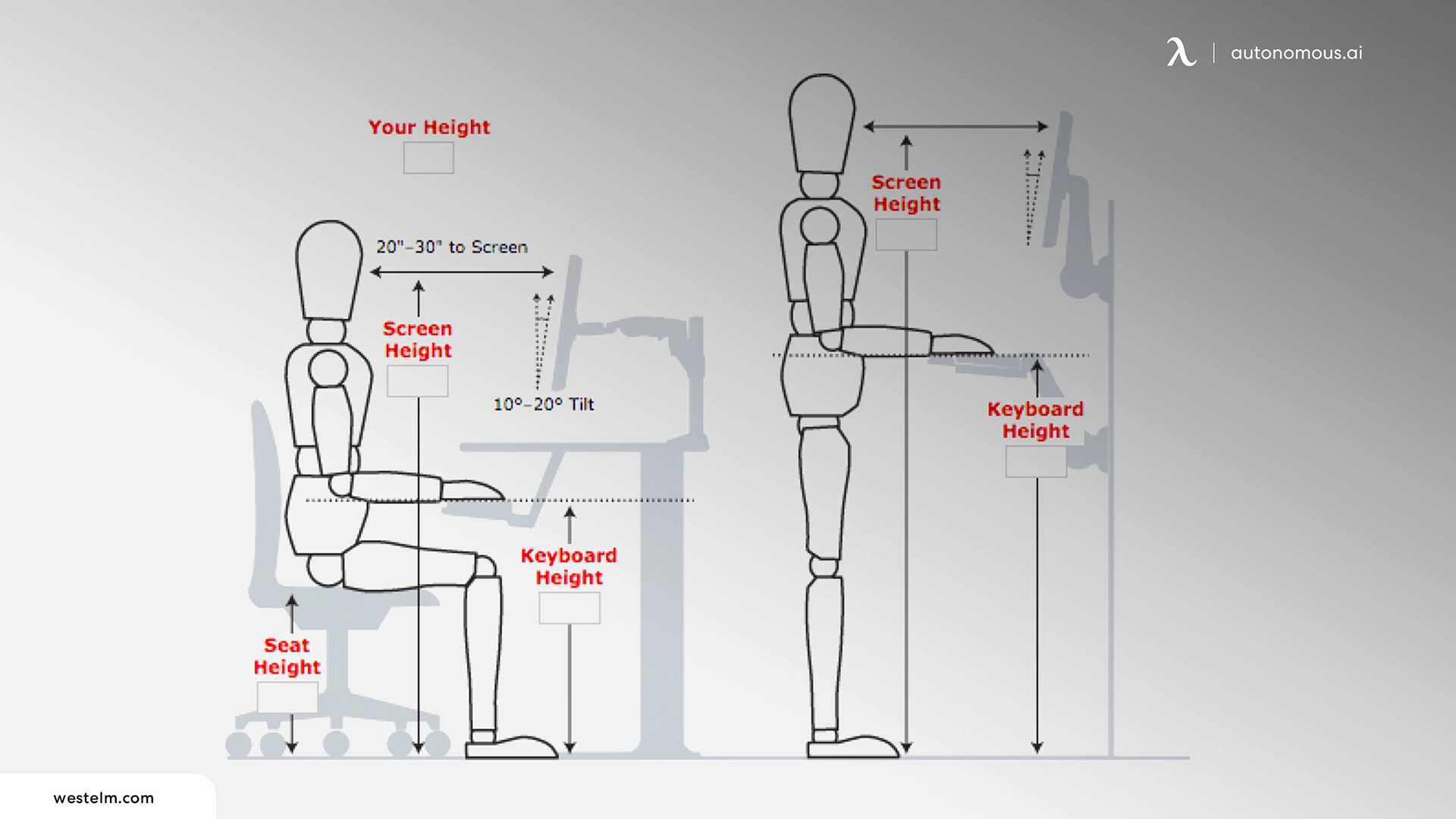
1. Set Your Chair Before You Touch the Desk

The chair is the first variable to set, not the desk. Most people do this in reverse — they push the desk to a height that feels roughly right, then adjust the chair to match. That sequence produces a workstation built around the desk's limitations rather than the body's requirements.

The correct order:

  1. Sit fully back in the chair so your lower back contacts the backrest
  2. Adjust seat height until your feet rest flat on the floor and your thighs are parallel to the ground
  3. Check that your knees form a 90-degree angle — hips level with or very slightly above the knees
  4. Only then adjust the desk to bring the surface level with your elbows

From that position, your desk height follows naturally from your body, not from a number on a chart. The chart in the previous section gives you the target range to confirm you're in the right zone — the physical sequence above is how you get there.

2. How Changing Desk Height Affects Monitor Position

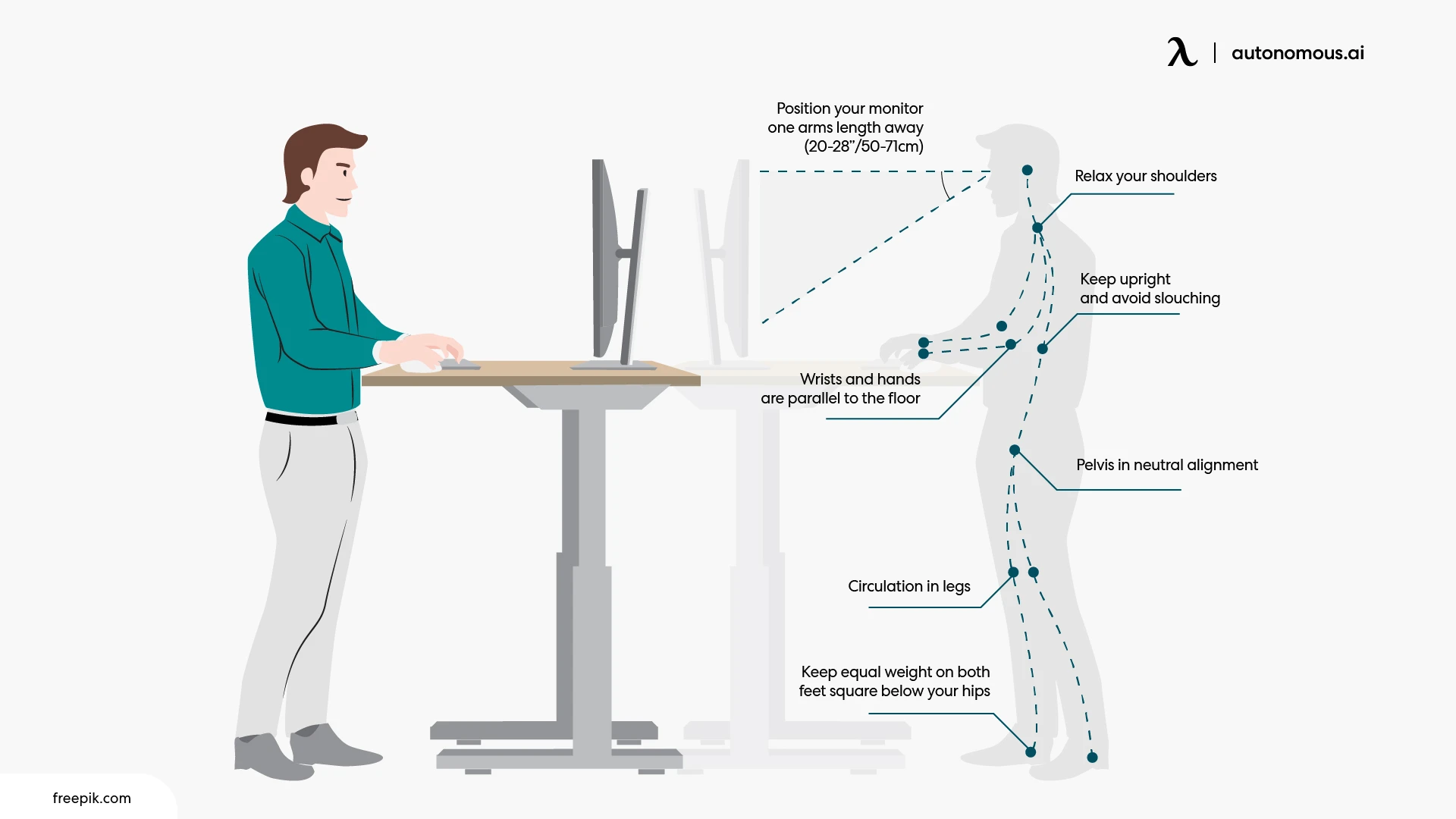
Monitor height is a dependent variable — it needs to be rechecked every time desk height changes. The correct monitor position places the top edge of the screen at or just below eye level, at roughly arm's length away.

When you raise the desk to standing height, the monitor drops relative to your eye level unless it moves with the desk. When you lower the desk back to seated height, it rises again. A fixed monitor stand locks that relationship in place for one position only. An adjustable monitor arm decouples screen height from desk height entirely, letting you recalibrate each time you switch positions without moving anything else.

One population-specific note: users who wear bifocal lenses need their monitor positioned 1 to 2 inches lower than standard eye-level guidance. Bifocals require a slight downward gaze to use the reading portion of the lens — placing the screen at standard eye level forces the head to tilt back to compensate, which reverses the neck strain the correct monitor height is meant to prevent.

3. Keyboard and Mouse on the Same Plane

The keyboard and mouse should sit at the same height. When the mouse sits higher than the keyboard — on a desk surface while the keyboard is on a tray, for example — the mousing arm must rotate outward at the elbow to reach it. That outward rotation elevates the shoulder on the mousing side and creates an asymmetric load across the upper back over time.

If a keyboard tray is in use, the mouse belongs on the tray surface alongside the keyboard, not on the desk above it. If both are on the desk surface, the same rule applies: same plane, same height, with the mouse positioned close enough that the elbow stays near the body rather than reaching forward or to the side.

Desk Height Doesn't Work Alone: The Chair-Monitor System

Ergonomic Desk Height for Shared Workstations

A shared workstation is one desk used by more than one person — and the ergonomic challenge is that a height setting calibrated for one user is almost certainly wrong for the next.

The solution is not finding a compromise height. It is specifying a desk with an adjustment range wide enough to cover the full spread of users who will sit at it.

What range is enough?

The ANSI/BIFMA G1 ergonomics guideline recommends that office furniture accommodate users from the 5th percentile female to the 95th percentile male. In practical terms, that means:

  • Seated adjustment range: 22 to 30 inches
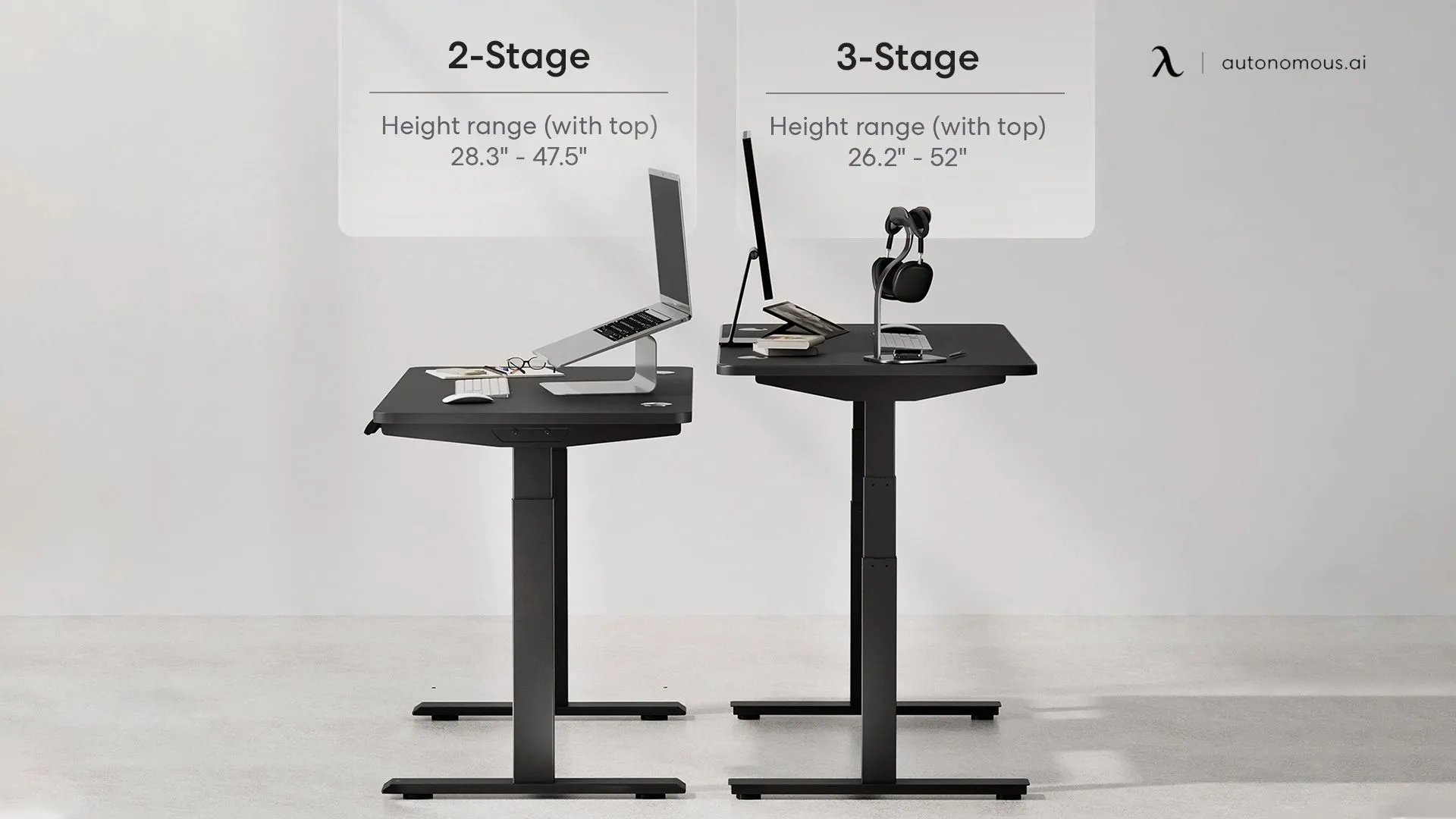
  • Standing adjustment range: 35 to 47 inches

A standing desk that adjusts across that full span covers nearly any adult user without requiring individual workarounds.

When you can't replace the desk:

For offices with existing fixed-height desks, accessories close a significant portion of the gap:

  • Keyboard tray — brings the work surface down for shorter users without touching the desk
  • Anti-fatigue mat — compensates for standing height differences when the desk is raised for taller users
  • Footrest — restores correct leg position for shorter users whose feet don't reach the floor

Neither replaces a properly ranged adjustable desk, but both reduce the mismatch for users at the edges of the height spectrum.

Minimum viable range for a shared seated workstation — where full sit-stand functionality is not required — is 25 to 30 inches. This covers users between approximately 5'3" and 6'2" without additional intervention.

For teams configuring workstations at scale, an electric height-adjustable desk with memory presets lets each person save their correct ergonomic desk height as a personal setting — removing the need to recalibrate every time the desk changes hands.

FAQs

What is the standard desk height?

The standard desk height is 29 to 30 inches (74–76 cm). However, this is not the correct ergonomic desk height for most people, as it was originally designed for individuals close to 6 feet tall.

How do I find the right ergonomic desk height for my body?

The correct ergonomic desk height is when your elbows are at a 90° angle and forearms are parallel to the floor. Measure from the floor to your elbows while seated or standing, then adjust your desk to match.

How do I know if my desk height is too high?

Your desk is too high if your shoulders lift, wrists bend upward, or neck tension builds while typing. These signs indicate your arms are positioned above a neutral elbow level.

What is the best desk height for typing?

The best desk height for typing is when your keyboard sits at or slightly below elbow level, allowing your wrists to stay flat and your shoulders relaxed.

What is the correct desk height for someone with back pain?

The correct desk height reduces strain by keeping your spine neutral and shoulders relaxed. A desk that is too high or too low can force poor posture, so use the elbow-height method to correct alignment before adjusting other factors.

What is the ideal desk height for a short person?

For someone under 5'3", ergonomic desk height typically falls between 21 and 25 inches. If your desk cannot go that low, use a keyboard tray and footrest to maintain proper posture.

What is the optimal desk height for a tall person?

For someone 6'3"+, the correct desk height usually ranges from 29 to 35 inches, and requires a standing desk that can extend to at least 48 inches for proper standing alignment.

What is the correct standing desk height?

The correct standing desk height is when your elbows remain at a 90° angle and your screen is at eye level. This keeps your wrists neutral and prevents shoulder strain.

Can desk height affect your posture?

Yes. Desk height directly affects spinal alignment, shoulder position, and neck angle. An incorrect height creates poor posture that cannot be fixed by awareness alone.

Does desk height affect wrist pain?

Yes. A desk that is too high forces your wrists to bend upward, increasing pressure on the carpal tunnel. Lowering the desk or using a keyboard tray typically resolves the issue.

Do I need an adjustable desk for ergonomic height?

In most cases, yes. Fixed desks rarely match your exact body proportions, while adjustable desks allow precise alignment for both sitting and standing positions.

Conclusion

Desk discomfort rarely comes from a single cause — it comes from a system that was never properly calibrated to begin with. Getting your ergonomic desk height right is the starting point, but the chair, monitor, and keyboard position all need to follow from that baseline for the setup to hold.

Use the measurement method and charts in this guide to find your numbers, then adjust in sequence: chair first, desk second, monitor last. If your desk won't adjust, the accessories section covers what to do next.

Small corrections made once tend to hold. Discomfort ignored tends to compound — and a well-calibrated workstation is one of the more direct contributions to a consistently productive work environment.

Autonomous Intern - Personal AI Assistant

Stay connected with us!

Subscribe to our weekly updates to stay in the loop about our latest innovations and community news!

Interested in a Link Placement?


What Is the Right Ergonomic Desk Height for You?